
What Kubernetes Is
The big picture of a cluster.
It is time for the big picture. What exactly is Kubernetes, what is inside a cluster, and how do the parts work together? Do not worry about memorising anything yet. In this lesson, you will simply build a mental map, and every later lesson will fill in one part of it.
- A cluster is a team of machines
- Some manage, others do the work
- Build the mental map first
Cluster, nodes, pods, containers
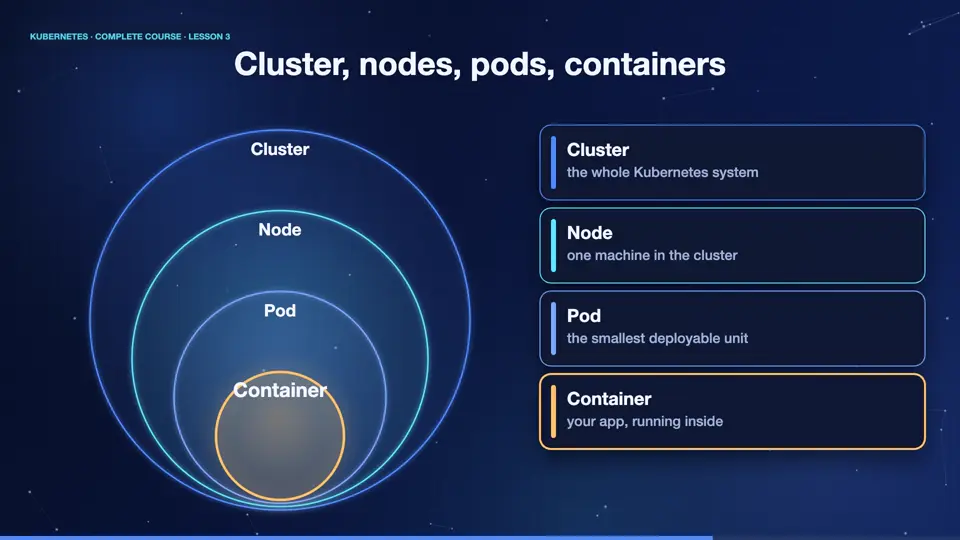
Here is the map, from big to small. A cluster is the whole system. A cluster is made of nodes, and a node is one machine, real or virtual. Inside a node, Kubernetes runs pods. A pod is the smallest thing you can deploy, and it holds one or more containers. And inside each container runs your actual application. Remember this order. Cluster, node, pod, container.
Control plane and worker nodes
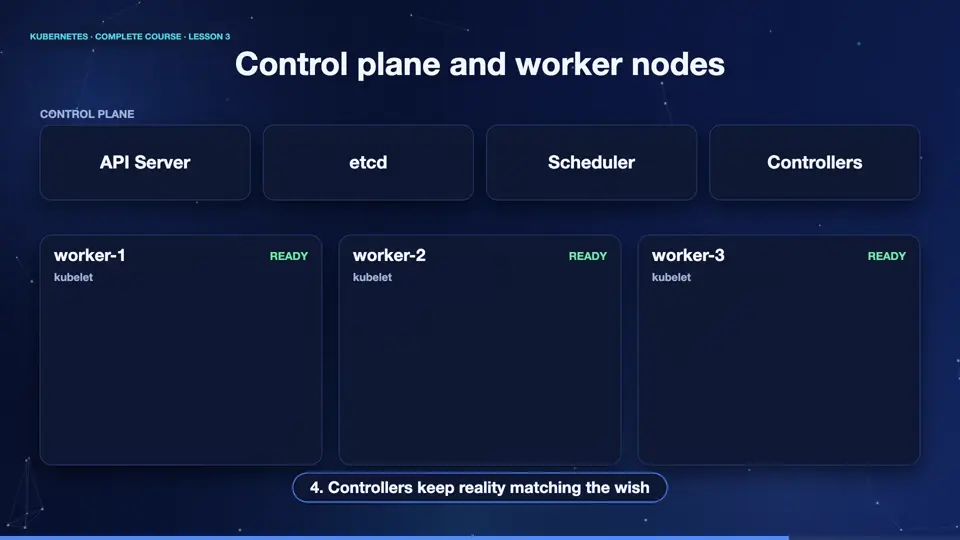
A cluster has two kinds of machines. The control plane is the brain. It makes every decision. The worker nodes are the muscle. They run your applications. Let's follow one request. You send a command, to the A P I server, which is the front door of the cluster. It saves your wish in a small database called et see dee. The scheduler notices that a new pod needs a home, and picks the best node. Then the controllers keep checking that reality matches your wish. And on the chosen node, a helper called the kubelet starts the pod.
The cluster in one table
Let's pin down the names. The A P I server is the front door, every command goes through it. Et see dee is the memory, it stores the whole state of the cluster. The scheduler decides where pods run. The controller manager runs the loops that heal and scale. On each worker, the kubelet starts and watches pods, and the kube proxy handles networking. You will study each of them in detail, in the next clip.
| key | value |
|---|---|
| API server | the front door of the cluster |
| etcd | the cluster memory |
| Scheduler | chooses a node for each pod |
| Controller manager | heals and scales |
| Kubelet | starts pods on a node |
| Kube-proxy | routes network traffic |
What Kubernetes is not
A few things Kubernetes is not. It is not a container runtime, it uses one like containerd to actually run containers. It is not a replacement for Docker images, you still build images. It is not a magic fix for a badly written app. And it does not hide complexity completely, it organises it. But for running many services reliably, nothing else is as powerful, or as widely supported.
Summary
Excellent. You now have the map. A cluster has a control plane, the brain, and worker nodes, the muscle. Pods run on the nodes, and containers run inside pods. Next, we open the brain, and study the control plane, piece by piece.
Key takeaways- Cluster > node > pod > container
- Control plane decides, workers run
- You send wishes, Kubernetes makes them true