
Lab: Talking to the API
Kubectl is just a client.
Everything you have done with kube control, was a conversation with the A P I server. Kube control is only one client. Anything that can send H T T P requests, can talk to Kubernetes. In this lab, we skip kube control, and talk to the A P I directly, with a plain H T T P tool. It makes the whole system much less mysterious.
- kubectl is just a client
- The API is plain HTTP
- Make the system less mysterious
How the API is organised
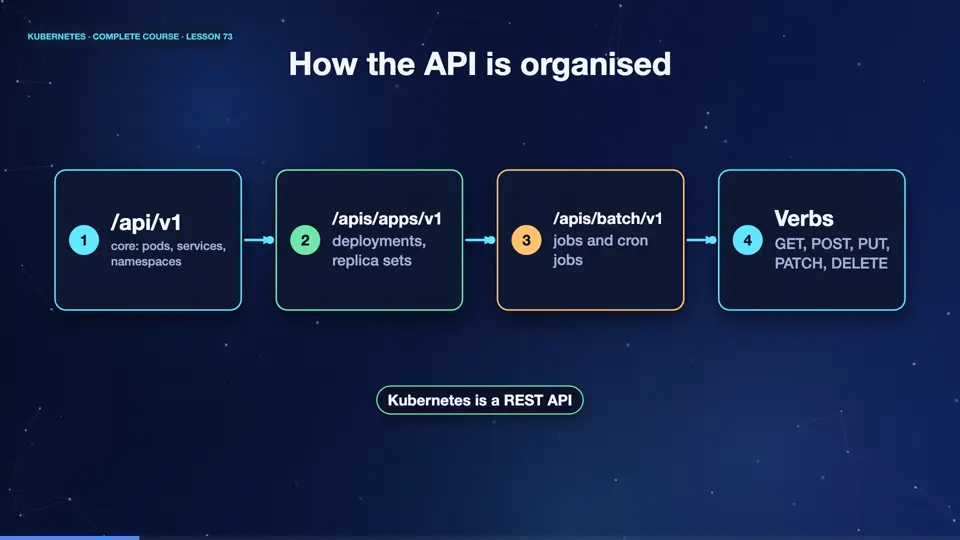
The A P I is organised in groups, and versions. The core group, with the path slash A P I slash v one, holds the oldest objects, pods, services, and namespaces. Named groups, under slash A P I S, hold the rest. Apps slash v one for deployments. Batch slash v one for jobs. Networking dot k eight s dot I O for ingress. Every object type is a resource, under its group, and version. And the usual H T T P verbs apply. Get reads, post creates, put replaces, patch changes, and delete removes.
- /api/v1core: pods, services, namespaces
- /apis/apps/v1deployments, replica sets
- /apis/batch/v1jobs and cron jobs
- VerbsGET, POST, PUT, PATCH, DELETE
Calling the API with curl
Let's try it. Kube control proxy opens a local, authenticated door to the A P I server, on a port of our choice. Now plain curl works. The version path answers with the server's version, as J S O N. The slash A P I S path lists every API group. And we can ask for the pods of any namespace, with a normal H T T P request. Notice the answer, a pod list, with metadata, and a continue token, because we limited the results. Every kube control command is made of requests like these.
kubectl proxy --port=8001
Starting to serve on 127.0.0.1:8001
curl -s localhost:8001/version | head -4
{
  "major": "1",
  "minor": "34",
  "emulationMajor": "1",
curl -s localhost:8001/apis | head -c 110
{
  "kind": "APIGroupList",
  "apiVersion": "v1",
  "groups": [
    {
      "name": "apiregistration.k8s.io",
curl -s 'localhost:8001/api/v1/namespaces/kube-system/pods?limit=1' | head -7
{
  "kind": "PodList",
  "apiVersion": "v1",
  "metadata": {
    "resourceVersion": "24640",
    "continue": "eyJ2IjoibWV0YS5rOHMuaW8vdjEiLCJydiI6MjQ2NDAsInN0YXJ0IjoiL2NvcmVkbnMtNjZiYzVjOTU3Ny1tNTJtNVx1MDAwMCJ9",
    "remainingItemCount": 12
What this teaches
This small lab teaches three things. First, everything is an object in an A P I, and kube control is a convenient client. Second, you can write your own programs, in any language, that read and change the cluster, which is how tools like Argo C D and operators work. Third, security is built into this A P I. Every request is authenticated, authorised, and checked by admission, exactly as you saw. Understanding the A P I, is understanding Kubernetes.
Summary
Good. The Kubernetes A P I is plain H T T P, organised in groups and versions, and kube control is just one client. Next, how objects own each other, and what happens when an owner is deleted.
Key takeaways- API groups and versions
- kubectl proxy + curl
- Operators are API clients