
Volumes
Storage that outlives containers.
A container's own files vanish when it restarts. For many apps, that is fine. But a database that forgets everything on every restart, is useless. Kubernetes solves this with volumes. In this lesson, you will see why container files are temporary, and how volumes change that.
- Container files are temporary
- Volumes attach storage to pods
- Containers can share a volume
Why container files disappear
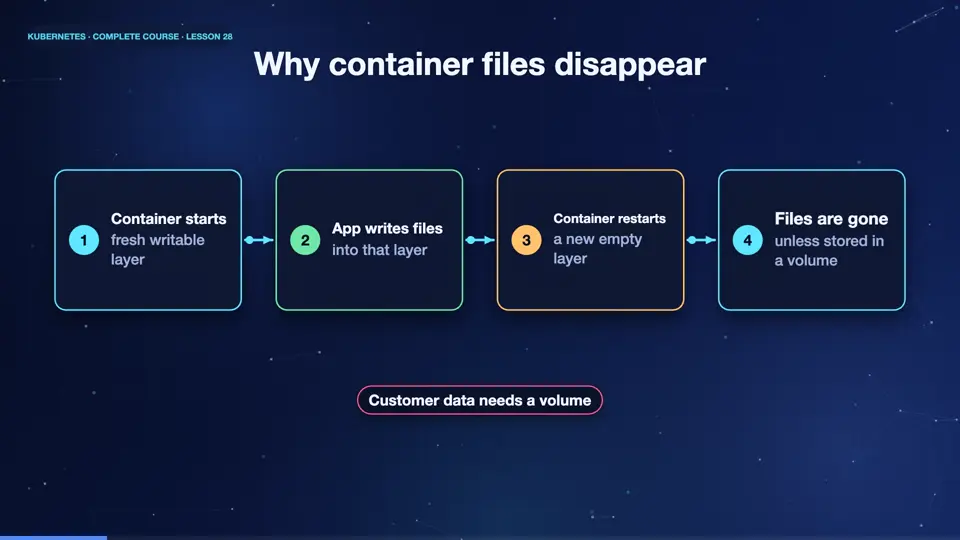
Every container starts from its image, with a fresh, empty writing layer on top. Anything the app writes goes into that layer. When the container crashes, and restarts, a new layer is created, and the old files are gone. And when a pod is replaced, even more is lost. For a cache, or a temporary file, that is acceptable. For customer data, it is a disaster. The fix is to store the data outside the container, in a volume.
- Container startsfresh writable layer
- App writes filesinto that layer
- Container restartsa new empty layer
- Files are goneunless stored in a volume
A shared scratch volume
The simplest volume is an empty dir. It starts empty when the pod starts, and lives as long as the pod lives. Here, two containers, a writer and a reader, mount the same volume, at the same path. Under volumes, we declare it once, with a name. Under each container, volume mounts connect it to a folder. Whatever one container writes, the other can read.
apiVersion: v1
kind: Pod
metadata:
  name: share
spec:
  containers:
  - name: writer
    image: busybox:1.36
    command: ["sh", "-c", "echo hi from writer > /shared/msg; sleep 3600"]
    volumeMounts:
    - name: scratch
      mountPath: /shared
  - name: reader
    image: busybox:1.36
    command: ["sleep", "3600"]
    volumeMounts:
    - name: scratch
      mountPath: /shared
  volumes:
  - name: scratch
emptyDir: {}Sharing files between containers
Let's test it. We apply the pod, and wait for both containers. The writer container created a file called msg, when it started. Now, from the reader container, a different container, we read that file. It prints, hi from writer. Both containers see the same folder. Remember, though, this volume dies with the pod. If the pod is deleted, the data goes with it. For data that must survive, we need something stronger.
kubectl apply -f share.yaml
pod/share created
kubectl get pod share
NAME    READY   STATUS    RESTARTS   AGE
share   2/2     Running   0          15s
kubectl exec share -c reader -- cat /shared/msg
hi from writer
File used: share.yaml
apiVersion: v1
kind: Pod
metadata:
  name: share
spec:
  containers:
  - name: writer
    image: busybox:1.36
    command: ["sh", "-c", "echo hi from writer > /shared/msg; sleep 3600"]
    volumeMounts:
    - name: scratch
      mountPath: /shared
  - name: reader
    image: busybox:1.36
    command: ["sleep", "3600"]
    volumeMounts:
    - name: scratch
      mountPath: /shared
  volumes:
  - name: scratch
    emptyDir: {}
Summary
Good. Container files are temporary. Volumes give pods storage, and several containers can share one. An empty dir lives and dies with its pod. Next, storage that truly outlives pods, persistent volumes and claims.
Key takeaways- Container files vanish on restart
- Volumes attach storage to pods
- emptyDir lives as long as the pod