
Custom Resources
Teaching Kubernetes new words.
Kubernetes knows about pods, deployments, and services. But what if your company has its own idea, like a website, or a database cluster, or a backup job? You can teach Kubernetes new object types. This is what makes it a platform, not just a tool. Let's add one.
- Add your own object types
- They work like built-in ones
- The foundation of operators
Extending the API
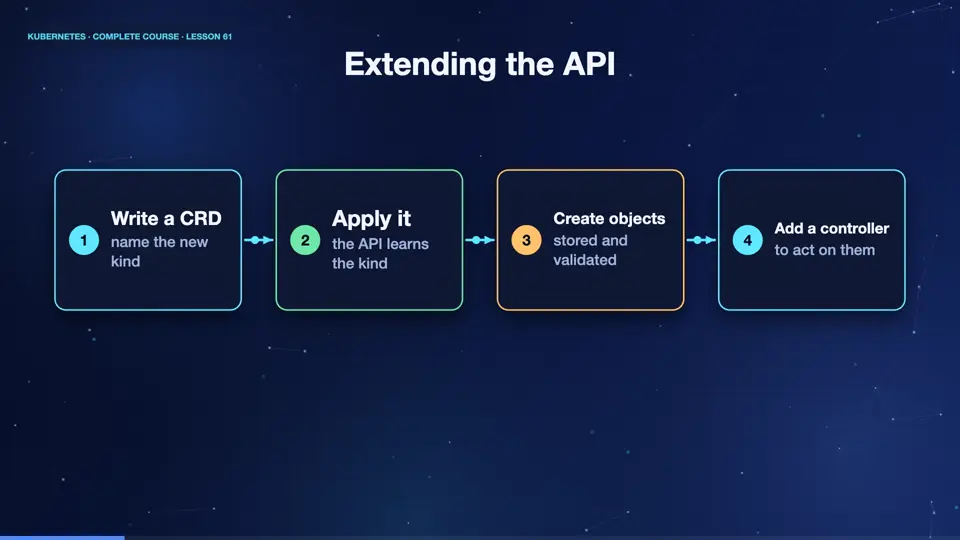
The Kubernetes A P I is extensible. You register a custom resource definition, a C R D, which describes a new kind of object, its name, and the shape of its fields. From then on, the A P I server accepts those objects, validates them, stores them in et see dee, and serves them, like any built in kind. Kube control works with them immediately. You can list them, describe them, and watch them. A definition alone only stores data. To make something happen, you add a controller.
- Write a CRDname the new kind
- Apply itthe API learns the kind
- Create objectsstored and validated
- Add a controllerto act on them
A CustomResourceDefinition
Here is a definition for a new kind, website. The group is example dot com, the plural name is websites, and the short name is w s. In the schema, a website has a spec, with a required field, domain, which is a string, and an optional replicas field, an integer between one and five. This schema is the contract. The A P I server will reject any website that breaks it.
apiVersion: apiextensions.k8s.io/v1
kind: CustomResourceDefinition
metadata:
  name: websites.example.com
spec:
  group: example.com
  scope: Namespaced
  names:
    plural: websites
    singular: website
    kind: Website
    shortNames: ["ws"]
  versions:
  - name: v1
    served: true
    storage: true
    schema:
      openAPIV3Schema:
        type: object
        properties:
          spec:
            type: object
            required: ["domain"]
            properties:
              domain:
                type: string
              replicas:
                type: integer
                minimum: 1
maximum: 5Our own kind of object
Let's use it. We apply the definition, and then create a website, called blog. Now, kube control get websites works, just like get pods. Next, we try a website with nine replicas, which breaks the maximum. The A P I server refuses it, and tells us exactly which field is wrong. Our new kind has validation, storage, and tooling, with no programming at all.
kubectl apply -f crd.yaml
customresourcedefinition.apiextensions.k8s.io/websites.example.com created
kubectl apply -f site.yaml
website.example.com/blog created
kubectl get websites
NAME   AGE
blog   0s
kubectl apply -f bad.yaml 2>&1 | cut -c1-120
The Website "toobig" is invalid: spec.replicas: Invalid value: 9: spec.replicas in body should be less than or equal to
kubectl api-resources | grep example
websites                            ws           example.com/v1                    true         Website
File used: crd.yaml
apiVersion: apiextensions.k8s.io/v1
kind: CustomResourceDefinition
metadata:
  name: websites.example.com
spec:
  group: example.com
  scope: Namespaced
  names:
    plural: websites
    singular: website
    kind: Website
    shortNames: ["ws"]
  versions:
  - name: v1
    served: true
    storage: true
    schema:
      openAPIV3Schema:
        type: object
        properties:
          spec:
            type: object
            required: ["domain"]
            properties:
              domain:
                type: string
              replicas:
                type: integer
                minimum: 1
                maximum: 5
File used: site.yaml
apiVersion: example.com/v1
kind: Website
metadata:
  name: blog
spec:
  domain: blog.example.com
  replicas: 2
File used: bad.yaml
apiVersion: example.com/v1
kind: Website
metadata:
  name: toobig
spec:
  domain: blog.example.com
  replicas: 9
Summary
Good. A custom resource definition teaches the A P I a new kind. It is stored, validated, and served like any built in object. But, on its own it is only data. Next, the programs that bring custom resources to life, operators.
Key takeaways- CRD registers a new kind
- Validated by its schema
- kubectl works with it at once