
QoS and Quotas
Who gets evicted first.
What happens when a node runs out of memory? Kubernetes must remove some pods, to protect the node. But which ones? The answer depends on a hidden label, called the quality of service class, which comes from the requests and limits you set. In this lesson, you will learn the three classes, and how to cap whole teams.
- A node runs out of memory
- Pods are evicted in an order
- Your requests decide the order
The three QoS classes
Kubernetes assigns every pod one of three classes. Guaranteed, when every container has requests equal to limits. These pods are the last to be evicted. Burstable, when requests are set, but lower than limits, or only some are set. They are in the middle. And best effort, when nothing is set at all. These are the first to go. So, giving your important pods equal requests and limits, is a way of telling Kubernetes, protect me.
Seeing the classes
Let's create one of each. The first pod sets equal requests and limits. The second, our hungry pod from before, has smaller requests than limits. And the third has no resources at all. Now we ask for the class of each pod. Guaranteed, burstable, and best effort. Same Kubernetes, three different levels of protection, decided only by what you wrote in the file.
kubectl apply -f qos.yaml -f oom.yaml
pod/guaranteed created
pod/hungry created
kubectl run plain --image=nginx:1.27
pod/plain created
kubectl get pods -o custom-columns=NAME:.metadata.name,QOS:.status.qosClass
NAME         QOS
guaranteed   Guaranteed
hungry       Burstable
plain        BestEffort
File used: qos.yaml
apiVersion: v1
kind: Pod
metadata:
  name: guaranteed
spec:
  containers:
  - name: app
    image: nginx:1.27
    resources:
      requests:
        memory: 64Mi
        cpu: 100m
      limits:
        memory: 64Mi
        cpu: 100m
File used: oom.yaml
apiVersion: v1
kind: Pod
metadata:
  name: hungry
spec:
  containers:
  - name: stress
    image: polinux/stress
    command: ["stress"]
    args: ["--vm", "1", "--vm-bytes", "200M", "--vm-hang", "1"]
    resources:
      requests:
        memory: 50Mi
        cpu: 100m
      limits:
        memory: 100Mi
        cpu: 200m
Limiting a whole namespace
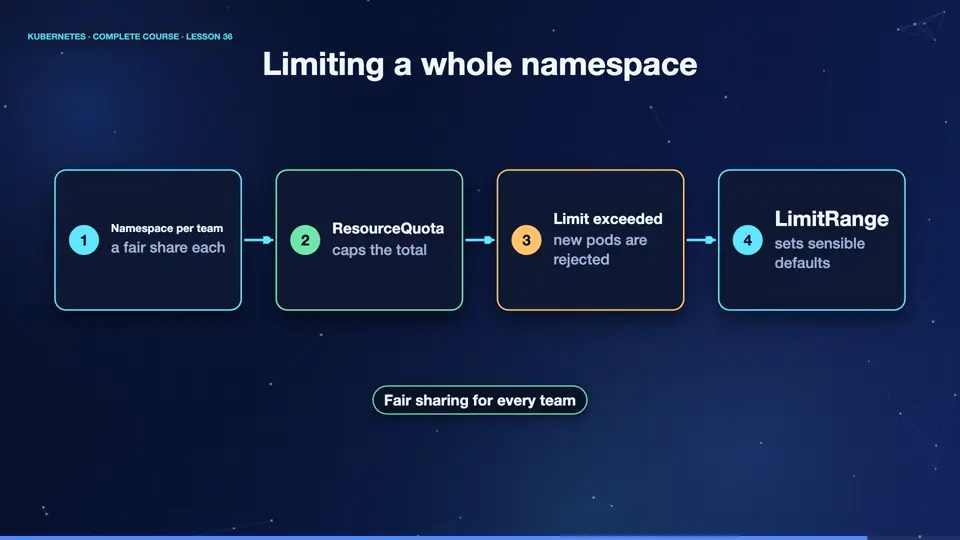
Limits on pods are not enough when many teams share a cluster. A resource quota caps a whole namespace. It can limit the number of pods, the total C P U and memory, even the number of volumes. When a team reaches its quota, new objects are rejected, with a clear error. A limit range complements it, by setting default requests and limits, for pods that forget to define them.
- Namespace per teama fair share each
- ResourceQuotacaps the total
- Limit exceedednew pods are rejected
- LimitRangesets sensible defaults
A quota says no
Let's try. We create a namespace for a team, and a quota that allows only two pods. The first two pods are created without trouble. The third is refused by the A P I server, with the message, forbidden, exceeded quota. It is a safe way to stop one team from filling the whole cluster.
kubectl create namespace team
namespace/team created
kubectl apply -f quota.yaml
resourcequota/team-quota created
kubectl run a --image=nginx:1.27 -n team
pod/a created
kubectl run b --image=nginx:1.27 -n team
pod/b created
kubectl run c --image=nginx:1.27 -n team 2>&1 | cut -c1-110
Error from server (Forbidden): pods "c" is forbidden: exceeded quota: team-quota, requested: pods=1, used: pod
File used: quota.yaml
apiVersion: v1
kind: ResourceQuota
metadata:
  name: team-quota
  namespace: team
spec:
  hard:
    pods: "2"
Summary
Wonderful. Requests and limits decide the quality of service class, and that decides who is evicted first. Quotas cap whole namespaces for fairness. With resources understood, we can now control where pods run, scheduling.
Key takeaways- Guaranteed, Burstable, BestEffort
- Equal requests and limits = Guaranteed
- ResourceQuota caps a namespace