
Versions and Upgrades
Keeping the cluster current.
Kubernetes releases a new minor version about three times a year, and supports only the latest few. So every cluster must be upgraded, again and again. Done carefully, an upgrade causes no downtime at all. In this lesson, you will learn how versions work, and the safe order for upgrading.
- Three releases a year
- Old versions lose support
- Upgrade in a safe order
How versions work
Kubernetes versions have three numbers, like one point thirty four point zero. The middle number, the minor version, brings new features, and changes. Only about the three most recent minor versions receive security fixes. Components must stay within allowed distances of each other. The kubelet may be a few minor versions older than the A P I server, but never newer. And you may upgrade only one minor version at a time. So, to go from thirty two to thirty five, you pass through thirty three and thirty four.
The safe upgrade order
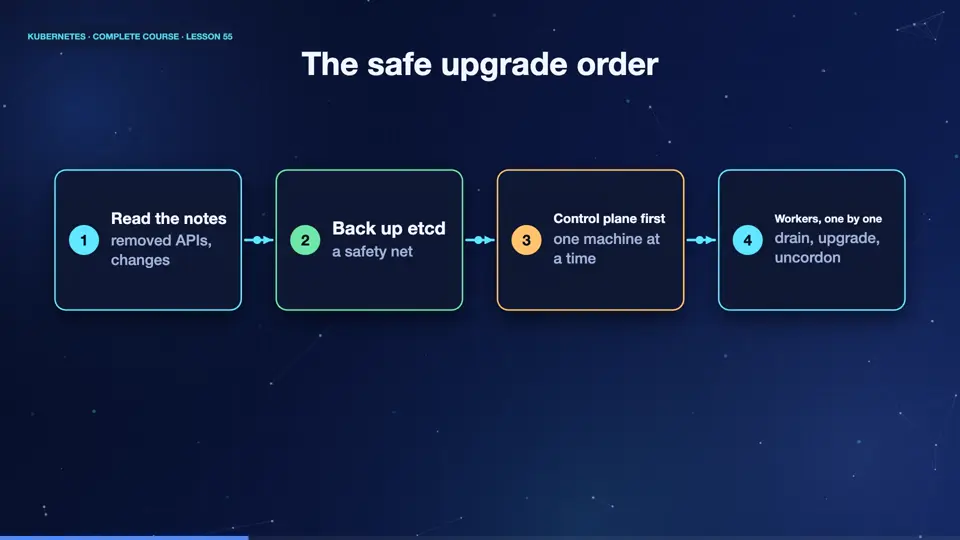
The upgrade follows a fixed order. First, read the release notes, and check for removed A P Is, because old object versions are sometimes deleted. Second, back up et see dee. Third, upgrade the control plane, one machine at a time. Fourth, upgrade the worker nodes, one at a time. For each worker, cordon, and drain it, upgrade the kubelet, and uncordon it. Because your apps run with several replicas, the other nodes keep serving, while each node is upgraded. Managed services do much of this for you.
- Read the notesremoved APIs, changes
- Back up etcda safety net
- Control plane firstone machine at a time
- Workers, one by onedrain, upgrade, uncordon
Checking versions
Let's check where we are. The server reports its version. Each node reports the version of its kubelet. In our cluster, everything is on the same version, one point thirty four. Before any upgrade, you compare this list with the target, and make sure that no node is left behind. Finally, you can ask the A P I server about the object versions it serves, to find deprecated ones, before an upgrade removes them.
kubectl version
Client Version: v1.34.1
Kustomize Version: v5.7.1
Server Version: v1.34.0
kubectl get nodes -o custom-columns=NAME:.metadata.name,VERSION:.status.nodeInfo.kubeletVersion
NAME      VERSION
k8s       v1.34.0
k8s-m02   v1.34.0
k8s-m03   v1.34.0
kubectl api-versions | head -8
admissionregistration.k8s.io/v1
apiextensions.k8s.io/v1
apiregistration.k8s.io/v1
apps/v1
authentication.k8s.io/v1
authorization.k8s.io/v1
autoscaling/v1
autoscaling/v2
Summary
Good. Upgrade one minor version at a time. Read the notes, back up et see dee, upgrade the control plane, then the workers, with cordon and drain. Next, the safety net itself, backing up, and restoring et see dee.
Key takeaways- One minor version at a time
- Control plane first, then workers
- Drain each worker before upgrading