
Watch Kubernetes Heal Itself
See it work before we learn it.
Imagine your website is running on three servers. Now imagine someone deletes all three. And before you can even blink, three new ones are already running. No alarm, no panic, no human. This is Kubernetes, and by the end of this course, you will master it.
A real cluster, live
This is not a drawing. This is a real Kubernetes cluster, running on this computer, and these are real commands. First, we ask Kubernetes for a deployment of three web servers. It answers instantly. Now we list the pods. A pod is one running copy of our app. Three pods, all running. Now watch closely. We will delete every single pod at once. And we list them again. The old pods are terminating, and three brand new pods, with new names, are already being created. Kubernetes noticed that reality no longer matched our wish, and it fixed the difference, automatically.
kubectl create deployment hello --image=nginx:1.27 --replicas=3
deployment.apps/hello created
kubectl get pods
NAME                     READY   STATUS    RESTARTS   AGE
hello-864f9ff7c8-5gvlm   1/1     Running   0          14s
hello-864f9ff7c8-9sz4x   1/1     Running   0          14s
hello-864f9ff7c8-xgxzq   1/1     Running   0          14s
kubectl delete pods --all --wait=false
pod "hello-864f9ff7c8-5gvlm" deleted from default namespace
pod "hello-864f9ff7c8-9sz4x" deleted from default namespace
pod "hello-864f9ff7c8-xgxzq" deleted from default namespace
kubectl get pods
NAME                     READY   STATUS              RESTARTS   AGE
hello-864f9ff7c8-4jf5r   0/1     ContainerCreating   0          0s
hello-864f9ff7c8-5gvlm   1/1     Terminating         0          14s
hello-864f9ff7c8-9sz4x   1/1     Terminating         0          14s
hello-864f9ff7c8-b4h9m   0/1     ContainerCreating   0          0s
hello-864f9ff7c8-bq6pb   0/1     ContainerCreating   0          0s
hello-864f9ff7c8-xgxzq   1/1     Terminating         0          14s
What just happened
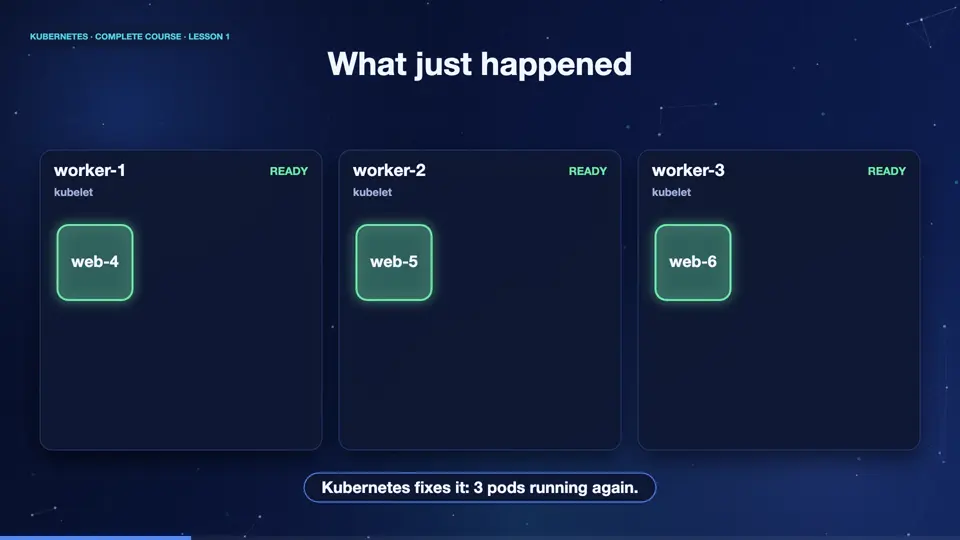
Let's replay that as a picture. Here is a small cluster, with three machines, which Kubernetes calls nodes. We asked for three copies of our app, and Kubernetes placed one pod on each machine. Now, a machine crashes, or in our case, we delete the pods. Kubernetes keeps watching, and it sees that three pods were wanted, but none exist. So it creates three new ones, and the app is back, usually in a few seconds. This watching and fixing never stops. It runs twenty four hours a day.
What you will be able to do
This is only the beginning. In this course, you will go from zero, to expert. You will understand how Kubernetes works inside. You will run apps, update them with no downtime, and scale them up and down. You will connect them with networking, keep their data safe, secure them, and watch them in production. And everything is explained in simple words, with real commands, so anyone can follow.
Summary
That was a first taste. Kubernetes watches your apps and keeps them alive, all by itself. Next, let's understand the problem that Kubernetes was born to solve, because once you see the problem, everything else makes sense.
Key takeaways- Kubernetes keeps your apps running
- You declare what you want
- It fixes any difference, automatically