
Taints and Tolerations
Nodes that push pods away.
Affinity is about pods choosing nodes. Taints work the other way around. A node says, keep away, unless you have permission. This is how you reserve special machines, like those with expensive graphics cards, for the pods that truly need them. Let's see how a taint and a toleration work together.
- Nodes can repel pods
- A taint is a keep-away sign
- A toleration is the permission
Taint and toleration
A taint is placed on a node, and has a key, a value, and an effect. The effect no schedule means, no new pod may come here, unless it tolerates the taint. Prefer no schedule is a soft version. And no execute is the strongest, it also evicts the pods that are already there. A toleration is placed on a pod. It says, I accept this taint. Notice, a toleration only allows a pod to enter. It does not force the pod to go there.
A reserved node
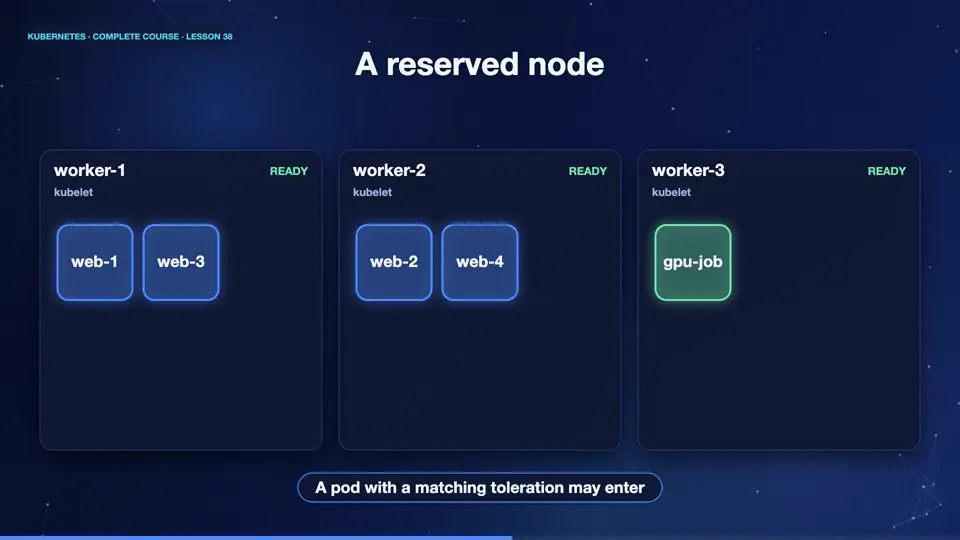
Here is a cluster where the third node is tainted, for G P U work. Normal pods are kept away, they land only on the other nodes. The node stays empty, saving its power for special jobs. Then a pod arrives, carrying a matching toleration, and it is allowed in. Combined with a node selector, this gives the G P U job its reserved machine, and keeps everyone else out.
A pod with a toleration
Here is the matching pod. Under tolerations, it says, key dedicated, value G P U, effect no schedule. That matches our taint exactly. And a node selector, with the host name label, sends it to that specific node. The toleration is the permission slip, and the selector is the destination.
apiVersion: v1
kind: Pod
metadata:
  name: gpu-job
spec:
  nodeSelector:
    kubernetes.io/hostname: k8s-m03
  tolerations:
  - key: dedicated
    operator: Equal
    value: gpu
    effect: NoSchedule
  containers:
  - name: app
image: nginx:1.27Taint a node
Let's do it. We taint the node m zero three. Then we create a deployment of six replicas. Look where they run. Not one pod went to m zero three. The scheduler respected the taint. Now we create the G P U job, with its toleration, and it lands on the tainted node. Finally, we remove the taint, with the same command, and a dash at the end.
kubectl taint nodes k8s-m03 dedicated=gpu:NoSchedule
node/k8s-m03 tainted
kubectl create deployment web --image=nginx:1.27 --replicas=6
deployment.apps/web created
kubectl get pods -o custom-columns=NAME:.metadata.name,NODE:.spec.nodeName | sort -k2
NAME                   NODE
web-66d47686b4-4psw2   k8s
web-66d47686b4-5pmj7   k8s
web-66d47686b4-lq4dj   k8s
web-66d47686b4-h5gqc   k8s-m02
web-66d47686b4-ptzkn   k8s-m02
web-66d47686b4-twlj2   k8s-m02
kubectl apply -f gpu-job.yaml
pod/gpu-job created
kubectl get pod gpu-job -o custom-columns=NAME:.metadata.name,NODE:.spec.nodeName
NAME      NODE
gpu-job   k8s-m03
File used: gpu-job.yaml
apiVersion: v1
kind: Pod
metadata:
  name: gpu-job
spec:
  nodeSelector:
    kubernetes.io/hostname: k8s-m03
  tolerations:
  - key: dedicated
    operator: Equal
    value: gpu
    effect: NoSchedule
  containers:
  - name: app
    image: nginx:1.27
Summary
Excellent. Taints repel pods from nodes, tolerations grant permission, and together with selectors they reserve special machines. Kubernetes itself uses taints, to keep pods off failing nodes. Next, we maintain nodes safely, with cordon and drain, and rank pods by priority.
Key takeaways- Taint: node says keep away
- Toleration: pod says I accept
- NoSchedule vs NoExecute