
Maintenance and Priority
Cordon, drain, and priorities.
Nodes need maintenance. They need operating system updates, hardware repairs, and eventually, replacement. How do you take one out of service, without hurting your apps? Kubernetes has a polite procedure, cordon, then drain. In this lesson, we also learn how pods can be ranked, when room is short.
- Maintenance must be polite
- Cordon, then drain
- Priorities rank important pods
The polite way to empty a node
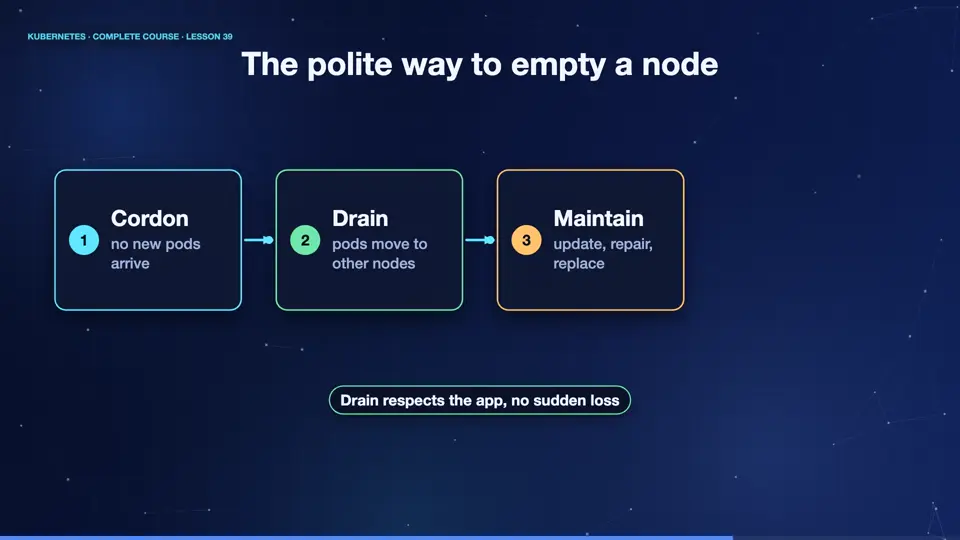
The procedure has three steps. First, cordon the node. That marks it as unschedulable, so no new pods arrive, but the existing ones keep running. Second, drain it. Kubernetes evicts every pod, politely, one at a time, respecting their shutdown time, and the controllers recreate them on other nodes. Now the node is empty, and you can update it, or even turn it off. Third, when it is back, uncordon it, and it accepts pods again.
- Cordonno new pods arrive
- Drainpods move to other nodes
- Maintainupdate, repair, replace
- Uncordonaccept pods again
Cordon and drain
Let's practise. We start six pods, spread across the nodes. We cordon the node m zero two, and the node list shows, scheduling disabled. Now we drain it. The command says, evicting pod, for each pod, and finally, node drained. We ignore the daemon set pods, because daemon sets always want a pod on every node. The evicted pods are recreated on the other nodes. Finally, we uncordon, and the node is back.
kubectl create deployment web --image=nginx:1.27 --replicas=6
deployment.apps/web created
kubectl cordon k8s-m02
node/k8s-m02 cordoned
kubectl get nodes
NAME      STATUS                     ROLES           AGE   VERSION
k8s       Ready                      control-plane   64m   v1.34.0
k8s-m02   Ready,SchedulingDisabled   <none>          64m   v1.34.0
k8s-m03   Ready                      <none>          63m   v1.34.0
kubectl drain k8s-m02 --ignore-daemonsets --delete-emptydir-data
node/k8s-m02 already cordoned
evicting pod default/web-66d47686b4-tx286
evicting pod default/web-66d47686b4-rh2dm
pod/web-66d47686b4-rh2dm evicted
pod/web-66d47686b4-tx286 evicted
node/k8s-m02 drained
Warning: ignoring DaemonSet-managed Pods: kube-system/kindnet-mrj8p, kube-system/kube-proxy-5c858
kubectl uncordon k8s-m02
node/k8s-m02 uncordoned
Pod priority
One more tool. When the cluster is full, which pods matter most? A priority class gives a number, to a group of pods. Here, critical has a value of one hundred thousand. A pod names its class, and the scheduler places higher numbers first. If there is no room, it may even evict lower priority pods, to make space. This is called preemption. Use it sparingly, for services like payments, and logins.
apiVersion: scheduling.k8s.io/v1
kind: PriorityClass
metadata:
  name: critical
value: 100000
globalDefault: false
description: "Payment and login services"
---
apiVersion: v1
kind: Pod
metadata:
  name: payments
spec:
  priorityClassName: critical
  containers:
  - name: app
image: nginx:1.27Spreading with topology
A final scheduling tool is topology spread. It says, keep my replicas evenly spread, across machines, or even across zones. Max skew of one means, no node may have more than one pod above any other. When unsatisfiable, do not schedule, makes it strict. This is how teams survive the loss of a whole data center zone, without any manual planning.
spec:
  topologySpreadConstraints:
  - maxSkew: 1
    topologyKey: kubernetes.io/hostname
    whenUnsatisfiable: DoNotSchedule
    labelSelector:
      matchLabels:
        app: web
Summary
Wonderful. Cordon and drain empty a node politely. Priority classes rank pods when room is short. And topology spread keeps replicas evenly distributed. You now control where pods run. Next, we let Kubernetes grow and shrink by itself, with autoscaling.
Key takeaways- cordon then drain, then uncordon
- PriorityClass ranks pods
- Topology spread balances replicas