
RBAC
Who may do what.
A cluster holds your applications, your data, and your secrets. Not everyone should be allowed to do everything. A developer may need to read pods, but not delete the database. Kubernetes controls this with role based access control, or R B A C. In this lesson, you will learn its four simple pieces.
- Not everyone may do everything
- Permissions are explicit
- Four simple building blocks
Authentication, then authorization
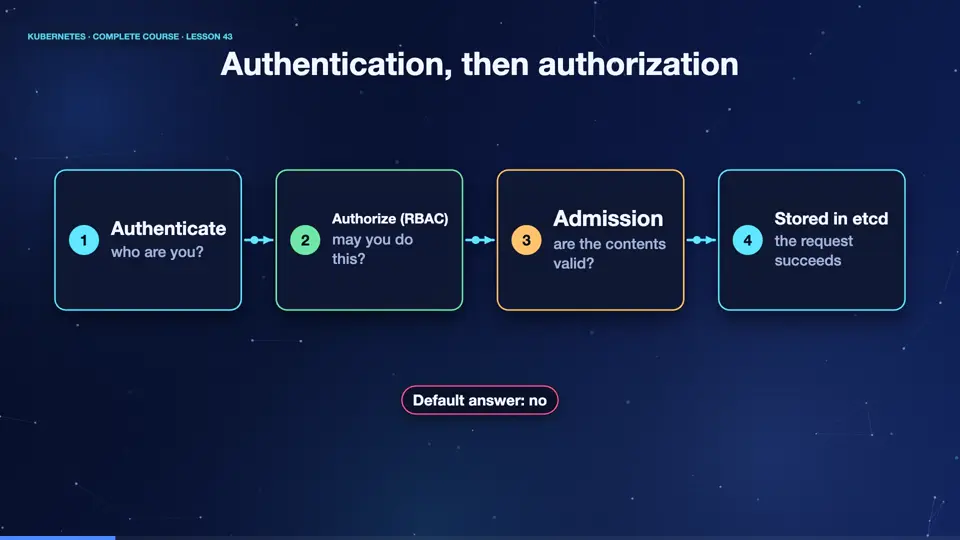
Every request to the A P I server passes through gates. First, authentication, who are you? Kubernetes checks a certificate, a token, or a login from an identity provider. Second, authorization, are you allowed to do this? That is where R B A C works. It looks for a rule that permits your user, to perform this verb, on this resource. If none exists, the answer is no. By default, nothing is allowed, so permissions are always added, never subtracted.
- Authenticatewho are you?
- Authorize (RBAC)may you do this?
- Admissionare the contents valid?
- Stored in etcdthe request succeeds
The four RBAC objects
There are four objects to know. A role is a list of permissions, inside one namespace, like, may get and list pods. A cluster role is the same, but for the whole cluster, or for resources that are not in any namespace, like nodes. A role binding connects a role to people, or to service accounts, inside a namespace. And a cluster role binding does the same for the entire cluster. The pattern is always the same, define what is allowed, then bind it to who.
A role and its binding
Here is a role, and its binding, in one file. The role is called pod reader, in the dev namespace. It has one rule. On the resource pods, the verbs get, list, and watch are allowed. Nothing else, so no deleting, no creating. Then the role binding gives that role to a user called jane. That is the complete picture. Subjects on one side, a role on the other, and a binding between them.
apiVersion: rbac.authorization.k8s.io/v1
kind: Role
metadata:
  name: pod-reader
  namespace: dev
rules:
- apiGroups: [""]
  resources: ["pods"]
  verbs: ["get", "list", "watch"]
---
apiVersion: rbac.authorization.k8s.io/v1
kind: RoleBinding
metadata:
  name: jane-reads-pods
  namespace: dev
subjects:
- kind: User
  name: jane
  apiGroup: rbac.authorization.k8s.io
roleRef:
  kind: Role
  name: pod-reader
apiGroup: rbac.authorization.k8s.ioAsking can-i
A wonderful command for testing is, auth can dash i. We can even pretend to be another user. Before the file, jane may not list pods. After applying it, she can. But can she delete pods? No. And can she list pods in another namespace, like default? Also no, because the role only exists in dev. This is the principle of least privilege, give only what is needed, nothing more.
kubectl create namespace dev
namespace/dev created
kubectl auth can-i list pods --as jane -n dev
no
kubectl apply -f rbac.yaml
role.rbac.authorization.k8s.io/pod-reader created
rolebinding.rbac.authorization.k8s.io/jane-reads-pods created
kubectl auth can-i list pods --as jane -n dev
yes
kubectl auth can-i delete pods --as jane -n dev
no
kubectl auth can-i list pods --as jane -n default
no
File used: rbac.yaml
apiVersion: rbac.authorization.k8s.io/v1
kind: Role
metadata:
  name: pod-reader
  namespace: dev
rules:
- apiGroups: [""]
  resources: ["pods"]
  verbs: ["get", "list", "watch"]
---
apiVersion: rbac.authorization.k8s.io/v1
kind: RoleBinding
metadata:
  name: jane-reads-pods
  namespace: dev
subjects:
- kind: User
  name: jane
  apiGroup: rbac.authorization.k8s.io
roleRef:
  kind: Role
  name: pod-reader
  apiGroup: rbac.authorization.k8s.io
Summary
Good. R B A C answers who may do what. Roles list permissions, bindings give them to people, and by default everything is denied. Use auth can dash i to check. Next, the identities that your apps use, service accounts.
Key takeaways- Role = permissions, Binding = who
- Namespace roles vs cluster roles
- Least privilege, always