
Storage Classes
Automatic storage on demand.
Creating volumes by hand for every claim would be slow, and tedious. Modern clusters create them automatically, the moment a claim appears. The recipe for that is a storage class. In this lesson, you will see how classes work, and why they make storage feel like a service.
- Volumes created on demand
- A class is a recipe
- Fast, slow, encrypted: your choice
What a StorageClass is
A storage class describes a type of storage, and how to create it. It names a provisioner, the program that makes the disks, such as the one of Amazon, Google, or Azure. It can set options, like fast solid state disks, or encrypted disks. And it sets the reclaim policy. A cluster can have several classes, perhaps named fast, standard, and archive. A claim picks one by name, or uses the default class, if it names none.
Dynamic provisioning
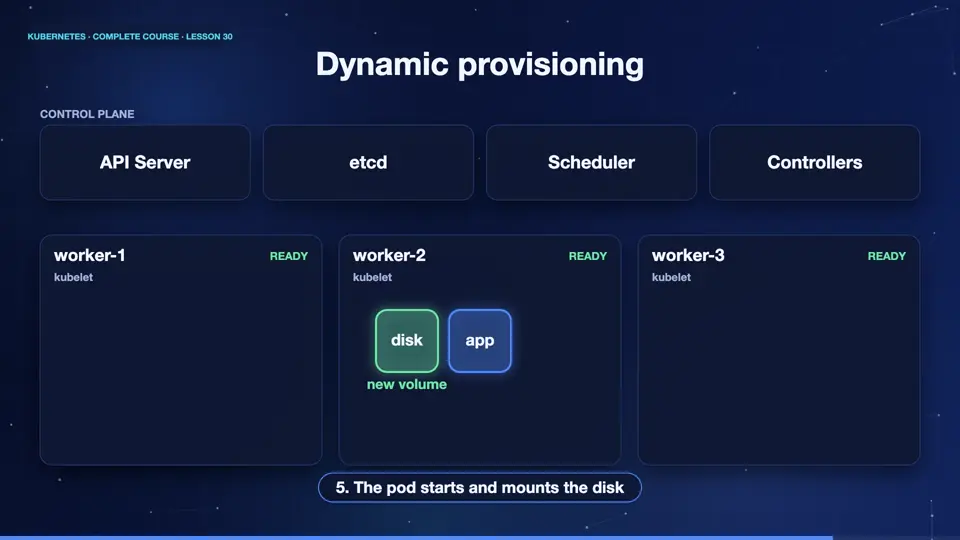
Here is the flow, called dynamic provisioning. A user creates a claim, asking for one gigabyte of the standard class. The provisioner of that class notices the claim. It creates a real disk, and a persistent volume describing it. Kubernetes binds the claim to the new volume. Then the pod that uses the claim starts, and mounts the disk. Nobody had to open a ticket, or prepare any storage in advance.
Classes in our cluster
Let's look at our cluster. It has one storage class, called standard, and it is marked as the default. Its provisioner creates disks on the node. When we create a claim, without naming a class, the default is used, and the volume appears in seconds. We can see the new persistent volume, with the reclaim policy, delete, and its status, bound. When we delete the claim, the volume is deleted too, which is why the list is empty at the end.
kubectl get storageclass
NAME                 PROVISIONER                RECLAIMPOLICY   VOLUMEBINDINGMODE   ALLOWVOLUMEEXPANSION   AGE
standard (default)   k8s.io/minikube-hostpath   Delete          Immediate           false                  45m
kubectl apply -f claim.yaml
persistentvolumeclaim/data-claim created
kubectl get pv -o custom-columns=NAME:.metadata.name,SIZE:.spec.capacity.storage,STATUS:.status.phase
NAME                                       SIZE   STATUS
pvc-4cfb2f2c-6459-45da-a694-523846b56f87   1Gi    Bound
kubectl delete -f claim.yaml
persistentvolumeclaim "data-claim" deleted from default namespace
kubectl get pv -o custom-columns=NAME:.metadata.name,SIZE:.spec.capacity.storage,STATUS:.status.phase
NAME   SIZE   STATUS
File used: claim.yaml
apiVersion: v1
kind: PersistentVolumeClaim
metadata:
  name: data-claim
spec:
  accessModes:
  - ReadWriteOnce
  resources:
    requests:
      storage: 1Gi
Summary
Good. A storage class is a recipe, and dynamic provisioning creates disks the moment a claim asks. The default class serves claims that do not choose. Next, a special kind of workload, built for apps that need identity and storage, the stateful set.
Key takeaways- StorageClass = recipe for storage
- Dynamic provisioning is automatic
- Default class serves most claims