
Service Types
ClusterIP, NodePort, LoadBalancer.
So far, our service works only inside the cluster. But real users are outside. Kubernetes offers three main service types, each one opens a bigger door than the last. In this lesson, you will learn what each type does, and which one to pick.
- Three types of service
- Each opens a bigger door
- Pick the smallest that works
Three doors, nested
The three types build on each other. Cluster I P is the default. It gives a stable address, reachable only from inside the cluster, perfect for a database, or an internal A P I. Node port includes everything in cluster I P, and also opens the same port, on every node, between thirty thousand and thirty two thousand. And load balancer includes node port, and also asks your cloud provider for a real external load balancer, with a public address.
- ClusterIPstable address inside the cluster
- NodePort+ a port on every node
- LoadBalancer+ a public cloud load balancer
Reaching in from outside
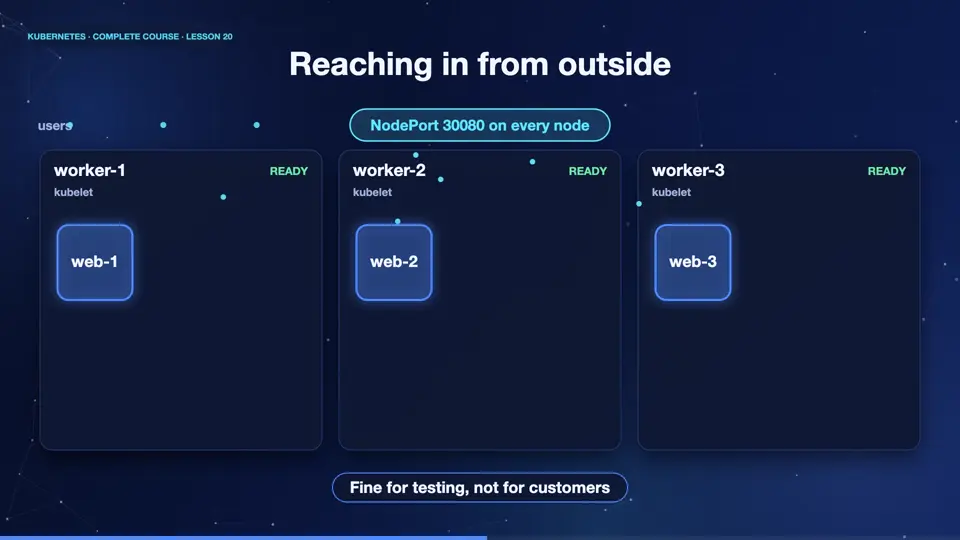
Here is a node port service. The service opens port thirty thousand, on every node. A visitor can send a request to any node's address, on that port, and Kubernetes forwards it to one of the pods, even if the pod lives on a different node. That is useful for testing. But, nobody wants to tell customers to visit, an address with a strange port number. For real traffic, the load balancer type, or an ingress, is used.
Types in practice
Let's create each type. We apply the deployment, and expose it three ways. The first service is cluster I P, with no external address. The second is a node port, and see the port numbers, eighty on the inside, and a high number on every node. The third is a load balancer. On a cloud, the external I P column would fill in within a minute. On our laptop cluster there is no cloud, so it stays pending. Real clusters on Amazon, Google, or Azure, create and bill a real load balancer for each such service.
kubectl apply -f deployment.yaml
deployment.apps/web created
kubectl expose deployment web --name=web-ip --port=80
service/web-ip exposed
kubectl expose deployment web --name=web-np --port=80 --type=NodePort
service/web-np exposed
kubectl expose deployment web --name=web-lb --port=80 --type=LoadBalancer
service/web-lb exposed
kubectl get svc
NAME         TYPE           CLUSTER-IP      EXTERNAL-IP   PORT(S)        AGE
kubernetes   ClusterIP      10.96.0.1       <none>        443/TCP        28m
web-ip       ClusterIP      10.107.73.87    <none>        80/TCP         1s
web-lb       LoadBalancer   10.96.187.255   <pending>     80:31789/TCP   0s
web-np       NodePort       10.99.123.15    <none>        80:30400/TCP   1s
File used: deployment.yaml
apiVersion: apps/v1
kind: Deployment
metadata:
  name: web
spec:
  replicas: 3
  selector:
    matchLabels:
      app: web
  template:
    metadata:
      labels:
        app: web
    spec:
      containers:
      - name: web
        image: nginx:1.27
        ports:
- containerPort: 80A tunnel for development
For development, there is a handy trick. Port forward connects a port on your own computer, directly to a service in the cluster, through a secure tunnel. No service type is needed. After starting it, we call local host, on port eighty eighty, and the answer comes from a pod inside the cluster. Stop the command, and the tunnel closes. It is perfect for quick checks, and for reaching databases, without exposing them.
kubectl apply -f deployment.yaml -f service.yaml
deployment.apps/web created
service/web created
kubectl port-forward svc/web 8080:80
Forwarding from [::1]:8080 -> 80
curl -s localhost:8080 | head -4
<!DOCTYPE html>
<html>
<head>
<title>Welcome to nginx!</title>
File used: deployment.yaml
apiVersion: apps/v1
kind: Deployment
metadata:
  name: web
spec:
  replicas: 3
  selector:
    matchLabels:
      app: web
  template:
    metadata:
      labels:
        app: web
    spec:
      containers:
      - name: web
        image: nginx:1.27
        ports:
        - containerPort: 80
File used: service.yaml
apiVersion: v1
kind: Service
metadata:
  name: web
spec:
  selector:
    app: web
  ports:
  - port: 80
    targetPort: 80
Summary
Excellent. Cluster I P is internal, node port opens a port on every node, and load balancer adds a public address from the cloud. Port forward gives a private tunnel, for development. Next, how pods find each other by name, using the cluster's built in D N S.
Key takeaways- ClusterIP: internal only
- NodePort: a port on every node
- LoadBalancer: public cloud address