
Controllers and HTTPS
Who does the routing, and TLS.
An ingress file is only a set of rules. It does nothing by itself, like a recipe nobody cooks. Something must read the rules and actually move the traffic. That something is an ingress controller. In this lesson, you will meet controllers, and learn how to protect traffic with H T T P S.
- Rules need a controller
- Several controllers to choose from
- HTTPS with a TLS certificate
Choosing an ingress controller
An ingress controller is a program, running as pods in your cluster, which reads ingress rules, and configures a real proxy. There are many. Engine X ingress is the most popular, and the one we use. Traefik is simple, and popular on small clusters. H A Proxy, and Envoy based controllers, like Contour, are powerful and fast. Cloud providers also offer their own, which create cloud load balancers. And a newer standard, called the Gateway A P I, is growing, as the successor of ingress.
Looking at the controller
Let's look at ours. It runs in its own namespace, as a normal deployment. The pod name starts with ingress nginx controller. And the ingress class object, tells Kubernetes which controller owns the class name, nginx. If you create an ingress without a controller installed, nothing happens, and the address stays empty. So always check that a controller is running.
kubectl get pods -n ingress-nginx
NAME                                       READY   STATUS      RESTARTS   AGE
ingress-nginx-admission-create-hvkbr       0/1     Completed   0          5m2s
ingress-nginx-admission-patch-zm5lk        0/1     Completed   0          5m2s
ingress-nginx-controller-9cc49f96f-t9w8q   1/1     Running     0          5m3s
kubectl get ingressclass
NAME    CONTROLLER             PARAMETERS   AGE
nginx   k8s.io/ingress-nginx   <none>       5m2s
How HTTPS works here
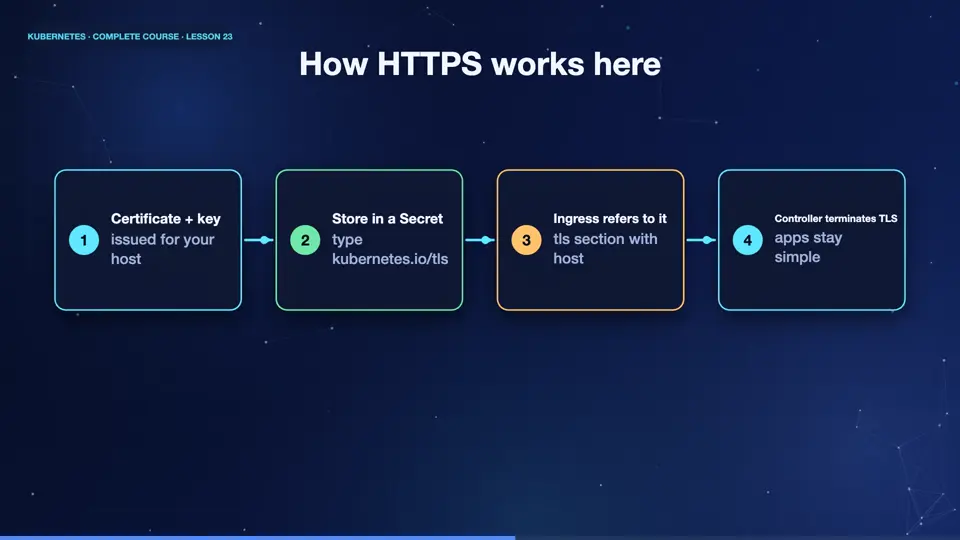
Now, secure traffic. H T T P S needs a certificate, and a private key. In Kubernetes, you store them in a secret, of the type T L S. The ingress then refers to that secret, in a tls section, naming the host. The controller loads the certificate, and handles the encryption. Your apps keep speaking plain H T T P inside the cluster, and the controller does the work at the door. This is called T L S termination.
- Certificate + keyissued for your host
- Store in a Secrettype kubernetes.io/tls
- Ingress refers to ittls section with host
- Controller terminates TLSapps stay simple
The tls section
Here is the same ingress, with a new tls section. Under tls, we list the host names that the certificate covers. And secret name points to the secret that holds the certificate and key. Everything else remains the same. Now, requests to this host must use secure H T T P S.
apiVersion: networking.k8s.io/v1
kind: Ingress
metadata:
  name: site
spec:
  ingressClassName: nginx
  tls:
  - hosts:
    - mysite.local
    secretName: mysite-tls
  rules:
  - host: mysite.local
    http:
      paths:
      - path: /shop
        pathType: Prefix
        backend:
          service:
            name: shop
            port:
              number: 80
      - path: /blog
        pathType: Prefix
        backend:
          service:
            name: blog
            port:
              number: 80
Serving HTTPS
Let's do it. We create a secret from a certificate file and a key file. For this demo, the certificate is self signed, which means, a browser would warn about it. We apply the ingress with the tls section. Then we call the secure address, with the insecure flag, because our certificate is homemade. The request works, over H T T P S. In production, you would use real certificates. A tool named cert manager can request them automatically from a free authority, and renew them before they expire.
kubectl apply -f apps.yaml
deployment.apps/shop created
service/shop created
deployment.apps/blog created
service/blog created
kubectl create secret tls mysite-tls --cert=tls.crt --key=tls.key
secret/mysite-tls created
kubectl apply -f ingress-tls.yaml
ingress.networking.k8s.io/site created
kubectl get ingress
NAME   CLASS   HOSTS          ADDRESS        PORTS     AGE
site   nginx   mysite.local   192.168.49.2   80, 443   8s
kubectl port-forward -n ingress-nginx svc/ingress-nginx-controller 8443:443
tunnel ready
curl -sk --resolve mysite.local:8443:127.0.0.1 https://mysite.local:8443/shop
Welcome to the SHOP
File used: apps.yaml
apiVersion: apps/v1
kind: Deployment
metadata:
  name: shop
spec:
  replicas: 2
  selector:
    matchLabels: {app: shop}
  template:
    metadata:
      labels: {app: shop}
    spec:
      containers:
      - name: echo
        image: hashicorp/http-echo:1.0
        args: ["-text=Welcome to the SHOP"]
        ports:
        - containerPort: 5678
---
apiVersion: v1
kind: Service
metadata:
  name: shop
spec:
  selector: {app: shop}
  ports:
  - port: 80
    targetPort: 5678
---
apiVersion: apps/v1
kind: Deployment
metadata:
  name: blog
spec:
  replicas: 2
  selector:
    matchLabels: {app: blog}
  template:
    metadata:
      labels: {app: blog}
    spec:
      containers:
      - name: echo
        image: hashicorp/http-echo:1.0
        args: ["-text=Welcome to the BLOG"]
        ports:
        - containerPort: 5678
---
apiVersion: v1
kind: Service
metadata:
  name: blog
spec:
  selector: {app: blog}
  ports:
  - port: 80
    targetPort: 5678
File used: ingress-tls.yaml
apiVersion: networking.k8s.io/v1
kind: Ingress
metadata:
  name: site
spec:
  ingressClassName: nginx
  tls:
  - hosts:
    - mysite.local
    secretName: mysite-tls
  rules:
  - host: mysite.local
    http:
      paths:
      - path: /shop
        pathType: Prefix
        backend:
          service:
            name: shop
            port:
              number: 80
      - path: /blog
        pathType: Prefix
        backend:
          service:
            name: blog
            port:
              number: 80
Summary
Excellent. An ingress controller turns rules into real traffic routing. Engine X is the most common choice. H T T P S uses a T L S secret, and the controller terminates the encryption at the front door. Next, we control which pods may talk to which, with network policies.
Key takeaways- Ingress needs a controller
- TLS secret + tls section = HTTPS
- cert-manager automates certificates