
Rolling Updates and Rollbacks
Change apps without downtime.
Shipping a new version is the scariest moment for any team. In the old days, it meant a maintenance window, and crossed fingers. Kubernetes makes it calm and routine. In this lesson, you will update an app with no downtime, and then undo a mistake in seconds.
- New versions, no downtime
- Old and new pods mix gently
- Mistakes can be undone
The rolling update
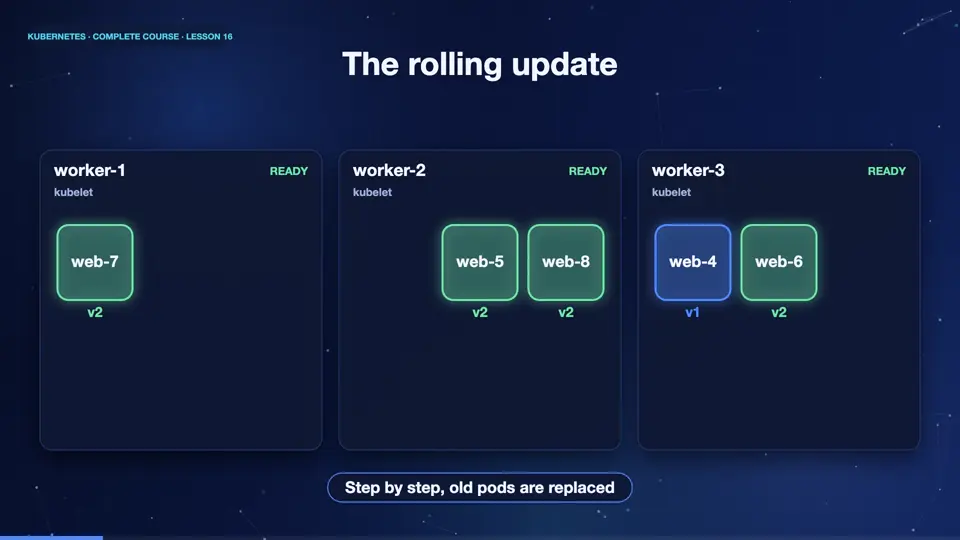
A rolling update replaces pods in small steps. Here, four pods run version one. We change the image to version two. The deployment creates a new replica set, and starts one new pod. When it is healthy, an old pod is removed, and then another new pod starts, and so on. At every moment, enough pods are running, to serve users. After a few steps, all four pods are new, and nobody noticed a thing.
Tuning the rollout
Two settings control how fast a rolling update goes. Max surge says how many extra pods may exist during the update, here, one. Max unavailable says how many pods may be missing, here, also one. Smaller numbers mean a slower, but safer update. We also set min ready seconds, so each new pod must stay healthy for six seconds, before the rollout continues, which gives problems time to show up.
apiVersion: apps/v1
kind: Deployment
metadata:
  name: web
spec:
  replicas: 4
  minReadySeconds: 6
  strategy:
    type: RollingUpdate
    rollingUpdate:
      maxSurge: 1
      maxUnavailable: 1
  selector:
    matchLabels:
      app: web
  template:
    metadata:
      labels:
        app: web
    spec:
      containers:
      - name: web
image: nginx:1.25Update, watch, undo
Let's do it for real. We apply the deployment, running engine X one point twenty five. Now we update, with set image, to one point twenty seven. Look at the pods immediately. You can see two generations at the same time, new pods created from the new replica set, and old pods still serving. Soon the rollout completes. The history lists each revision. And if the new version is bad, one command, rollout undo, returns to the previous one, instantly.
kubectl apply -f deployment.yaml
deployment.apps/web created
kubectl set image deployment/web web=nginx:1.27
deployment.apps/web image updated
kubectl get pods
NAME                   READY   STATUS    RESTARTS   AGE
web-767d6f4df8-vg8rs   1/1     Running   0          3s
web-767d6f4df8-xx2xd   1/1     Running   0          3s
web-f65bc46d8-hc552    1/1     Running   0          23s
web-f65bc46d8-j5gpk    1/1     Running   0          23s
web-f65bc46d8-jw8f9    1/1     Running   0          23s
kubectl rollout status deployment/web
Waiting for deployment "web" rollout to finish: 2 out of 4 new replicas have been updated...
Waiting for deployment "web" rollout to finish: 3 out of 4 new replicas have been updated...
Waiting for deployment "web" rollout to finish: 1 old replicas are pending termination...
Waiting for deployment "web" rollout to finish: 3 of 4 updated replicas are available...
deployment "web" successfully rolled out
kubectl rollout history deployment/web
deployment.apps/web
REVISION  CHANGE-CAUSE
1         <none>
2         <none>
kubectl rollout undo deployment/web
deployment.apps/web rolled back
File used: deployment.yaml
apiVersion: apps/v1
kind: Deployment
metadata:
  name: web
spec:
  replicas: 4
  minReadySeconds: 6
  strategy:
    type: RollingUpdate
    rollingUpdate:
      maxSurge: 1
      maxUnavailable: 1
  selector:
    matchLabels:
      app: web
  template:
    metadata:
      labels:
        app: web
    spec:
      containers:
      - name: web
        image: nginx:1.25
Summary
Excellent. A rolling update swaps pods gradually, so users never see downtime. Max surge and max unavailable control the speed, and rollout undo reverses a bad release in seconds. Next, how to change the number of copies, and how Kubernetes heals itself.
Key takeaways- Rolling update: gradual replacement
- set image / apply starts a rollout
- rollout undo = instant rollback