
Ingress
One front door for many apps.
Imagine you run ten web apps. If each one needs its own load balancer, you pay for ten public addresses, and manage ten separate doors. There is a much better way. An ingress gives your whole cluster one front door, and routes visitors to the right app. Let's see how.
- One address, many apps
- Routes by host name and path
- Cheaper and easier to manage
One door, many services
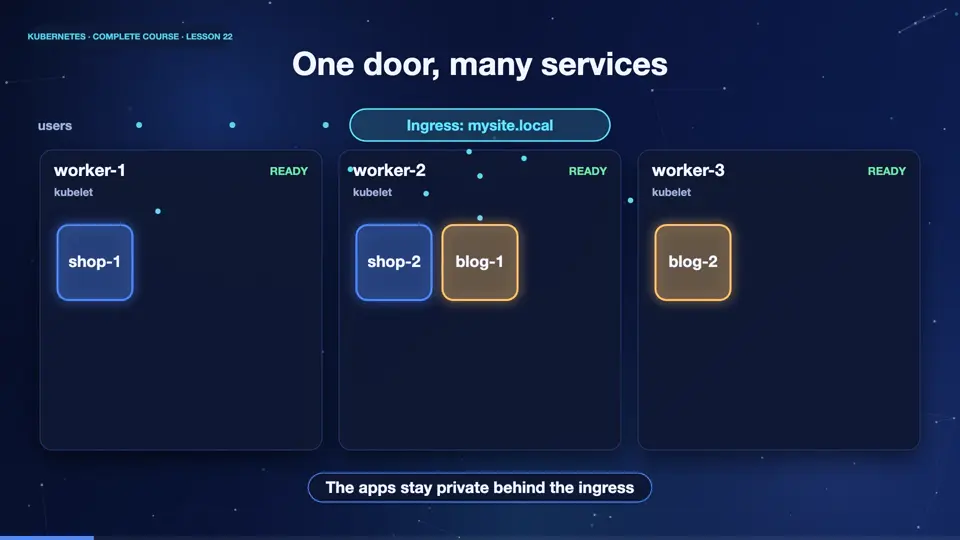
Here is the idea. A visitor arrives at a single address. The ingress looks at the request. If the path starts with slash shop, it forwards the request to the shop service, and its pods. If the path starts with slash blog, it goes to the blog service instead. The apps themselves can stay private, as cluster I P services. Only the ingress is exposed to the world.
An Ingress in YAML
This is an ingress file. The kind is ingress. The class name nginx says which controller should handle it, and we will meet controllers next. Under rules, we have a host name, mysite dot local. Then a list of paths. The first path, slash shop, sends traffic to the service called shop, on port eighty. And the second path, slash blog, sends traffic to the blog service. Adding another app means adding another path.
apiVersion: networking.k8s.io/v1
kind: Ingress
metadata:
  name: site
spec:
  ingressClassName: nginx
  rules:
  - host: mysite.local
    http:
      paths:
      - path: /shop
        pathType: Prefix
        backend:
          service:
            name: shop
            port:
              number: 80
      - path: /blog
        pathType: Prefix
        backend:
          service:
            name: blog
            port:
number: 80Routing in action
Let's try it. We deploy two apps, shop and blog, each with its own service, and apply the ingress. The ingress is listed, with its host, and its port. Now we send requests through the ingress controller, with the host header, mysite dot local. Slash shop answers, welcome to the shop. Slash blog answers, welcome to the blog. And a path that no rule matches, returns four oh four. One door, many apps.
kubectl apply -f apps.yaml
deployment.apps/shop created
service/shop created
deployment.apps/blog created
service/blog created
kubectl apply -f ingress.yaml
ingress.networking.k8s.io/site created
kubectl get ingress
NAME   CLASS   HOSTS          ADDRESS   PORTS   AGE
site   nginx   mysite.local             80      8s
kubectl port-forward -n ingress-nginx svc/ingress-nginx-controller 8081:80
tunnel ready
curl -s -H 'Host: mysite.local' localhost:8081/shop
Welcome to the SHOP
curl -s -H 'Host: mysite.local' localhost:8081/blog
Welcome to the BLOG
curl -s -o /dev/null -w '%{http_code}\n' -H 'Host: mysite.local' localhost:8081/other
404
File used: apps.yaml
apiVersion: apps/v1
kind: Deployment
metadata:
  name: shop
spec:
  replicas: 2
  selector:
    matchLabels: {app: shop}
  template:
    metadata:
      labels: {app: shop}
    spec:
      containers:
      - name: echo
        image: hashicorp/http-echo:1.0
        args: ["-text=Welcome to the SHOP"]
        ports:
        - containerPort: 5678
---
apiVersion: v1
kind: Service
metadata:
  name: shop
spec:
  selector: {app: shop}
  ports:
  - port: 80
    targetPort: 5678
---
apiVersion: apps/v1
kind: Deployment
metadata:
  name: blog
spec:
  replicas: 2
  selector:
    matchLabels: {app: blog}
  template:
    metadata:
      labels: {app: blog}
    spec:
      containers:
      - name: echo
        image: hashicorp/http-echo:1.0
        args: ["-text=Welcome to the BLOG"]
        ports:
        - containerPort: 5678
---
apiVersion: v1
kind: Service
metadata:
  name: blog
spec:
  selector: {app: blog}
  ports:
  - port: 80
    targetPort: 5678
File used: ingress.yaml
apiVersion: networking.k8s.io/v1
kind: Ingress
metadata:
  name: site
spec:
  ingressClassName: nginx
  rules:
  - host: mysite.local
    http:
      paths:
      - path: /shop
        pathType: Prefix
        backend:
          service:
            name: shop
            port:
              number: 80
      - path: /blog
        pathType: Prefix
        backend:
          service:
            name: blog
            port:
              number: 80
Summary
Good. An ingress is one front door, that routes requests by host name and path, to services behind it. Your apps stay private, and you pay for one public address. Next, we look at who actually does the routing, the ingress controller, and how to add secure H T T P S.
Key takeaways- Ingress: routing rules by host and path
- Apps stay private ClusterIP services
- One public address for many apps