
Network Policies
Who may talk to whom.
By default, every pod in a cluster can talk to every other pod. That is convenient, but dangerous. If one pod is hacked, the attacker can reach everything. Network policies are firewall rules for pods. In this lesson, you will learn to lock down a database, so only the right apps may reach it.
- Default: everything talks to everything
- Policies act as pod firewalls
- Allow only what is needed
Open by default
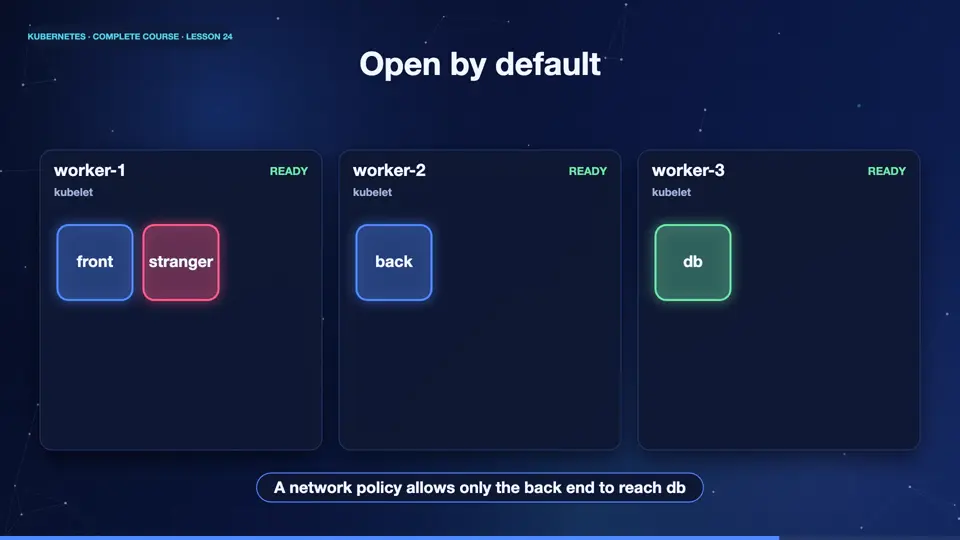
Here is a small system. A front end, a back end, and a database, with a stranger, a pod that should have no access. In the default setup, all of them can talk to everything. The stranger can call the database directly. A network policy changes this. It selects some pods, and says which traffic is allowed to reach them. Everything not listed, is blocked.
A NetworkPolicy
Here is a policy. The pod selector says which pods are protected, here, the pods labelled app equals db. The policy types field says that we control incoming traffic, ingress. Then comes the allow list. It permits traffic from pods labelled role equals app, and only on port eighty. Once a pod is selected by a policy, anything that is not allowed is denied. That is the key idea.
apiVersion: networking.k8s.io/v1
kind: NetworkPolicy
metadata:
  name: db-only-from-app
spec:
  podSelector:
    matchLabels:
      app: db
  policyTypes:
  - Ingress
  ingress:
  - from:
    - podSelector:
        matchLabels:
          role: app
    ports:
- port: 80Locking the database
Let's prove it. We create a database, and two client pods. One is labelled role equals app. The other has no label. Before any policy, both can reach the database. Now we apply the policy. The labelled client still gets the page. The other client waits, and then times out. The packets are dropped. Note that network policies need a network plugin that enforces them, and in our cluster, it does. On some setups, policies are silently ignored, so always test.
kubectl create deployment db --image=nginx:1.27
deployment.apps/db created
kubectl expose deployment db --port=80
service/db exposed
kubectl exec client -- wget -qO- -T 3 http://db | head -1
<!DOCTYPE html>
kubectl exec other -- wget -qO- -T 3 http://db | head -1
<!DOCTYPE html>
kubectl apply -f policy.yaml
networkpolicy.networking.k8s.io/db-only-from-app created
kubectl exec client -- wget -qO- -T 3 http://db | head -1
<!DOCTYPE html>
kubectl exec other -- wget -qO- -T 3 http://db 2>&1 | head -1
wget: download timed out
File used: policy.yaml
apiVersion: networking.k8s.io/v1
kind: NetworkPolicy
metadata:
  name: db-only-from-app
spec:
  podSelector:
    matchLabels:
      app: db
  policyTypes:
  - Ingress
  ingress:
  - from:
    - podSelector:
        matchLabels:
          role: app
    ports:
    - port: 80
Summary
Wonderful. Network policies are pod firewalls. Once a pod is selected, only the traffic you allow can reach it. They need a network plugin that supports them. Next, we learn how to give apps their settings and secrets, without baking them into images.
Key takeaways- Default: all pods can talk
- Policy selects pods, allows traffic
- Everything else is denied