
DaemonSets
One pod on every node.
Sometimes you do not want a number of copies. You want exactly one copy, on every machine. Think of a log collector, or a monitoring agent, that must watch each node. The daemon set does exactly that. In this lesson, you will see how it works, and where you already met it.
- Exactly one pod per node
- New node? New pod, automatically
- Used for node-level helpers
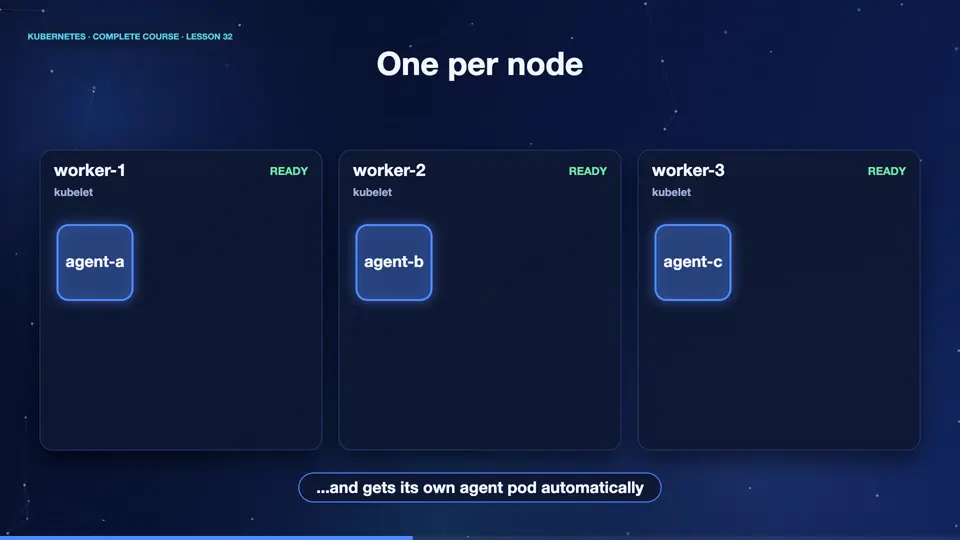
One per node
A daemon set puts one pod on every node. Here we have three nodes, and three agent pods, one on each. Now the cluster grows, a fourth node joins. The daemon set controller notices, and instantly starts an agent there, too. And when a node is removed, its agent pod disappears with it. You never say how many. The number simply follows the nodes.
Where daemon sets are used
Typical uses are node level helpers. A log collector, which reads logs from every node, and sends them away. A monitoring agent, which reports the health of each machine. A network plugin, which sets up the pod network on each node. And kube proxy, which you met earlier, is itself a daemon set. You can also restrict a daemon set to some nodes, for example, only those with graphics cards, using node selectors.
A DaemonSet in action
Let's create one. The file looks like a deployment, but without the replicas field. After a few seconds, the daemon set reports three desired, three ready, matching our three nodes. And the pod list shows each pod, and the node it landed on, one per node. Finally, we look at the daemon sets already running in the system. There is the network plugin, and kube proxy, working quietly on every node.
kubectl apply -f ds.yaml
daemonset.apps/agent created
kubectl get ds agent
NAME    DESIRED   CURRENT   READY   UP-TO-DATE   AVAILABLE   NODE SELECTOR   AGE
agent   3         3         3       3            3           <none>          12s
kubectl get pods -l app=agent -o custom-columns=NAME:.metadata.name,NODE:.spec.nodeName
NAME          NODE
agent-4wsqs   k8s-m02
agent-66vg5   k8s
agent-wlfwp   k8s-m03
kubectl get ds -n kube-system
NAME         DESIRED   CURRENT   READY   UP-TO-DATE   AVAILABLE   NODE SELECTOR            AGE
kindnet      3         3         3       3            3           <none>                   51m
kube-proxy   3         3         3       3            3           kubernetes.io/os=linux   51m
File used: ds.yaml
apiVersion: apps/v1
kind: DaemonSet
metadata:
  name: agent
spec:
  selector:
    matchLabels:
      app: agent
  template:
    metadata:
      labels:
        app: agent
    spec:
      containers:
      - name: agent
        image: busybox:1.36
        command: ["sleep", "3600"]
Summary
Excellent. A daemon set runs one pod on every node, and follows the cluster as it grows or shrinks. It is perfect for logging, monitoring, and networking helpers. Next, work that runs once and finishes, jobs, and work on a schedule, cron jobs.
Key takeaways- DaemonSet: one pod per node
- Follows nodes automatically
- Used by agents and plugins