
DNS and Meshes
Names, and smarter traffic.
Two more pieces complete the networking picture. Core D N S turns names into addresses, and you already used it. And for large systems, a service mesh adds encryption and smart traffic control between every pair of services. In this lesson, we look at how both work, and when a mesh is worth it.
- CoreDNS: names to addresses
- Service mesh: smarter traffic
- Is a mesh worth it?
Inside a pod and CoreDNS
Let's look at a pod's D N S settings. The file, resolv dot conf, names the cluster D N S server as the name server, the service address you saw before. It also lists search domains, which is why the short name web works. And an option, called n dots five, means that names with fewer than five dots are tried with each search domain first. Then we read the configuration of core D N S itself. The kubernetes block answers cluster names, and everything else is forwarded to the outside world.
kubectl apply -f pods.yaml
pod/a created
pod/b created
kubectl exec a -- cat /etc/resolv.conf
nameserver 10.96.0.10
search default.svc.cluster.local svc.cluster.local cluster.local
options ndots:5
kubectl -n kube-system get cm coredns -o jsonpath='{.data.Corefile}' | head -12
.:53 {
    log
    errors
    health {
       lameduck 5s
    }
    ready
    kubernetes cluster.local in-addr.arpa ip6.arpa {
       pods insecure
       fallthrough in-addr.arpa ip6.arpa
       ttl 30
    }
File used: pods.yaml
apiVersion: v1
kind: Pod
metadata:
  name: a
spec:
  nodeName: k8s-m02
  containers:
  - name: app
    image: busybox:1.36
    command: ["sleep", "3600"]
---
apiVersion: v1
kind: Pod
metadata:
  name: b
spec:
  nodeName: k8s-m03
  containers:
  - name: app
    image: busybox:1.36
    command: ["sleep", "3600"]
What a service mesh adds
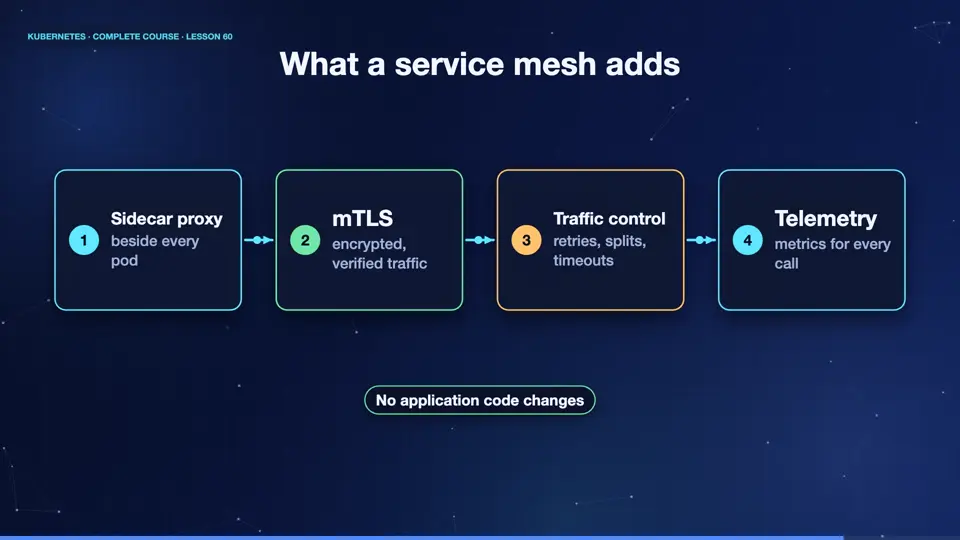
A service mesh, like Istio or Linkerd, adds a small proxy beside every pod, usually as a sidecar. All traffic passes through these proxies. That gives you features without changing any app code. Automatic encryption between services, called mutual T L S. Retries and time outs. Fine grained traffic splitting, for canary releases. And detailed metrics for every call. The control plane of the mesh configures all the proxies.
- Sidecar proxybeside every pod
- mTLSencrypted, verified traffic
- Traffic controlretries, splits, timeouts
- Telemetrymetrics for every call
Do you need a mesh?
Be honest about whether you need one. A mesh is powerful, but it adds moving parts, uses extra memory for every proxy, and takes time to learn. If you have a handful of services, plain Kubernetes services, ingress, and network policies are enough. If you have dozens of teams and services, need encryption everywhere, and want uniform metrics, a mesh pays off. Start simple, and add a mesh when you feel the pain it solves.
Without a mesh
- Services, ingress, policies
- Fewer moving parts
- Less to learn and run
- Good for small systems
With a mesh
- mTLS everywhere
- Traffic splitting and retries
- Uniform metrics and tracing
- Good for large systems
Summary
Wonderful. Core D N S gives every service a name, and a mesh adds encryption and traffic control, when you need them. Networking is complete. Next, extending Kubernetes itself, with custom resources and operators.
Key takeaways- CoreDNS resolves cluster names
- ndots and search domains
- Mesh: powerful, but only if needed