
Placing Pods
Node selectors and affinity.
By default, the scheduler picks any node with room. Usually that is exactly what you want. But sometimes you have preferences. A database needs a fast disk. Two copies of an app should never share a machine. Kubernetes lets you guide the scheduler. In this lesson, you will see how.
- Default: any node with room
- Sometimes you have preferences
- Guide the scheduler with rules
Filter, then score
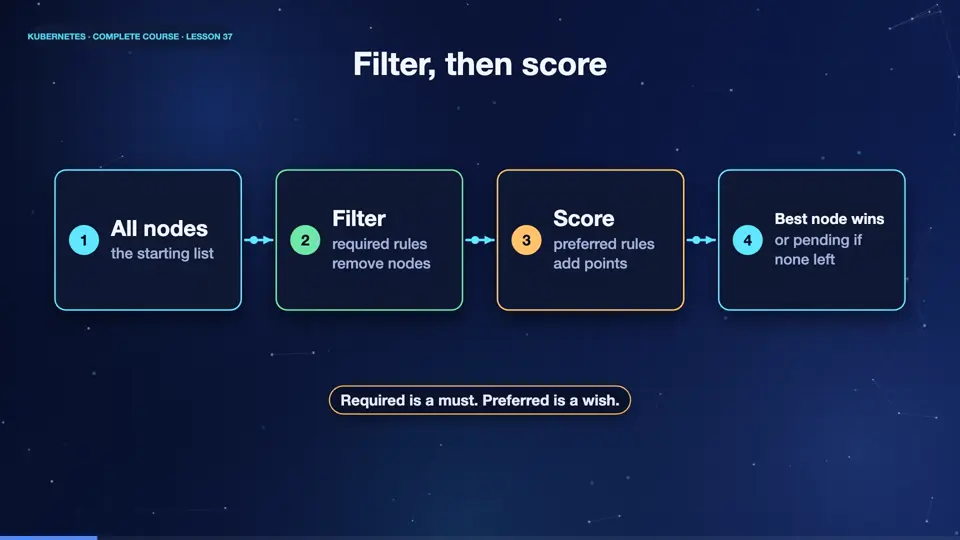
Remember the scheduler's two steps. It filters out the nodes that cannot run the pod, and then scores the rest. Your rules plug into both steps. Hard rules, called required, remove nodes from the list, and if no node is left, the pod waits, pending. Soft rules, called preferred, only change the scores, and the pod can still land elsewhere. Required is a must, preferred is a wish.
- All nodesthe starting list
- Filterrequired rules remove nodes
- Scorepreferred rules add points
- Best node winsor pending if none left
A node selector
The simplest rule is a node selector. First, you put a label on a node, for example, disk equals S S D. Then, in the pod, node selector says, only run on nodes with that label. Here, our pod demands a node with fast disks. It is easy to understand, but it only supports exact matches.
apiVersion: v1
kind: Pod
metadata:
  name: fast
spec:
  nodeSelector:
    disk: ssd
  containers:
  - name: app
    image: nginx:1.27
Labelling a node
Let's try it. We label the worker called k eight s m zero two. Then we create the pod, and ask where it landed. It is on m zero two, the only node with the label. Our own pod forced the scheduler's hand. Without the label on any node, this pod would stay pending forever, so use selectors with care.
kubectl label node k8s-m02 disk=ssd
node/k8s-m02 labeled
kubectl apply -f fast.yaml
pod/fast created
kubectl get pods -o custom-columns=NAME:.metadata.name,NODE:.spec.nodeName
NAME   NODE
fast   k8s-m02
File used: fast.yaml
apiVersion: v1
kind: Pod
metadata:
  name: fast
spec:
  nodeSelector:
    disk: ssd
  containers:
  - name: app
image: nginx:1.27Spreading replicas apart
For richer rules, there is affinity. Pod anti affinity says, do not place this pod near other pods with a given label. The topology key, host name, defines near, as the same machine. So this deployment says, never put two spread pods on the same node. It is a great way to survive the loss of a single machine. There is also pod affinity, for placing pods together, and node affinity, which is a stronger node selector.
apiVersion: apps/v1
kind: Deployment
metadata:
  name: spread
spec:
  replicas: 4
  selector:
    matchLabels:
      app: spread
  template:
    metadata:
      labels:
        app: spread
    spec:
      affinity:
        podAntiAffinity:
          requiredDuringSchedulingIgnoredDuringExecution:
          - labelSelector:
              matchLabels:
                app: spread
            topologyKey: kubernetes.io/hostname
      containers:
      - name: app
        image: nginx:1.27
One per node
We ask for four replicas of that deployment, on a cluster of three nodes. Three pods are running, each on a different node. The fourth has nowhere to go, because the rule forbids sharing, so it stays pending. That is the rule doing its job. If you prefer a softer approach, use the preferred version, and the fourth pod would be allowed to double up.
kubectl apply -f spread.yaml
deployment.apps/spread created
kubectl get pods -o custom-columns=NAME:.metadata.name,NODE:.spec.nodeName,STATUS:.status.phase
NAME                      NODE      STATUS
spread-5b9bfdcc87-9hjdt   k8s       Running
spread-5b9bfdcc87-kqm9v   <none>    Pending
spread-5b9bfdcc87-qgmkt   k8s-m02   Running
spread-5b9bfdcc87-qmtqf   k8s-m03   Running
File used: spread.yaml
apiVersion: apps/v1
kind: Deployment
metadata:
  name: spread
spec:
  replicas: 4
  selector:
    matchLabels:
      app: spread
  template:
    metadata:
      labels:
        app: spread
    spec:
      affinity:
        podAntiAffinity:
          requiredDuringSchedulingIgnoredDuringExecution:
          - labelSelector:
              matchLabels:
                app: spread
            topologyKey: kubernetes.io/hostname
      containers:
      - name: app
        image: nginx:1.27
Summary
Good. Node selectors and affinity guide the scheduler. Required rules are hard, preferred rules are soft, and anti affinity spreads replicas across machines. Next, the opposite idea, where a node pushes pods away, taints and tolerations.
Key takeaways- nodeSelector: exact label match
- Affinity: richer and softer rules
- Anti-affinity spreads replicas