
CI/CD Pipelines
From commit to cluster.
Git ops covers the delivery half. But before delivery, code must be tested, built into an image, and pushed to a registry. That is the job of the pipeline. In this lesson, you will see a complete path, from a developer's commit, to a running pod, with no manual steps.
- Test and build automatically
- Push an image to a registry
- Update Git, and let GitOps deliver
From commit to cluster
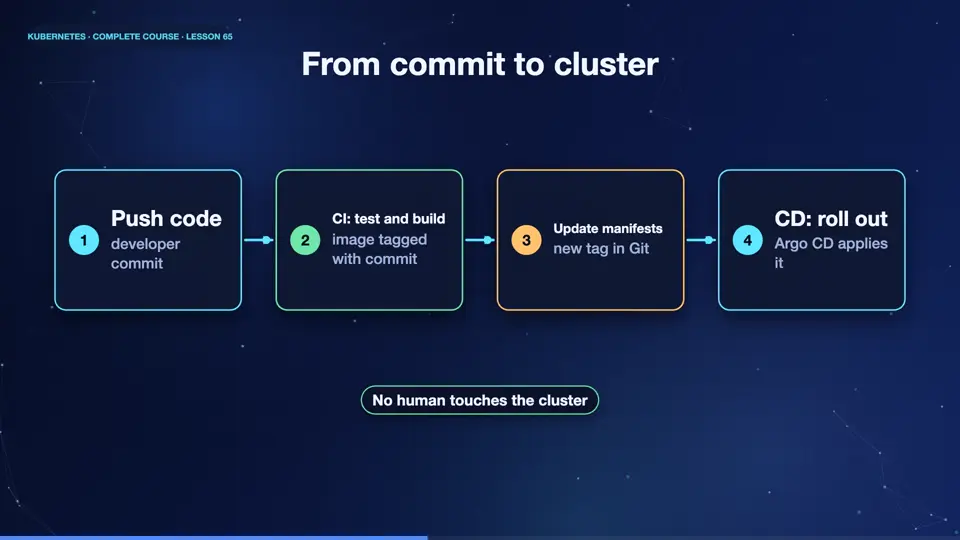
Here is the full path. A developer pushes code. The C I system, for example, GitHub Actions, runs the tests, and builds a container image, tagged with the commit. It pushes the image to a registry. Then it updates one line in the manifest repository, the image tag. Argo C D sees that commit, and rolls out the new version, with a rolling update. Every step is automatic, logged, and repeatable.
- Push codedeveloper commit
- CI: test and buildimage tagged with commit
- Update manifestsnew tag in Git
- CD: roll outArgo CD applies it
A pipeline file
Here is a pipeline, in the GitHub Actions format. It runs on every push to the main branch. The first step builds a docker image, tagged with the commit identifier, and pushes it. The second step edits the image tag in the manifests, with kustomize, commits the change, and pushes it. After that, the pipeline is done. Delivery is the job of Git ops, not of the pipeline, so the pipeline never needs credentials to your cluster.
name: deploy
on:
  push:
    branches: [main]
jobs:
  ship:
    runs-on: ubuntu-latest
    steps:
    - uses: actions/checkout@v4
    - name: Build and push image
      run: |
        docker build -t registry.example.com/shop:${{ github.sha }} .
        docker push registry.example.com/shop:${{ github.sha }}
    - name: Update the manifest in Git
      run: |
        kustomize edit set image shop=registry.example.com/shop:${{ github.sha }}
git commit -am "deploy ${{ github.sha }}" && git pushPipeline good practice
A few habits make pipelines trustworthy. Tag images with the commit, never with latest, so you know exactly what runs. Scan images for known vulnerabilities, before pushing. Keep secrets in the pipeline's secret store, never in the repository. Use separate environments, and promote the same image from test, to staging, to production, rather than rebuilding it. And keep the pipeline fast, because slow feedback makes people work around it.
Summary
Wonderful. A pipeline tests, builds, and pushes the image, then updates Git, and Git ops delivers it. Tag by commit, scan, and promote the same image through environments. Next, the last topics of the course, cost, managed services, and a production readiness checklist.
Key takeaways- CI: test, build, push
- Update the manifest repo
- GitOps delivers it