
ConfigMaps
Settings that live outside your image.
A good container image is built once, and runs anywhere. But the app inside needs settings, like a database address, or a colour theme, and these differ between a test and a production environment. Baking them into the image would force a new build for every change. A config map solves this.
- Build the image once
- Keep settings outside it
- Change settings without rebuilding
Separating code from config
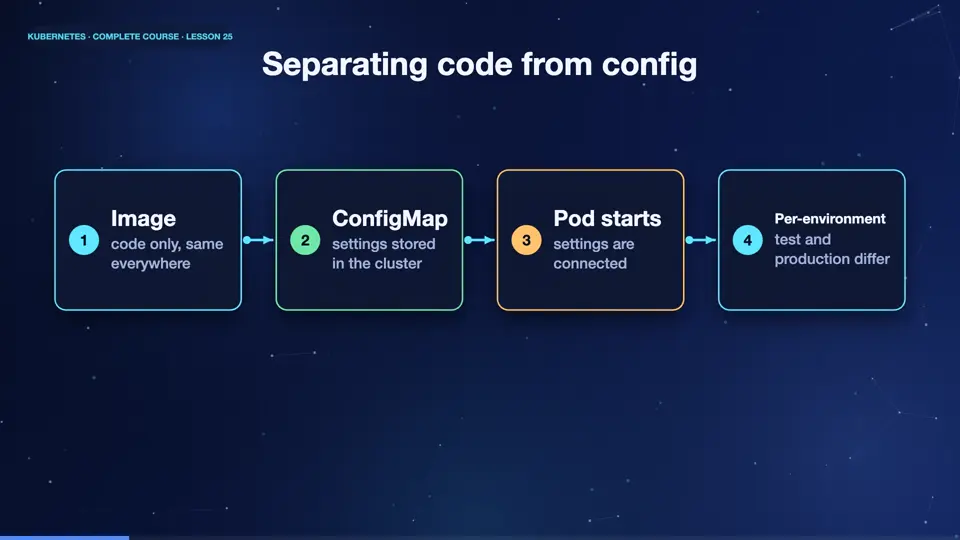
The idea is simple. The image holds the code, and it never changes between environments. The settings live in a config map, an object stored in the cluster. When a pod starts, Kubernetes connects the config map to it. In testing, the pod reads the test settings. In production, the very same image reads the production settings. One image, many environments, no secrets or addresses hidden inside.
- Imagecode only, same everywhere
- ConfigMapsettings stored in the cluster
- Pod startssettings are connected
- Per-environmenttest and production differ
Creating a ConfigMap
Let's create one. The command, create config map, takes a name, and any number of key and value pairs. Here, a greeting of hello, and a colour of blue. Now we look at it as Y A M L. Under data, the keys and values are stored in plain text. Anyone who can read the config map can read the values, which is why passwords never belong here. You can also create config maps from files, or write them in Y A M L, like any other object.
kubectl create configmap app-config --from-literal=GREETING=Hello --from-literal=COLOR=blue
configmap/app-config created
kubectl get configmap app-config
NAME         DATA   AGE
app-config   2      0s
kubectl get configmap app-config -o yaml | head -5
apiVersion: v1
data:
  COLOR: blue
  GREETING: Hello
kind: ConfigMap
Summary
Good. A config map stores non secret settings in the cluster, separate from the image. The same image can run anywhere with different settings. Next, the sensitive side, passwords and keys, with secrets.
Key takeaways- ConfigMap: settings outside the image
- Plain text, never for passwords
- One image, many environments