
Scaling and Self-Healing
More copies, and automatic recovery.
Two promises make Kubernetes feel like magic. If more people arrive, you can add copies of your app in seconds. And if something breaks, Kubernetes repairs it by itself. In this lesson, you will see both promises kept, with real commands.
- Scale up for busy days
- Scale down to save money
- Failures are repaired for you
Scaling by command
Scaling is just changing the number of replicas. We start with four pods. A single scale command raises the number to eight, and within seconds, four new pods appear, spread across the nodes. When the busy period ends, we scale back down to two, and Kubernetes removes the extra pods. Because pods are identical, adding or removing copies is safe. Later, you will see how to automate this, so that the number follows the traffic.
kubectl create deployment web --image=nginx:1.27 --replicas=4
deployment.apps/web created
kubectl scale deployment web --replicas=8
deployment.apps/web scaled
kubectl get deployment web
NAME   READY   UP-TO-DATE   AVAILABLE   AGE
web    8/8     8            8           21s
kubectl scale deployment web --replicas=2
deployment.apps/web scaled
kubectl get deployment web
NAME   READY   UP-TO-DATE   AVAILABLE   AGE
web    2/2     2            2           29s
A container crashes
Now, self healing. Our deployment has four pods. We cause a crash, by telling the web server inside one of them, to quit. The container exits. Watch the restarts column. The kubelet noticed the stopped container, and started it again. One restart, and the pod is running again, after a moment. This is the first layer of healing, the kubelet restarts failed containers, on the same node.
kubectl create deployment web --image=nginx:1.27 --replicas=4
deployment.apps/web created
kubectl exec deploy/web -- nginx -s quit
2026/10/30 19:45:11 [notice] 37#37: signal process started
kubectl get pods
NAME                   READY   STATUS    RESTARTS     AGE
web-66d47686b4-cjwrd   1/1     Running   1 (5s ago)   17s
web-66d47686b4-db7v4   1/1     Running   0            17s
web-66d47686b4-p7bt7   1/1     Running   0            17s
web-66d47686b4-q24qn   1/1     Running   0            17s
A whole node fails
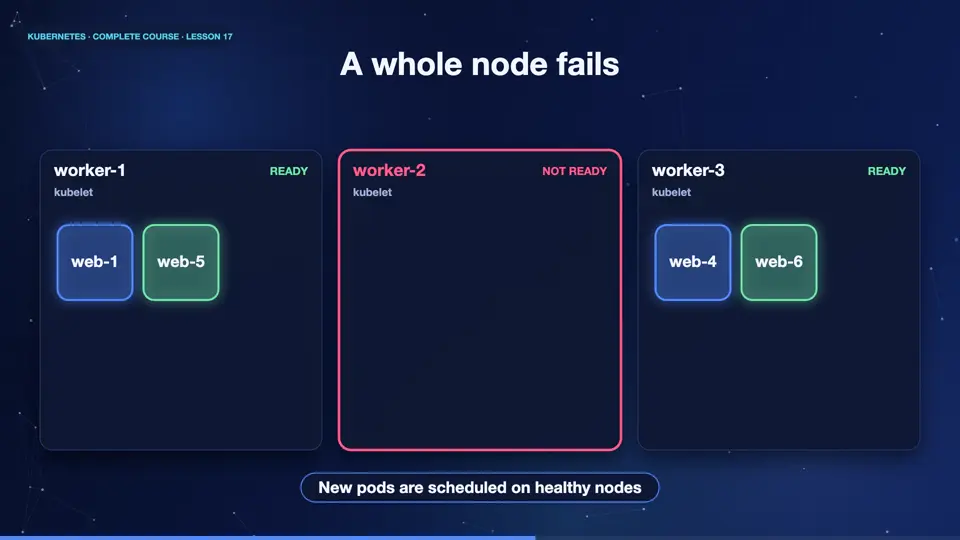
The second layer handles a whole machine failing. Here are four pods, spread over three nodes. Suddenly, worker two loses power. The control plane stops hearing from its kubelet, and after a short grace period, marks the node as not ready. The pods on it are lost. The deployment's replica set notices that two pods are missing, and asks for new ones. The scheduler places them on the healthy nodes. The app is back to four pods, and no human woke up.
Summary
Good. Scaling changes the replica count, up or down, in seconds. Self healing works in layers, the kubelet restarts crashed containers, and the controllers replace pods from failed nodes. Next, the different strategies teams use to release new versions.
Key takeaways- scale changes the replica count
- Kubelet restarts failed containers
- Controllers replace lost pods