
DNS and Discovery
Finding services by name.
Nobody wants to type I P addresses. Inside the cluster, you can reach any service just by its name. Behind this convenience is a small D N S server, running as pods in the cluster. In this lesson, you will see how names are built, and how to use them across namespaces.
- Reach services by name
- Built-in DNS server
- Works across namespaces
How a name becomes an address
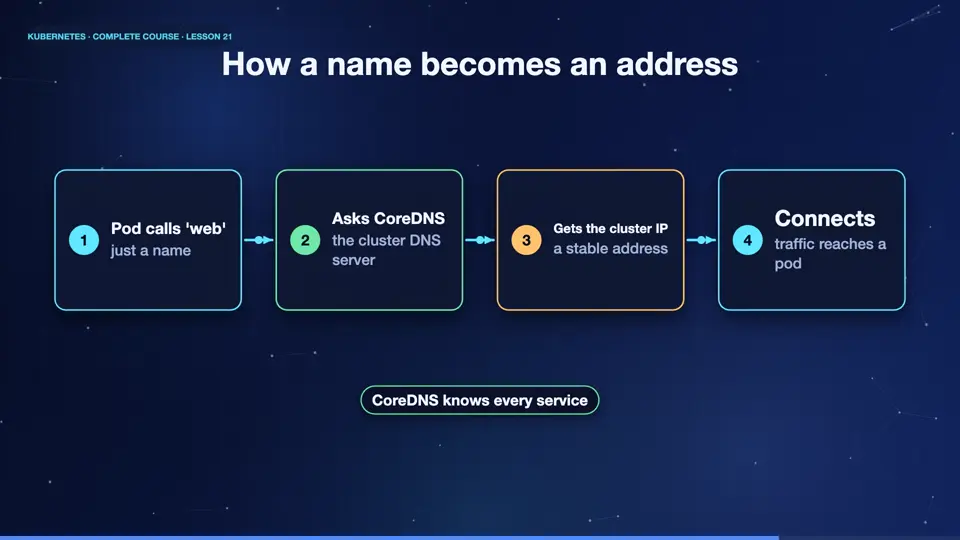
When a pod wants to call a service called web, it just uses the name. Its operating system asks the cluster D N S server, which is called core D N S. Core D N S watches the A P I server, so it knows every service. It answers with the stable cluster I P of the service. The pod then connects to that address, and Kubernetes forwards the request to a healthy pod. Every pod is automatically set up to use core D N S.
- Pod calls 'web'just a name
- Asks CoreDNSthe cluster DNS server
- Gets the cluster IPa stable address
- Connectstraffic reaches a pod
Names for the same service
A service has a full name, built from parts. Service name, then dot, the namespace, then dot s v c, then dot cluster dot local. So web in the default namespace is web dot default dot s v c dot cluster dot local. Inside the same namespace, the short name web is enough. To reach a service in another namespace, add the namespace, for example, web dot shop. The full name works from anywhere.
| You write | It means | Works from |
|---|---|---|
| web | web in my own namespace | same namespace |
| web.shop | web in namespace shop | any namespace |
| web.shop.svc.cluster.local | the full name | anywhere in the cluster |
DNS in action
Let's look. From the client pod, we look up the full name of the service. The answer shows the D N S server, at the cluster's special address, and below it, the full name of the service, with its cluster I P. Now we create a second namespace, with its own service called api. From our client in the default namespace, the short name api fails, because it lives elsewhere. But api dot shop works, as the namespace is part of the name.
kubectl apply -f deployment.yaml -f service.yaml
deployment.apps/web created
service/web created
kubectl exec client -- nslookup web.default.svc.cluster.local
Server:		10.96.0.10
Address:	10.96.0.10:53

Name:	web.default.svc.cluster.local
Address: 10.103.32.230
kubectl create namespace shop
namespace/shop created
kubectl create deployment api -n shop --image=nginx:1.27
deployment.apps/api created
kubectl expose deployment api -n shop --port=80
service/api exposed
kubectl exec client -- wget -qO- -T 3 http://api 2>&1 | head -2
wget: bad address 'api'
command terminated with exit code 1
kubectl exec client -- wget -qO- -T 3 http://api.shop | head -2
<!DOCTYPE html>
<html>
File used: deployment.yaml
apiVersion: apps/v1
kind: Deployment
metadata:
  name: web
spec:
  replicas: 3
  selector:
    matchLabels:
      app: web
  template:
    metadata:
      labels:
        app: web
    spec:
      containers:
      - name: web
        image: nginx:1.27
        ports:
        - containerPort: 80
File used: service.yaml
apiVersion: v1
kind: Service
metadata:
  name: web
spec:
  selector:
    app: web
  ports:
  - port: 80
    targetPort: 80
Summary
Wonderful. Every service gets a D N S name. Use the short name inside a namespace, add the namespace to cross over, and the full name works everywhere. Next, a smarter front door for web traffic, one address, many apps, with ingress.
Key takeaways- CoreDNS resolves service names
- name.namespace crosses namespaces
- Full: name.ns.svc.cluster.local