
ReplicaSets
Keeping the right number of pods.
Remember the bare pod, which died, and never came back? A replica set fixes that. It promises that a certain number of identical pods will always be running. In this lesson, you will see how it makes that promise, and how it finds its pods using labels.
- A promise of N pods
- Replaces any that disappear
- Finds its pods by label
A ReplicaSet in YAML
Here is a replica set. The kind is replica set. In the spec, replicas says how many pods we want, here, three. The selector tells the replica set how to recognise its pods, by the label app equals rs demo. And the template is a blueprint for new pods. Inside the template is a normal pod description, whose labels must match the selector. So the replica set simply counts pods with that label, and uses the template, to make more, if some are missing.
apiVersion: apps/v1
kind: ReplicaSet
metadata:
  name: rsdemo
spec:
  replicas: 3
  selector:
    matchLabels:
      app: rsdemo
  template:
    metadata:
      labels:
        app: rsdemo
    spec:
      containers:
      - name: rsdemo
        image: nginx:1.27
        ports:
        - containerPort: 80
Counting and creating
Let's watch it work. We want three replicas. The replica set counts the pods with its label, and finds three. All is well. Now a pod disappears, perhaps because its node failed. The count is two, but three are wanted. So the replica set uses the template, to create one new pod, and the count returns to three. It does the same in reverse. If an extra pod with the same label appears, the replica set deletes one, to get back to three.
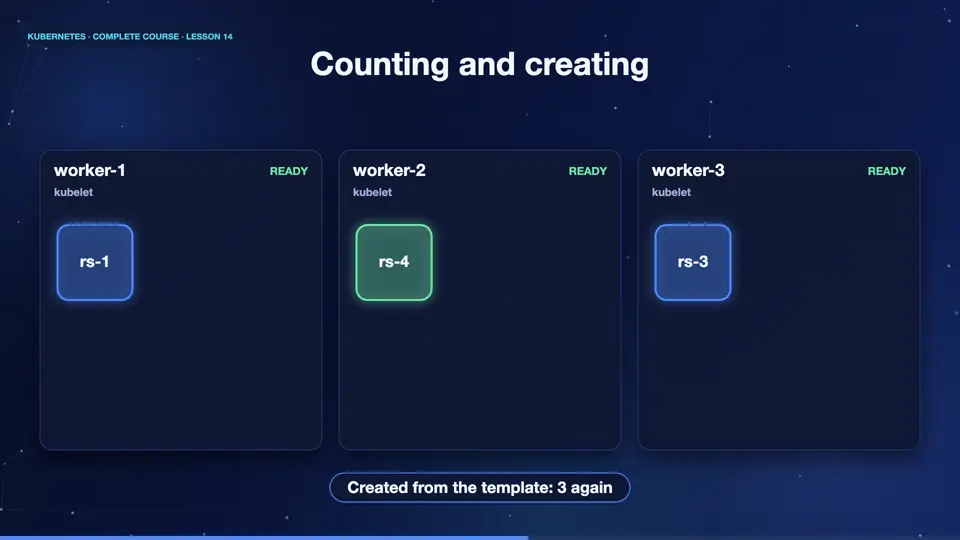
A ReplicaSet in action
Let's apply the file. The replica set reports desired three, current three, ready three. Now we delete one pod. Notice the timing. The replica set sees that only two exist, and immediately creates a replacement, which you can tell by its very young age. Doing this by hand would be slow. A replica set does it in a moment, at any hour of the day.
kubectl apply -f replicaset.yaml
replicaset.apps/rsdemo created
kubectl get rs
NAME     DESIRED   CURRENT   READY   AGE
rsdemo   3         3         3       14s
kubectl get pods -o name | head -1 | xargs kubectl delete
pod "rsdemo-62wj6" deleted from default namespace
kubectl get pods
NAME           READY   STATUS    RESTARTS   AGE
rsdemo-grbmq   1/1     Running   0          2s
rsdemo-q2m94   1/1     Running   0          16s
rsdemo-rlvr6   1/1     Running   0          16s
File used: replicaset.yaml
apiVersion: apps/v1
kind: ReplicaSet
metadata:
  name: rsdemo
spec:
  replicas: 3
  selector:
    matchLabels:
      app: rsdemo
  template:
    metadata:
      labels:
        app: rsdemo
    spec:
      containers:
      - name: rsdemo
        image: nginx:1.27
        ports:
        - containerPort: 80
Summary
Excellent. A replica set keeps a fixed number of identical pods alive, finds them by label, and creates new ones from a template. But you almost never use replica sets directly. There is a smarter manager above them, and it is next.
Key takeaways- ReplicaSet: N pods, always
- Selector matches pod labels
- Template builds replacement pods