
Service Accounts
Identities for pods.
People log in to a cluster. But programs inside the cluster sometimes need to call the A P I too. A deployment tool, a monitoring agent, or an operator. Pods get their identity from a service account. In this lesson, you will learn what it is, and how to keep it minimal.
- Pods need identities too
- Every pod has a service account
- Give each app only what it needs
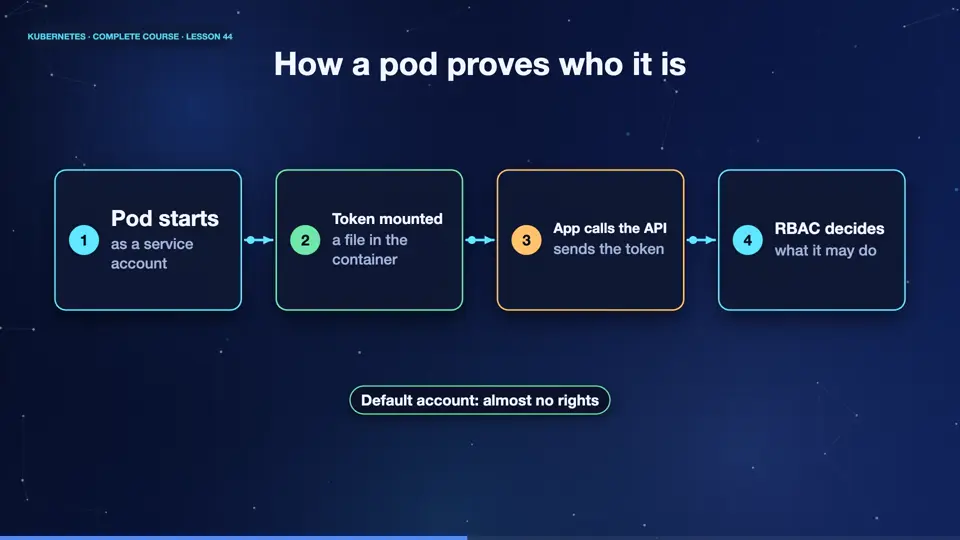
How a pod proves who it is
Every namespace has a service account called default. Unless you choose another, every pod runs as it. Kubernetes gives the pod a short lived token, and places it inside the container, as a file. The app reads the token, and sends it with its A P I calls. The A P I server checks the token, and treats the pod as that service account. Then R B A C decides what the account may do. Since the default account has almost no rights, a typical app is harmless, unless you give it more.
- Pod startsas a service account
- Token mounteda file in the container
- App calls the APIsends the token
- RBAC decideswhat it may do
Looking inside a pod
Let's see it. We create a service account called reader, and ask what it can do. Right now, nothing, the answer is no. Then, inside a normal pod, we list the folder, where the credentials are mounted. There is a certificate to trust the A P I server, the pod's namespace, and the token itself. That is everything a program needs, to talk to the cluster.
kubectl create namespace dev
namespace/dev created
kubectl create serviceaccount reader -n dev
serviceaccount/reader created
kubectl auth can-i list pods --as system:serviceaccount:dev:reader -n dev
no
kubectl run probe --image=busybox:1.36 -- sleep 600
pod/probe created
kubectl exec probe -- ls /var/run/secrets/kubernetes.io/serviceaccount
ca.crt
namespace
token
Service account good habits
A few habits keep things safe. Create one service account per application, so you can give each exactly the rights it needs. Never bind powerful roles, like cluster admin, to a service account, unless you absolutely must. If your app never calls the A P I, turn off the token with, automount service account token, false. And prefer short lived tokens, which Kubernetes now issues by default.
| Habit | Why |
|---|---|
| One account per app | rights fit each app |
| Avoid cluster-admin | a leaked token is not a disaster |
| Disable the token if unused | nothing to steal |
| Use short-lived tokens | they expire by themselves |
Summary
Excellent. Pods act as service accounts, carrying a token that R B A C checks. Make one per app, grant the least, and turn off tokens that you do not need. Next, we harden the pods themselves, with security contexts.
Key takeaways- Pods run as a ServiceAccount
- Token mounted as a file
- One account per app, least rights