
The Declarative Model
Tell Kubernetes what, not how.
There is one idea that makes Kubernetes different from a pile of scripts. It is called the declarative model. Once you understand it, YAML files, deployments, and even upgrades will feel natural. In this lesson, you will learn to think the Kubernetes way.
- You describe the end result
- Kubernetes figures out the steps
- This idea powers everything
Imperative versus declarative
There are two ways to give instructions. The imperative way is a list of steps. Start a server. Install the app. Start it again if it fails. You are in charge of every step, and every mistake. The declarative way is different. You only describe the end result. I want five copies of this app, running. Kubernetes works out the steps, and keeps working, so the result stays true. Think of a taxi. You do not steer. You just give the destination.
Imperative: how
- Run this command
- Then that command
- You handle every failure
- Hard to repeat safely
Declarative: what
- Describe the end result
- Kubernetes finds the steps
- It fixes failures itself
- Safe to repeat any time
Desired state and actual state
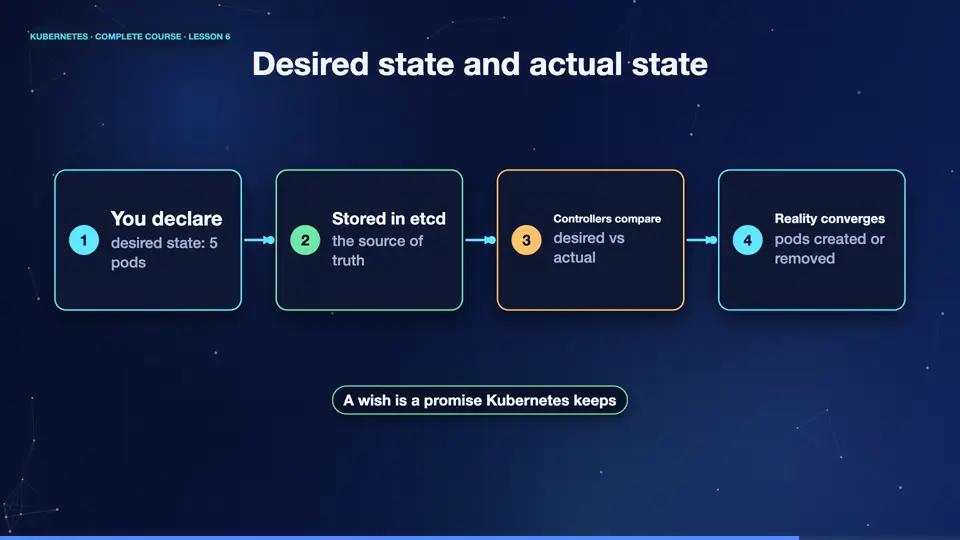
Kubernetes always tracks two things. The desired state, which is what you asked for, and the actual state, which is what really exists. You change the desired state, by sending a description to the A P I server. It is stored in et see dee. Then the controllers compare the two, and act until the actual state matches. If something breaks later, the actual state drifts, and the controllers pull it back. Your wish is a promise that Kubernetes keeps.
- You declaredesired state: 5 pods
- Stored in etcdthe source of truth
- Controllers comparedesired vs actual
- Reality convergespods created or removed
Changing the wish
Let's try it. We declare a deployment with two copies. Now we change the wish, to five copies, with the scale command. We did not start any pod ourselves. We only changed the number. Now watch the list. Three new pods appear, because the actual state had to catch up. And if we change the wish back to one, four pods are removed. The cluster simply follows the wish.
kubectl create deployment demo --image=nginx:1.27 --replicas=2
deployment.apps/demo created
kubectl scale deployment demo --replicas=5
deployment.apps/demo scaled
kubectl get pods
NAME                    READY   STATUS    RESTARTS   AGE
demo-7b497649b5-jtnwd   1/1     Running   0          6s
demo-7b497649b5-mhmx4   1/1     Running   0          6s
demo-7b497649b5-n9swb   1/1     Running   0          15s
demo-7b497649b5-qlkw4   1/1     Running   0          15s
demo-7b497649b5-wqfd5   1/1     Running   0          6s
kubectl scale deployment demo --replicas=1
deployment.apps/demo scaled
kubectl get pods
NAME                    READY   STATUS    RESTARTS   AGE
demo-7b497649b5-mhmx4   1/1     Running   0          12s
Why this model wins
This model has big benefits. Your files describe the whole system, so you can keep them in Git, review them, and share them. You can apply the same file ten times, and the result is the same. You can rebuild an entire environment from files. And because Kubernetes keeps correcting drift, the system heals itself. Almost everything you will learn next, is a new kind of wish you can declare.
Summary
That is the heart of Kubernetes. You declare the desired state, controllers keep working until the actual state matches, forever. With the theory in place, it is time to get our hands dirty. Next, we install the tools and build our own cluster.
Key takeaways- Declarative: describe the end result
- Controllers close the gap forever
- Files in Git become your truth