
Debugging Services
When the network misbehaves.
Sometimes every pod looks healthy, yet the app cannot be reached. The problem is in the connections. Most service problems come from a very small set of mistakes, and a simple checklist finds them. In this lesson, we debug a broken service, step by step.
- Pods healthy, app unreachable
- A small set of usual mistakes
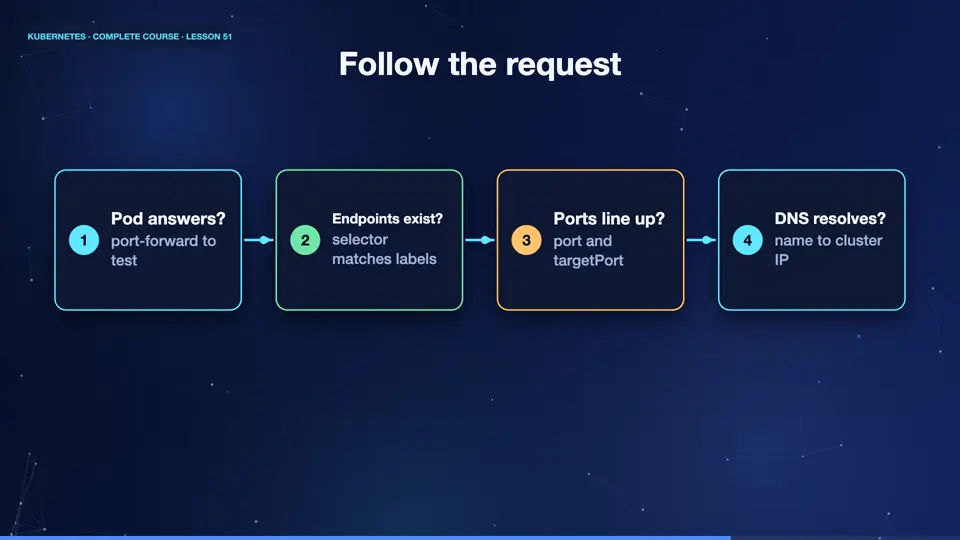
- Follow the path of the request
Follow the request
The trick is to follow the path of a request, and test each hop. Is the pod itself answering? Test it with port forward. Does the service have endpoints? If not, the selector does not match the pod labels. Does the service port, map to the right target port? Does the name resolve, with D N S? And finally, if the traffic comes from outside, is the ingress, or the load balancer, pointing at the right service? Work from the pod outward, and the broken link reveals itself.
- Pod answers?port-forward to test
- Endpoints exist?selector matches labels
- Ports line up?port and targetPort
- DNS resolves?name to cluster IP
A subtle typo
Here is a classic. The deployment labels its pods, app equals web. But the service, below, selects app equals w b e. A typo. Everything looks healthy, the pods run, and the service exists, but the selector matches no pods, so there is nowhere to send traffic.
apiVersion: apps/v1
kind: Deployment
metadata:
  name: web
spec:
  replicas: 2
  selector:
    matchLabels:
      app: web
  template:
    metadata:
      labels:
        app: web
    spec:
      containers:
      - name: web
        image: nginx:1.27
---
apiVersion: v1
kind: Service
metadata:
  name: web
spec:
  selector:
    app: wbe
  ports:
  - port: 80
Empty endpoints
Let's find it. We apply the file. The pods are running. Now describe the service, and look at two lines, selector, and endpoints. The selector says app equals w b e, and the endpoints line is empty. That is the clue. We fix the selector, with a patch. And describe again. Now the endpoints list two pod addresses. A single typo was the whole problem, and the endpoints line told us.
kubectl apply -f broken.yaml
deployment.apps/web created
service/web created
kubectl get pods
NAME                   READY   STATUS    RESTARTS   AGE
web-767d6f4df8-sfzcf   1/1     Running   0          14s
web-767d6f4df8-wlq2t   1/1     Running   0          14s
kubectl describe svc web | grep -E 'Selector|Endpoints'
Selector:                 app=wbe
Endpoints:
kubectl patch svc web -p '{"spec":{"selector":{"app":"web"}}}'
service/web patched
kubectl describe svc web | grep -E 'Selector|Endpoints'
Selector:                 app=web
Endpoints:                10.244.2.178:80,10.244.1.148:80
File used: broken.yaml
apiVersion: apps/v1
kind: Deployment
metadata:
  name: web
spec:
  replicas: 2
  selector:
    matchLabels:
      app: web
  template:
    metadata:
      labels:
        app: web
    spec:
      containers:
      - name: web
        image: nginx:1.27
---
apiVersion: v1
kind: Service
metadata:
  name: web
spec:
  selector:
    app: wbe
  ports:
- port: 80Service debugging checklist
Keep this checklist. If the endpoints are empty, compare the selector with the pod labels, and check that the pods are ready, because pods that fail readiness are removed. If the endpoints exist, but connections fail, check that the target port matches the port the container really listens on. If names do not resolve, test D N S from a debug pod. If only outside access fails, test the ingress, and its controller logs. Always change one thing at a time.
Summary
Wonderful. Following the request path, and checking endpoints, ports, D N S, and ingress, solves most network problems. With debugging in your toolbox, we can build the eyes of the cluster next, monitoring, logging, and alerting.
Key takeaways- Empty endpoints = selector or readiness
- targetPort must match the container
- Test one hop at a time