
Release Strategies
Recreate, blue-green, and canary.
Rolling updates are the default, but they are not the only way to release software. Different apps need different levels of caution. In this lesson, you will learn four strategies, and when to choose each, from the simplest to the most careful.
- Four ways to release
- Speed against safety
- Choose by risk
Recreate and rolling
The simplest strategy is recreate. Stop every old pod, then start the new ones. It is easy to understand, and it guarantees that two versions never run together, which matters for some databases. But users see downtime, between the stop and the start. Rolling update, the default, avoids downtime, by mixing old and new gradually. The cost is that for a short time, both versions serve users at once, so they must be compatible.
Recreate
- Stop all old pods
- Then start all new pods
- Short downtime
- Never two versions together
Rolling update (default)
- Replace pods gradually
- No downtime
- Two versions at once, briefly
- Needs compatible versions
Blue-green releases
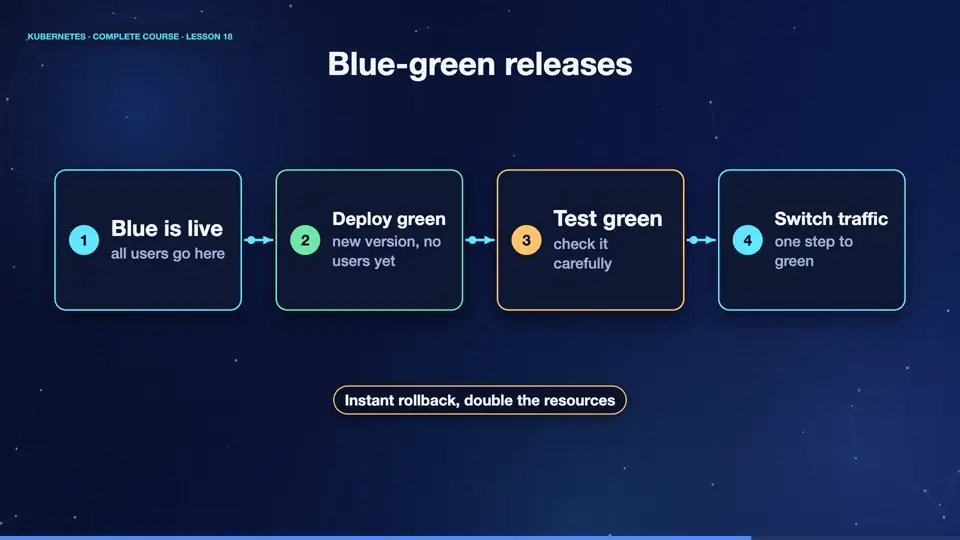
In a blue green release, you run two complete copies of your app. Blue is the live version, serving all users. Green is the new version, running beside it, tested, but receiving no users yet. When you are confident, you switch the traffic from blue to green, in one step. If something is wrong, you switch right back. It gives instant rollback, but needs double the resources, while both exist.
- Blue is liveall users go here
- Deploy greennew version, no users yet
- Test greencheck it carefully
- Switch trafficone step to green
A canary release
A canary release is more careful still. You send a small part of the traffic to the new version first, and watch. Here are two deployments, with the same app label, so one service would send traffic to both. Three stable pods, and one canary pod. So roughly one request in four reaches the new version. The track column shows which is which. If the canary behaves, you increase its share, step by step, until it takes over. If it misbehaves, you delete it, and only a few users were affected.
kubectl apply -f shop.yaml
deployment.apps/shop-stable created
deployment.apps/shop-canary created
kubectl get pods -l app=shop -L track
NAME                           READY   STATUS    RESTARTS   AGE   TRACK
shop-canary-69c9f44f9-v7v4j    1/1     Running   0          14s   canary
shop-stable-6bc69fcdb6-2mdhq   1/1     Running   0          14s   stable
shop-stable-6bc69fcdb6-4f5qh   1/1     Running   0          14s   stable
shop-stable-6bc69fcdb6-qbhrj   1/1     Running   0          14s   stable
File used: shop.yaml
apiVersion: apps/v1
kind: Deployment
metadata:
  name: shop-stable
spec:
  replicas: 3
  selector:
    matchLabels: {app: shop, track: stable}
  template:
    metadata:
      labels: {app: shop, track: stable}
    spec:
      containers:
      - name: web
        image: nginx:1.25
---
apiVersion: apps/v1
kind: Deployment
metadata:
  name: shop-canary
spec:
  replicas: 1
  selector:
    matchLabels: {app: shop, track: canary}
  template:
    metadata:
      labels: {app: shop, track: canary}
    spec:
      containers:
      - name: web
image: nginx:1.27Choosing a strategy
So which one should you choose? Use a rolling update for most apps, because it is simple, and has no downtime. Use recreate, when two versions cannot run together. Use blue green, when you need an instant switch and rollback, and can afford the extra resources. Use a canary, when the change is risky, and you want real users to test it, a little at a time. Specialised tools can automate the traffic shifting for you, and you will meet them later.
| Strategy | Downtime | Extra cost | Best for |
|---|---|---|---|
| Rolling update | none | low | most apps |
| Recreate | short | none | no mixed versions |
| Blue-green | none | double | instant switch |
| Canary | none | small | risky changes |
Summary
Wonderful. You now know four ways to release. Rolling is the default, recreate is simple, blue green switches instantly, and canary tests with a few users first. Next, we connect our pods to the world, with services, because pods come and go, but users need a stable address.
Key takeaways- Rolling: the default
- Blue-green: instant switch
- Canary: test with a few users