
The Pod Network
Every pod gets its own address.
Kubernetes networking can seem like magic. A pod on one machine calls a pod on another, as if they were side by side. Behind that magic are just a few simple rules, and a plugin that follows them. In this lesson, you will learn the rules, and see them working.
- A few simple rules
- One address per pod
- A plugin makes it real
The Kubernetes network rules
Kubernetes demands three things from the network. Every pod gets its own I P address. Every pod can reach every other pod, on any node, using that address, without any address translation. And agents on a node, like the kubelet, can reach all pods on that node. There is no port mapping between pods, as in plain Docker. A pod sees itself with the same address that others use. These rules keep the model simple, for apps.
Who builds the network
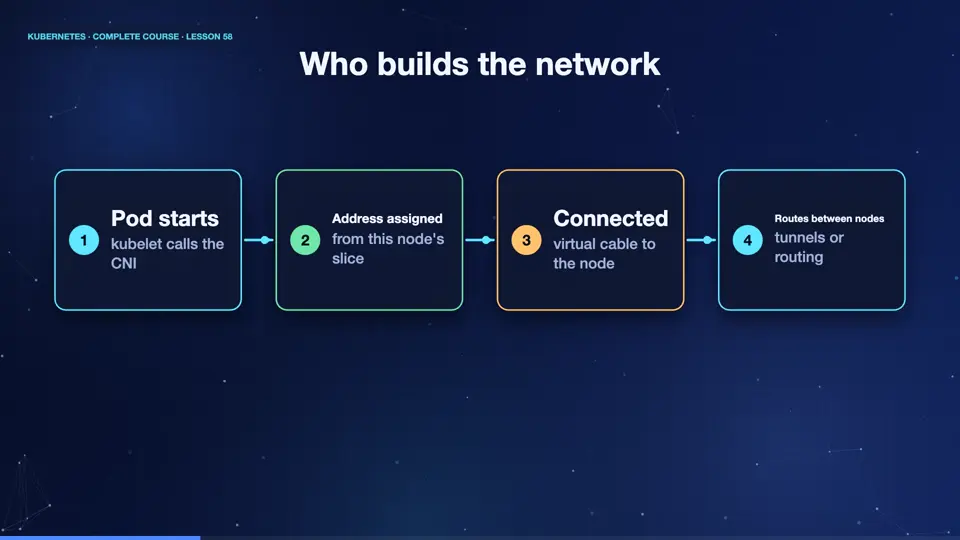
Kubernetes itself does not build this network. A plugin does, following a standard called the C N I, the container network interface. When a pod starts, the kubelet asks the plugin to give it an address, and to connect it. Each node receives a slice of the address space, a pod C I D R. Pods on that node take addresses from the slice. The plugin then makes sure packets find their way between nodes, using tunnels, or routes. Popular plugins are Calico, Cilium, and Flannel.
- Pod startskubelet calls the CNI
- Address assignedfrom this node's slice
- Connectedvirtual cable to the node
- Routes between nodestunnels or routing
Pods talking across nodes
Let's see it. Each node owns a slice, here, ten dot two forty four dot zero, dot one, and dot two, each a slash twenty four. We create two pods, one on each of two different nodes. Their addresses come from the slices of their nodes. Now we ping one from the other. The packets cross from one machine to another, and the answer returns. No special setup by us, just the rules, and the plugin.
kubectl get nodes -o custom-columns=NAME:.metadata.name,PODCIDR:.spec.podCIDR
NAME      PODCIDR
k8s       10.244.0.0/24
k8s-m02   10.244.1.0/24
k8s-m03   10.244.2.0/24
kubectl apply -f pods.yaml
pod/a created
pod/b created
kubectl get pods -o custom-columns=NAME:.metadata.name,IP:.status.podIP,NODE:.spec.nodeName
NAME   IP             NODE
a      10.244.1.157   k8s-m02
b      10.244.2.188   k8s-m03
kubectl exec a -- ping -c 2 $(kubectl get pod b -o jsonpath='{.status.podIP}')
PING 10.244.2.188 (10.244.2.188): 56 data bytes
64 bytes from 10.244.2.188: seq=0 ttl=62 time=1.324 ms
64 bytes from 10.244.2.188: seq=1 ttl=62 time=0.168 ms

--- 10.244.2.188 ping statistics ---
2 packets transmitted, 2 packets received, 0% packet loss
round-trip min/avg/max = 0.168/0.746/1.324 ms
File used: pods.yaml
apiVersion: v1
kind: Pod
metadata:
  name: a
spec:
  nodeName: k8s-m02
  containers:
  - name: app
    image: busybox:1.36
    command: ["sleep", "3600"]
---
apiVersion: v1
kind: Pod
metadata:
  name: b
spec:
  nodeName: k8s-m03
  containers:
  - name: app
    image: busybox:1.36
    command: ["sleep", "3600"]
Summary
Good. Every pod gets its own address, and every pod can reach every other. A C N I plugin builds the network, giving each node a slice of addresses. Next, how a service address, which belongs to no machine, still reaches the right pod.
Key takeaways- One IP per pod, no NAT
- CNI plugin builds the network
- Each node owns a pod CIDR slice