
Common Errors
What the messages mean.
Kubernetes errors look cryptic at first. Pending. Image pull back off. Create container config error. But there are only a handful of common ones, and each has a short list of causes. Learn them once, and most future problems will feel familiar.
- A handful of common errors
- Each has a short list of causes
- Learn them once
Errors and their usual causes
Here is your field guide. Pending means no node could take the pod, so check requests, taints, and selectors. Image pull back off means the image name or tag is wrong, or the registry needs a login. Crash loop back off means the app starts, and then fails, so read the logs. Create container config error means a config map or secret that the pod uses, does not exist. O O M killed means the memory limit was too low. And evicted means the node ran short of resources.
| Status | Usual cause | First check |
|---|---|---|
| Pending | no node fits | describe: events |
| ImagePullBackOff | wrong tag, no login | image name, secret |
| CrashLoopBackOff | app exits with error | logs --previous |
| CreateContainerConfigError | missing ConfigMap or Secret | describe: events |
| OOMKilled | memory limit too low | limits, usage |
| Evicted | node out of resources | kubectl top node |
An image that does not exist
Let's create two common errors on purpose. First, a pod that uses an image tag that does not exist. The status goes to error image pull, and then image pull back off. Describe shows the events. Failed to pull image, not found. The fix is to correct the tag. Second, a pod whose environment comes from a config map, that does not exist. The status says, create container config error, and the event names the missing config map.
kubectl run badimage --image=nginx:no-such-tag
pod/badimage created
kubectl get pod badimage
NAME       READY   STATUS         RESTARTS   AGE
badimage   0/1     ErrImagePull   0          12s
kubectl describe pod badimage | grep -E 'Failed|BackOff' | head -3 | cut -c1-110
  Warning  Failed     10s   kubelet            Failed to pull image "nginx:no-such-tag": Error response from d
  Warning  Failed     10s   kubelet            Error: ErrImagePull
  Normal   BackOff    9s    kubelet            Back-off pulling image "nginx:no-such-tag"
kubectl apply -f cfgerr.yaml
pod/cfgerr created
kubectl get pod cfgerr
NAME     READY   STATUS                       RESTARTS   AGE
cfgerr   0/1     CreateContainerConfigError   0          8s
kubectl describe pod cfgerr | tail -2 | cut -c1-110
  Normal   Pulled     5s (x3 over 7s)  kubelet            Container image "busybox:1.36" already present on ma
  Warning  Failed     5s (x3 over 7s)  kubelet            Error: configmap "missing-config" not found
File used: cfgerr.yaml
apiVersion: v1
kind: Pod
metadata:
  name: cfgerr
spec:
  containers:
  - name: app
    image: busybox:1.36
    command: ["sleep", "3600"]
    env:
    - name: SETTING
      valueFrom:
        configMapKeyRef:
          name: missing-config
key: settingReading a Pending pod
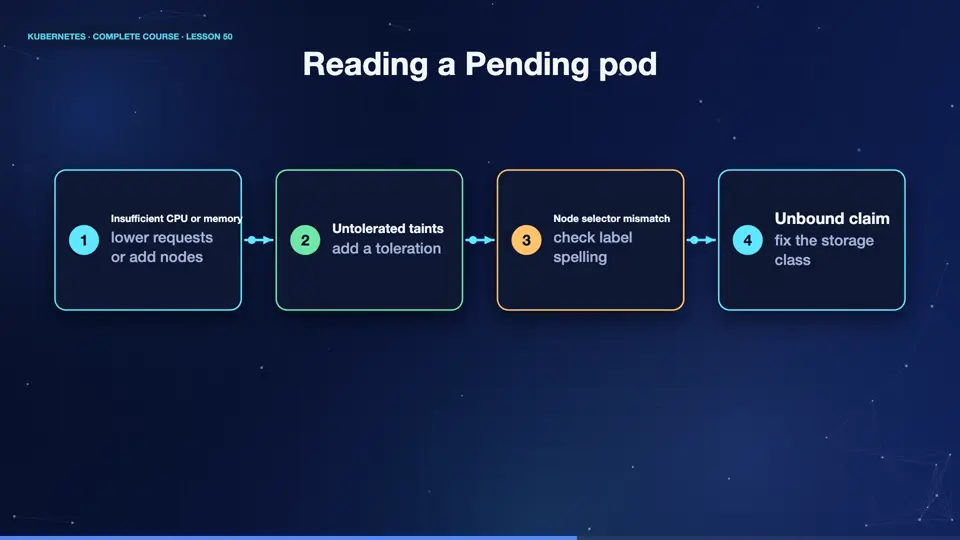
Pending deserves extra attention. The scheduler explains itself in the events. It might say, insufficient C P U, or insufficient memory, so reduce the requests, or add nodes. It might say, nodes had taints that the pod did not tolerate, so add a toleration. Or it might say, no nodes matched the node selector, so check the label spelling. Or a volume claim is not bound. The message tells you which filter removed every node.
- Insufficient CPU or memorylower requests or add nodes
- Untolerated taintsadd a toleration
- Node selector mismatchcheck label spelling
- Unbound claimfix the storage class
Summary
Excellent. You now have a field guide to the common statuses, and what to check first for each. Next, the last area of debugging, when pods are fine, but the network is not, services and connections.
Key takeaways- Pending: scheduling problem
- ImagePullBackOff: image or login
- CrashLoopBackOff: read the logs