
Inside the Control Plane
The brain of Kubernetes.
Every decision in a cluster, where to run a pod, when to restart it, how many copies to keep, is made by the control plane. If you understand its four parts, you understand how Kubernetes thinks. In this lesson, we open the brain, and meet each part by name.
- Four parts make every decision
- Each part has one clear job
- They only talk through the API
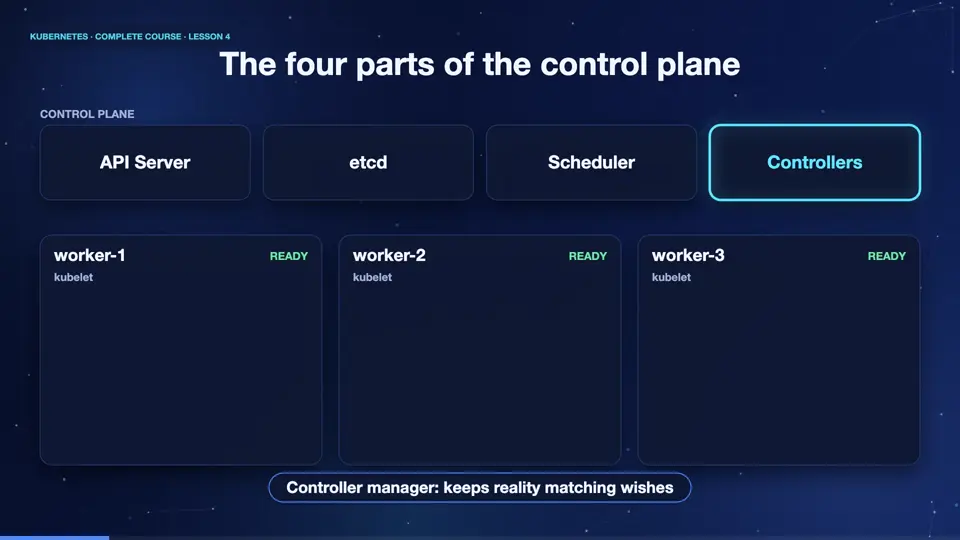
The four parts of the control plane
The control plane has four main parts. First, the A P I server. It is the only door into the cluster. Every command, every tool, and every other component talks to it, and nothing else. Second, et see dee, the memory. It is a small, reliable database that stores the complete state of the cluster, and nothing is real until it is written there. Third, the scheduler, which chooses a node for every new pod. And fourth, the controller manager, which runs many small loops, that keep reality matching your wishes.
The control plane is just pods
Here is something beautiful. In many clusters, the control plane itself runs as pods, in a special area called the kube system namespace. Let's list them. You can see et see dee, the A P I server, the scheduler, and the controller manager, all running. Below them, you see core DNS, which gives names to services, and kube proxy, which appears once on every node. Everything in Kubernetes is an object you can look at, even Kubernetes itself.
kubectl get pods -n kube-system
NAME                          READY   STATUS    RESTARTS      AGE
coredns-66bc5c9577-m52m5      1/1     Running   2 (10m ago)   11m
etcd-k8s                      1/1     Running   0             11m
kindnet-blfp9                 1/1     Running   0             10m
kindnet-glr5z                 1/1     Running   0             11m
kindnet-mrj8p                 1/1     Running   0             11m
kube-apiserver-k8s            1/1     Running   0             11m
kube-controller-manager-k8s   1/1     Running   0             11m
kube-proxy-5c858              1/1     Running   0             11m
kube-proxy-9b87p              1/1     Running   0             11m
kube-proxy-b5dkf              1/1     Running   0             10m
kube-scheduler-k8s            1/1     Running   0             11m
storage-provisioner           1/1     Running   1 (10m ago)   11m
kubectl get nodes
NAME      STATUS   ROLES           AGE   VERSION
k8s       Ready    control-plane   11m   v1.34.0
k8s-m02   Ready    <none>          11m   v1.34.0
k8s-m03   Ready    <none>          10m   v1.34.0
kubectl get --raw /healthz
ok
How the scheduler decides
Let's look closer at the scheduler. When a new pod appears, with no node assigned, the scheduler wakes up. First it filters out every node that cannot run the pod, for example, nodes without enough memory. Then it scores the remaining nodes, preferring the ones with the most free room, and a good spread. It picks the winner, and writes the node name into the pod. That is all it does. It never starts anything itself.
- New podno node assigned yet
- Filterdrop nodes that cannot fit it
- Scorerank the remaining nodes
- Bindwrite the winner on the pod
Controllers: the self-healing loops
Now the heart of Kubernetes, the controllers. A controller is a loop with a simple job. It looks at the desired state, what you asked for. It looks at the actual state, what exists now. If they differ, it acts to close the gap. Then it looks again, forever. There is a controller for deployments, one for nodes, one for jobs, and many more. This idea has a name, the control loop, and it is why Kubernetes feels alive.
- Observewhat is running now
- Comparewith what you asked for
- Actcreate or delete things
- Repeatforever
Summary
Good. The control plane has four parts. The A P I server is the door. Et see dee is the memory. The scheduler chooses nodes. And controllers keep reality matching your wishes. Next, we move to the worker nodes, where your applications actually run.
Key takeaways- API server: the only door
- etcd: the cluster memory
- Scheduler picks, controllers heal