
Services
A stable address for moving pods.
Pods are mortal. They are created, destroyed, and replaced, and every new pod gets a brand new address. So how can anything reliably talk to your app? The answer is a service, one of the most important objects in Kubernetes. In this lesson, you will see what it does, and how.
- Pod addresses keep changing
- A service gives one stable address
- It spreads traffic across pods
The moving address problem
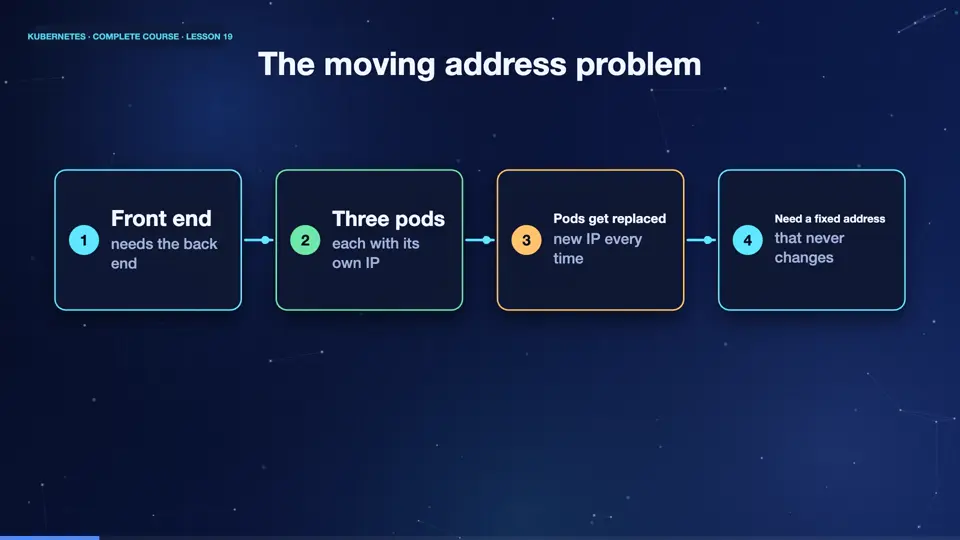
Imagine a front end that needs to talk to a back end. The back end runs as three pods. Each pod has its own I P address. But when a pod is replaced, it gets a new address, and when you scale up, you get more addresses. If the front end memorised an address, it would break within hours. We need something that never changes, in front of the pods that always do.
- Front endneeds the back end
- Three podseach with its own IP
- Pods get replacednew IP every time
- Need a fixed addressthat never changes
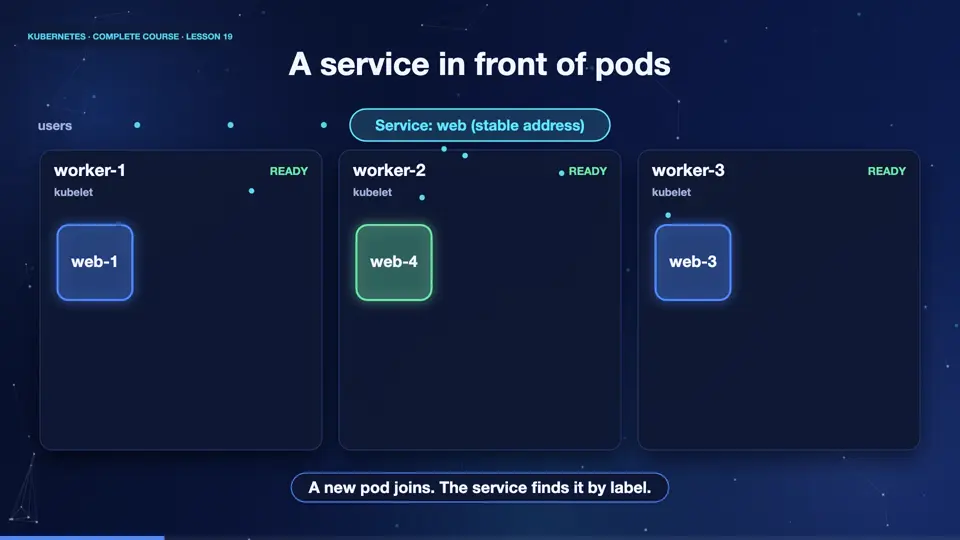
A service in front of pods
A service is exactly that fixed address. It has a stable I P and a name, that live as long as the service exists. It finds its pods using a label selector, the same idea you learned earlier. Requests sent to the service, are spread across all the healthy matching pods. When a pod dies, and a new one appears, the service notices instantly, and updates its list. The users, and the other apps, never see the changes.
A Service in YAML
Here is a service file. The kind is service. The selector says, send traffic to pods with the label app equals web. And ports describes the doors. Port is the port that the service listens on, and target port is the port inside the pod, where the container listens. Here, both are eighty. That is all it takes.
apiVersion: v1
kind: Service
metadata:
  name: web
spec:
  selector:
    app: web
  ports:
  - port: 80
targetPort: 80Calling the service
Let's try it. We apply the deployment, and the service. The service has a cluster I P, a stable address that only works inside the cluster. Under the hood, kubernetes keeps a list of the pod addresses that match, called an endpoint slice. Now, from a client pod, we call the service by its name, and receive the web page. And if we delete one of the pods, look at the endpoints. The list changes by itself, and the service address stays the same.
kubectl apply -f deployment.yaml -f service.yaml
deployment.apps/web created
service/web created
kubectl get svc web
NAME   TYPE        CLUSTER-IP      EXTERNAL-IP   PORT(S)   AGE
web    ClusterIP   10.109.176.58   <none>        80/TCP    14s
kubectl get endpointslices -l kubernetes.io/service-name=web
NAME        ADDRESSTYPE   PORTS   ENDPOINTS                             AGE
web-275mw   IPv4          80      10.244.0.41,10.244.2.77,10.244.1.64   14s
kubectl exec client -- wget -qO- http://web | head -4
<!DOCTYPE html>
<html>
<head>
<title>Welcome to nginx!</title>
kubectl get pods -l app=web -o name | head -1 | xargs kubectl delete
pod "web-f4dd7dd4f-7v9w8" deleted from default namespace
kubectl get endpointslices -l kubernetes.io/service-name=web
NAME        ADDRESSTYPE   PORTS   ENDPOINTS                             AGE
web-275mw   IPv4          80      10.244.0.41,10.244.1.64,10.244.2.78   24s
File used: deployment.yaml
apiVersion: apps/v1
kind: Deployment
metadata:
  name: web
spec:
  replicas: 3
  selector:
    matchLabels:
      app: web
  template:
    metadata:
      labels:
        app: web
    spec:
      containers:
      - name: web
        image: nginx:1.27
        ports:
        - containerPort: 80
File used: service.yaml
apiVersion: v1
kind: Service
metadata:
  name: web
spec:
  selector:
    app: web
  ports:
  - port: 80
    targetPort: 80
Summary
Good. A service gives pods a stable address and a name, finds them by label, and spreads traffic among them. Next, the different kinds of services, and how to reach your app from outside the cluster.
Key takeaways- Service: stable IP and name
- Finds pods by label selector
- Updates as pods come and go