
Logging
What your apps say.
Metrics tell you that something is wrong. Logs tell you why. Every container writes its messages to its output, and Kubernetes captures them. But there is a catch. When a pod is deleted, its logs vanish. In this lesson, you will read logs, and learn how real clusters keep them.
- Metrics say what, logs say why
- Containers write to standard output
- Pod deleted: logs gone
Reading logs
Let's read some logs. We run a web server, with two replicas, and send it a few requests. Logs for one pod show the requests it served. The tail flag limits the output to the last few lines. With a label selector, we read the logs from every pod together, and the prefix flag says which pod wrote each line. And since shows only the last minute. These flags answer most day to day questions.
kubectl apply -f web.yaml
deployment.apps/web created
service/web created
for i in 1 2 3; do kubectl exec caller -- wget -qO- http://web > /dev/null; done
kubectl logs deploy/web --tail=2 | cut -c1-110
10.244.2.183 - - [30/Oct/2026:20:54:32 +0000] "GET / HTTP/1.1" 200 615 "-" "Wget" "-"
10.244.2.183 - - [30/Oct/2026:20:54:33 +0000] "GET / HTTP/1.1" 200 615 "-" "Wget" "-"
Found 2 pods, using pod/web-767d6f4df8-nzxpg
kubectl logs -l app=web --tail=1 --prefix | cut -c1-110
[pod/web-767d6f4df8-nzxpg/web] 10.244.2.183 - - [30/Oct/2026:20:54:33 +0000] "GET / HTTP/1.1" 200 615 "-" "Wge
[pod/web-767d6f4df8-qkcp6/web] 10.244.2.183 - - [30/Oct/2026:20:54:33 +0000] "GET / HTTP/1.1" 200 615 "-" "Wge
kubectl logs deploy/web --since=1m | wc -l
      25
Found 2 pods, using pod/web-767d6f4df8-nzxpg
File used: web.yaml
apiVersion: apps/v1
kind: Deployment
metadata:
  name: web
spec:
  replicas: 2
  selector:
    matchLabels:
      app: web
  template:
    metadata:
      labels:
        app: web
    spec:
      containers:
      - name: web
        image: nginx:1.27
---
apiVersion: v1
kind: Service
metadata:
  name: web
spec:
  selector:
    app: web
  ports:
  - port: 80
Keeping logs for real
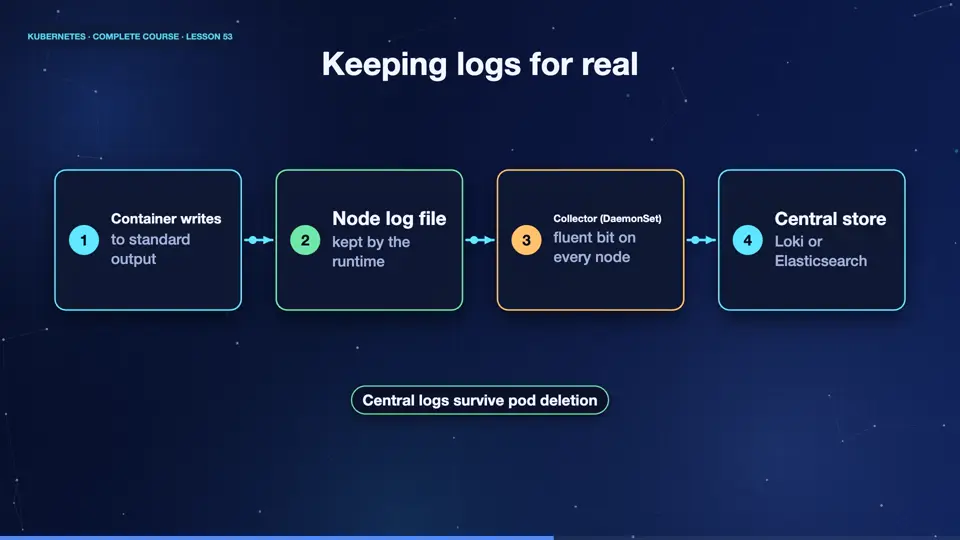
In production, you do not rely on kube control logs. A log collector runs on every node, as a daemon set, the pattern you learned earlier. Tools like fluent bit read the container log files, add the pod name, and the namespace, and ship them to a central store, such as Loki, or Elasticsearch. There, you can search across all pods, over weeks. Even if a pod is long gone, its logs remain.
- Container writesto standard output
- Node log filekept by the runtime
- Collector (DaemonSet)fluent bit on every node
- Central storeLoki or Elasticsearch
Good logging habits
A few habits make logs far more useful. Write to standard output, not to files inside the container. Use structured logs, such as J S O N, so they can be searched by field. Include a request identifier, so you can follow one request across services. Never log passwords, tokens, or personal data. And choose sensible levels, so that errors stand out from routine messages.
Summary
Wonderful. Kube control logs is for quick looks, a collector and a central store are for production. Write structured logs to standard output. Next, the remaining pieces, events, dashboards, and sensible alerts.
Key takeaways- kubectl logs: --tail, -l, --since
- Collector DaemonSet + central store
- Structured logs to stdout