
Persistent Volumes
Data that survives pods.
For a database, you need storage that lives on, even if the pod, or the whole node, is gone. Kubernetes handles this with two objects, that work as a pair. One describes the storage that exists, the other asks for some. In this lesson, you will learn how they fit together.
- Storage that outlives pods
- One object offers storage
- Another one asks for it
Volume and claim
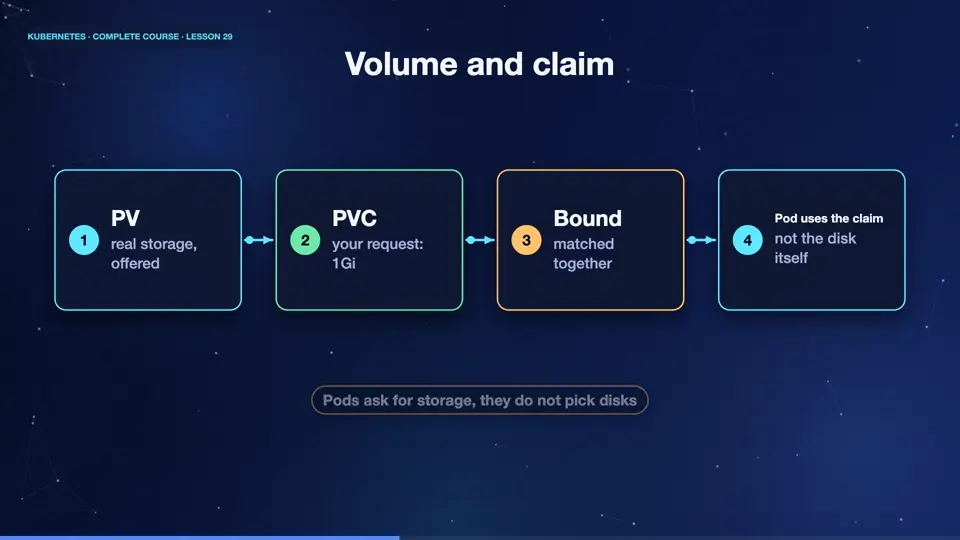
Here are the two objects. A persistent volume, or P V, is a piece of real storage in the cluster, like a disk. An administrator, or an automatic system, creates it. A persistent volume claim, or P V C, is a request from a user, I need one gigabyte, that one node can write to. Kubernetes matches the claim to a suitable volume, and binds them together. The pod then uses the claim, and never needs to know where the disk really is. It is like renting an apartment, without caring who owns the building.
- PVreal storage, offered
- PVCyour request: 1Gi
- Boundmatched together
- Pod uses the claimnot the disk itself
A claim for one gigabyte
This is a claim. The access mode, read write once, means one node at a time can write. Other modes allow many readers, or many writers, depending on the storage. And under resources, we request one gigabyte. That is the entire request. It does not say which disk, or which server. We describe the need, and Kubernetes finds the storage.
apiVersion: v1
kind: PersistentVolumeClaim
metadata:
  name: data-claim
spec:
  accessModes:
  - ReadWriteOnce
  resources:
    requests:
      storage: 1Gi
Claim, mount, survive
Let's try it. We apply the claim, and it becomes bound, to a volume that was created for us automatically. Next, a pod mounts the claim at slash data, and writes a note into it. Now we delete the pod, completely. And create a new pod, with the same claim. The note is still there. The pod was replaced, but the data lived on. That is what persistent means.
kubectl apply -f claim.yaml
persistentvolumeclaim/data-claim created
kubectl get pvc -o custom-columns=NAME:.metadata.name,STATUS:.status.phase,SIZE:.status.capacity.storage
NAME         STATUS   SIZE
data-claim   Bound    1Gi
kubectl apply -f pod.yaml
pod/writer created
kubectl exec writer -- sh -c 'echo hello from storage > /data/note.txt'
kubectl delete pod writer --now
pod "writer" deleted from default namespace
kubectl apply -f pod.yaml
pod/writer created
kubectl exec writer -- cat /data/note.txt
hello from storage
File used: claim.yaml
apiVersion: v1
kind: PersistentVolumeClaim
metadata:
  name: data-claim
spec:
  accessModes:
  - ReadWriteOnce
  resources:
    requests:
      storage: 1Gi
File used: pod.yaml
apiVersion: v1
kind: Pod
metadata:
  name: writer
spec:
  containers:
  - name: app
    image: busybox:1.36
    command: ["sleep", "3600"]
    volumeMounts:
    - name: data
      mountPath: /data
  volumes:
  - name: data
    persistentVolumeClaim:
claimName: data-claimAccess modes and reclaim policy
Two more settings matter. Access modes say who can use the volume. Read write once, one node can read and write. Read only many, many nodes can read. Read write many, many nodes can write, which needs special storage. And the reclaim policy says what happens when the claim is deleted. Delete removes the data, and the disk. Retain keeps them for an administrator to inspect. For important data, retain is the careful choice.
| Setting | Value | Meaning |
|---|---|---|
| accessMode | ReadWriteOnce | one node reads and writes |
| accessMode | ReadOnlyMany | many nodes can read |
| accessMode | ReadWriteMany | many nodes can write |
| reclaim | Delete | remove data with the claim |
| reclaim | Retain | keep data for an admin |
Summary
Excellent. A persistent volume is real storage, a claim is a request for it, and Kubernetes binds them. Pods use the claim, so data survives when pods are replaced. Next, how the volumes get created automatically, with storage classes.
Key takeaways- PV: storage, PVC: the request
- Bound pairs survive pod deletion
- Reclaim policy: Delete or Retain