
Tool Use
Letting the model take action.
A language model, on its own, can only produce text. It cannot check the weather, send an email, or do exact arithmetic. But give it tools, and it can. In this lesson, you will learn how tool use, also called function calling, turns a talker into a doer.
- A model alone only produces text
- Tools let it act
- Function calling, explained
How function calling works
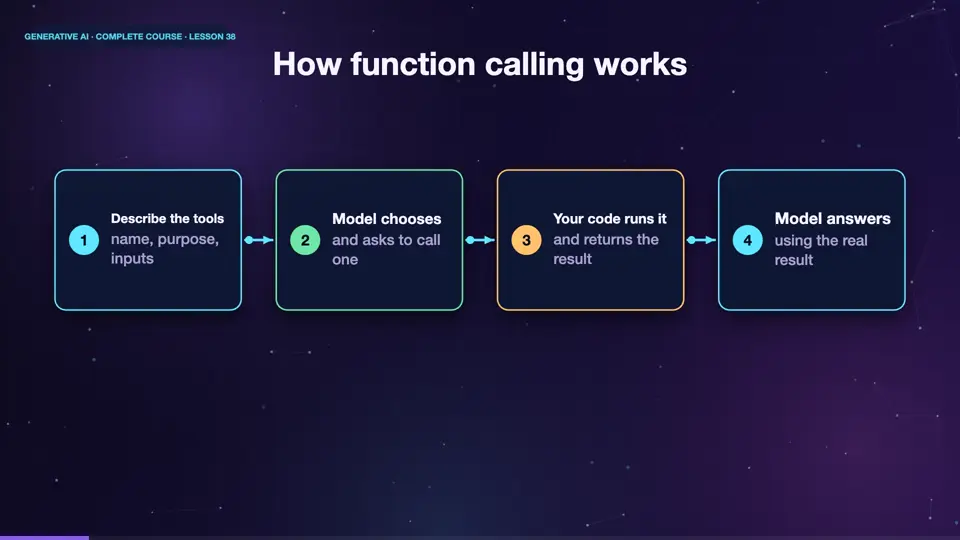
Here is the idea. You describe your tools to the model, each with a name, a purpose, and the inputs it needs. When the user asks something, the model decides whether a tool is needed. If so, it does not answer in words. It replies with a request, call the weather tool, with the city Paris. Your program runs the tool, and sends the result back. The model then writes the final answer, using that result. The model asks, your code acts.
- Describe the toolsname, purpose, inputs
- Model choosesand asks to call one
- Your code runs itand returns the result
- Model answersusing the real result
A tool description
This is how a tool is described. A name, get weather. A description, in plain words, that tells the model when to use it. And the inputs, here a single text field, called city. The description matters a lot, because it is what the model reads, to decide whether the tool fits the question. Write it as clearly as you would, for a new colleague.
tools = [{
    "type": "function",
    "function": {
        "name": "get_weather",
        "description": "Get the current weather for a city.",
        "parameters": {
            "type": "object",
            "properties": {"city": {"type": "string"}},
            "required": ["city"],
        },
    },
}]
A tool call in action
Watch the flow. The user asks, what is the weather in Paris? The model does not guess. It decides to call the weather tool, with Paris. Your program fetches the real temperature, and returns it. The model then replies, it is eighteen degrees, and partly cloudy in Paris. The answer is based on live data, not on memory.
Tools you can give a model
Almost anything with a program behind it can be a tool. A calculator, for exact maths. A search engine, for fresh facts. A database query, for your own records. An email sender, a calendar, a code runner, a file reader. Each tool extends what the model can do. But each also brings risk, so give a model only the tools it needs, and ask for human approval, before actions that cannot be undone.
Summary
Good. With function calling, the model chooses a tool, your code runs it, and the model uses the result. Describe tools clearly, give only the tools needed, and ask for approval before risky actions. Next, we combine tools into a loop, and meet the agent.
Key takeaways- Model asks, your code acts
- Clear tool descriptions matter
- Limit tools, approve risky actions