
APIs and Messages
How software talks to a language model.
So far, you have used A I through a chat window. Now we step behind the curtain. Every chat app, talks to a model through an A P I, a way for one program to ask another program for help. In this lesson, you will learn how that conversation works, and you will see it is not complicated.
- Behind every chat window is an API
- A program asks, the model answers
- Simpler than you think
Request and response
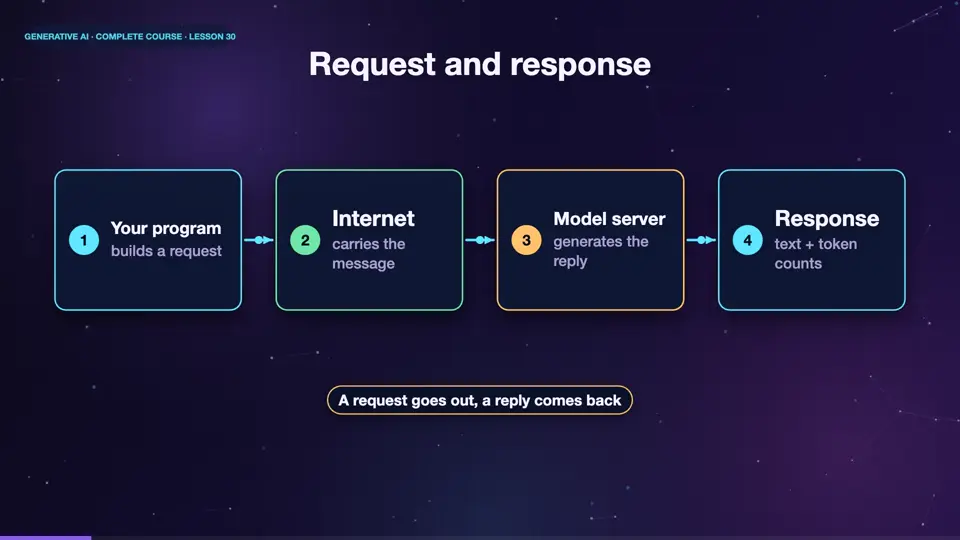
An A P I works like a restaurant. Your program is the customer, and the model is the kitchen. Your program sends a request, over the internet, that says, here is my conversation, please reply. The model's server does the work, and sends back a response, containing the reply text, and some details, like how many tokens were used. All you need is an address, a key to prove who you are, and a message.
- Your programbuilds a request
- Internetcarries the message
- Model servergenerates the reply
- Responsetext + token counts
The three message roles
The conversation is a list of messages, and each has a role. The system message sets the rules, for example, you are a friendly cooking assistant. User messages are what the person says. Assistant messages are what the model said earlier. Because the model has no memory between requests, your program must send the whole list every time. That is how a conversation feels continuous.
- systemsets behaviour and rules
- userwhat the person says
- assistantwhat the model said before
- userthe new question
A request in code
Here is what a request looks like, in Python. We create a client, and call the chat method. We pass the name of a model, and a list of messages. A system message, and a user message. The reply comes back, as an object. We print the text from the first choice. The exact names differ between providers, but this shape is almost universal.
from openai import OpenAI

client = OpenAI()   # reads your API key from the environment

reply = client.chat.completions.create(
    model="gpt-4o-mini",
    messages=[
        {"role": "system", "content": "You are a friendly cooking assistant."},
        {"role": "user", "content": "Give me a 3-step pasta recipe."},
    ],
    temperature=0.7,
)
print(reply.choices[0].message.content)Keep your API key secret
One rule above all. Your A P I key is like a password, and like a credit card. Anyone who has it can spend your money. Never put it in your code. Never post it online, or share it in a screenshot. Store it in an environment variable, or a secrets manager. And if you ever leak a key, revoke it at once, and create a new one.
Summary
Good. An A P I lets your program send messages to a model, and get a reply. Messages have roles, system, user, and assistant, and you send the whole conversation each time. And guard your key. Next, we use this to build a small chatbot, that remembers the conversation.
Key takeaways- API = program-to-program request
- Roles: system, user, assistant
- Keep the API key secret