
Choosing AI Tools
A practical buyer's guide.
New A I tools appear every week. How do you choose, without wasting time, or money? In this lesson, you will get a simple method, and a set of questions, that cut through the marketing.
- Too many tools
- A simple method to choose
- Questions that cut through marketing
Six questions before you choose
Ask six questions. What exact job do I need done? How good is it, on my own examples? What does it cost, at my real usage? Where does my data go, and is it used for training? Can I export my work, and leave? And who is responsible, when it makes a mistake? A tool that answers all six well, is a safe bet.
Match the tool to the job
Different jobs suit different tools. For general questions and writing, a chat assistant. For code, an assistant built into your editor. For pictures, an image generator, and for audio, a speech or music tool. For answers from your own documents, a retrieval tool. For private, offline work, a local model. And for repetitive workflows, an automation tool, with an A I step inside.
| Job | Kind of tool |
|---|---|
| Questions and writing | chat assistant |
| Programming | coding assistant in your editor |
| Pictures and design | image generator |
| Answers from your documents | retrieval or RAG tool |
| Private and offline | a local model |
| Repetitive workflows | automation with an AI step |
A two-week trial
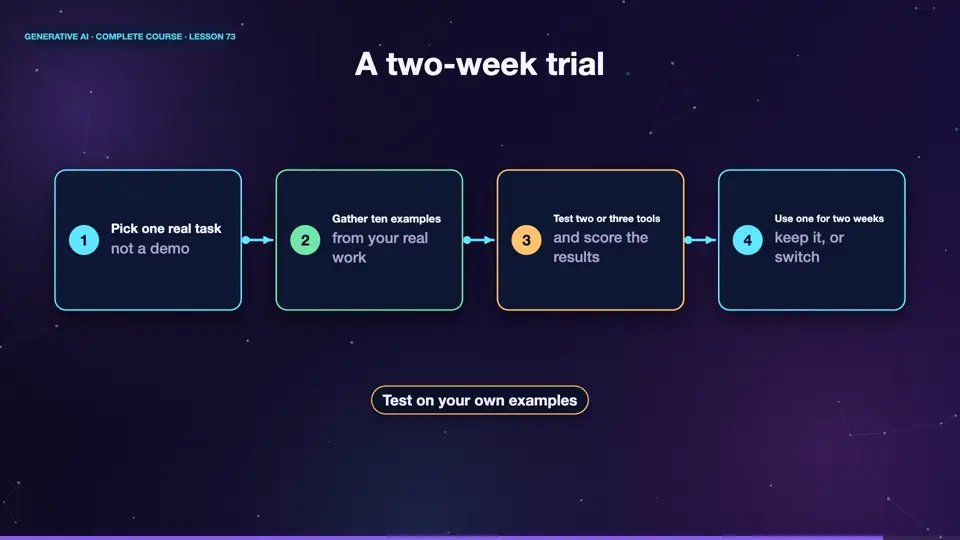
Here is a low risk way to decide. Pick your real task. Gather ten real examples. Try two or three tools on all ten, and score the results, with the scorecard from earlier. Check the cost, and the privacy terms. Then choose one, and use it for two weeks, in real work. If it saves time, and you trust its output, keep it. If not, switch, without regret.
- Pick one real tasknot a demo
- Gather ten examplesfrom your real work
- Test two or three toolsand score the results
- Use one for two weekskeep it, or switch
Summary
Good. Ask six questions before choosing, match the tool to the job, and run a short trial on your own examples. Tools will keep changing, but this method will not. Next, our last clip of ideas, ten mini projects, that you can start this week.
Key takeaways- Six questions before you choose
- Match the tool to the job
- Trial on your own examples