
Monitoring AI in Production
Keeping systems healthy.
Launching an A I app is only the beginning. Models change, users surprise you, and quality can quietly slip. In this lesson, you will learn what to watch, how to collect feedback, and how to improve safely.
- Launch is only the beginning
- What to watch
- Improve safely
What to monitor
Watch several things. Quality, are answers correct, and helpful? Safety, are there harmful, or private outputs? Cost, tokens used, and spending per day. Speed, how long users wait. And errors, failed calls, and timeouts. Build a simple dashboard, with these numbers, and check it often.
The improvement loop
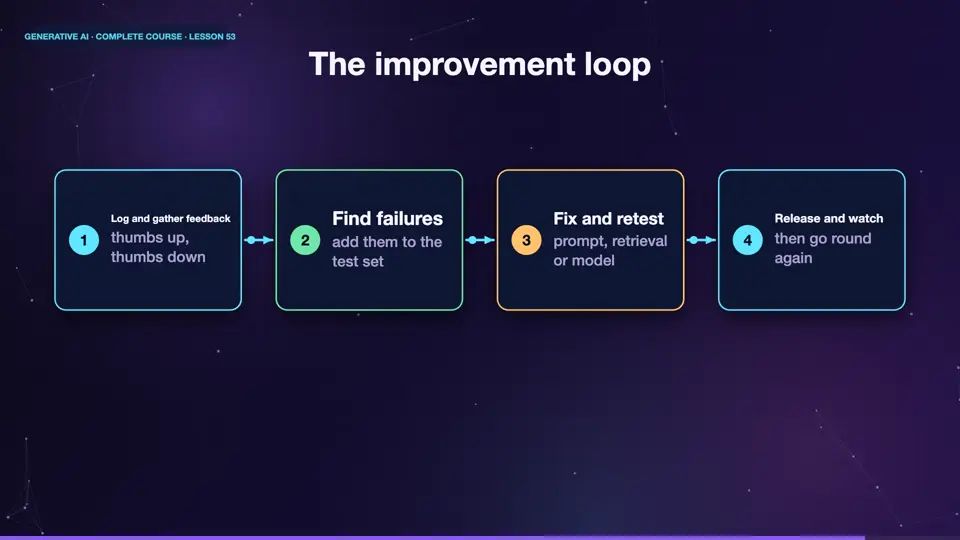
A healthy system improves, in a loop. Log real conversations, with privacy protected. Collect feedback, like thumbs up and thumbs down. Find the failures, and add them to your test set. Fix the prompt, the retrieval, or the model. Run the whole test set again, to be sure nothing else broke. Then release, and watch. Measure, learn, improve.
- Log and gather feedbackthumbs up, thumbs down
- Find failuresadd them to the test set
- Fix and retestprompt, retrieval or model
- Release and watchthen go round again
Plan for change
One more warning. Providers update their models. A prompt that worked perfectly last month, may behave differently today. So pin a specific model version, where you can. Keep your test set, and run it, before switching versions. And keep a fallback plan, such as a second model, in case a service goes down.
Without a plan
- A silent model update changes results
- No tests to catch it
- A single point of failure
With a plan
- Pin the model version
- Run your test set before switching
- Keep a fallback model ready
Summary
Well done. Monitor quality, safety, cost, speed, and errors. Turn every failure into a test, and improve in a loop. Pin versions, and keep a fallback. That completes our section on customising, and running A I. Next, the most important section of all, using A I responsibly.
Key takeaways- Watch quality, safety, cost, speed, errors
- Every failure becomes a test
- Pin versions, keep a fallback