
Misinformation and Deepfakes
Telling real from synthetic.
It has never been easier to create a convincing fake, a photo, a voice, or a video. That brings creative joy, and also serious danger. In this lesson, you will learn the main risks, and practical habits to protect yourself, and others.
- Convincing fakes are easy now
- Creative joy, and serious danger
- Habits that protect you
The main risks
Several risks stand out. Fake news, written at scale, that looks credible. Deepfake videos, that put words in someone's mouth. Cloned voices, used in phone scams. Fake reviews, and fake profiles, that manipulate opinion. And the quieter problem, that when anything can be fake, people start to doubt things that are real.
Habits to protect yourself
Build a few habits. Pause before sharing something shocking. Check where it came from, and whether trusted sources report it. Look closely for odd details, like strange hands, or mismatched shadows. Be careful with urgent calls asking for money, even if the voice sounds familiar. Agree a family code word, for emergencies. And search for the original, with a reverse image search.
Tools for provenance
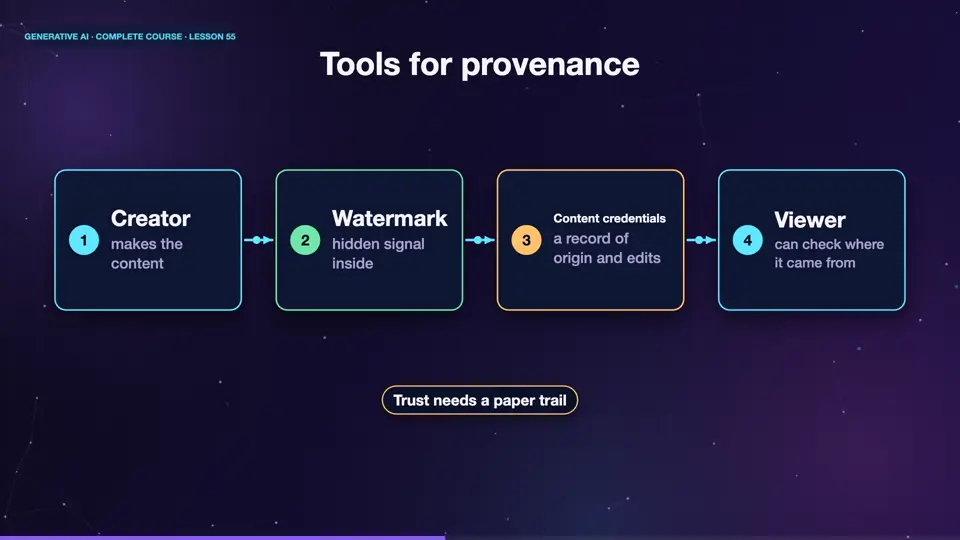
Technology is also fighting back. Watermarks can be hidden inside A I generated images, and audio, so that detectors can spot them. A standard called content credentials, attaches a record of where an image came from, and how it was edited. Neither is perfect, but together they help build trust, in what we see, and hear.
- Creatormakes the content
- Watermarkhidden signal inside
- Content credentialsa record of origin and edits
- Viewercan check where it came from
Summary
Good. Fakes are easy, so risks are real. Pause, check the source, look for odd details, and be careful with urgent requests. Watermarks, and content credentials are helping build trust. Next, security, how people attack A I systems, and how to defend them.
Key takeaways- Pause, check the source, look closer
- Be careful with urgent money requests
- Watermarks and credentials help