
What Happens When You Visit a Website
One click, many steps.
You type a shop's address and press enter. Less than a second later, the page appears. In that second, at least five different systems worked together. Let's walk through them.
- You press enter
- Under a second later
- Many systems worked together
From address to page
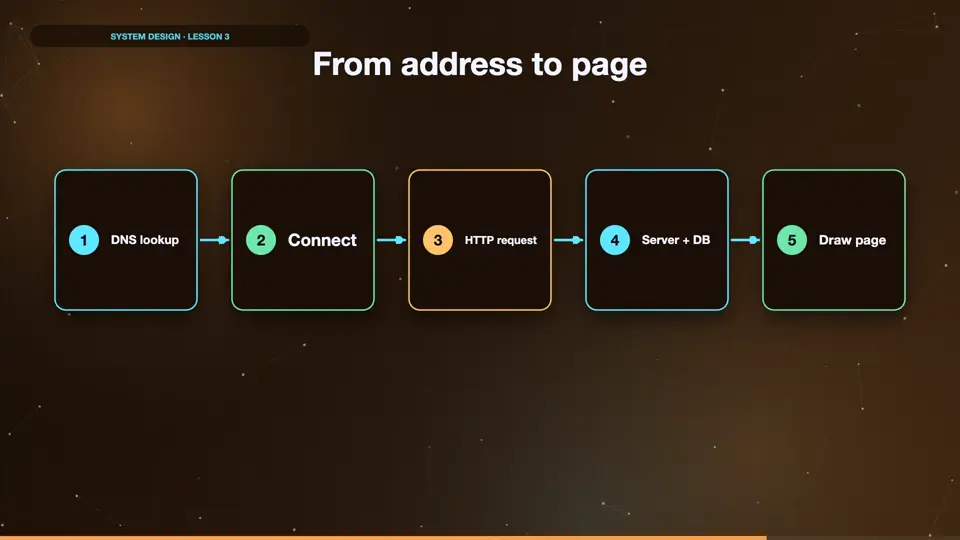
First, DNS turns the name, like shop dot com, into an IP address, the server's number on the internet. Then your browser opens a connection to that address. It sends an HTTP request. The server builds the page, often asking a database. And the response comes back, and the browser draws it.
- DNS lookup
- Connect
- HTTP request
- Server + DB
- Draw page
The words to remember
Let's pin down the words. DNS is the internet's phone book. An IP address is a machine's number. HTTP is the language browsers and servers speak. And latency is the time each step takes. Every design in this course speeds up, or protects, one of these steps.
| key | value |
|---|---|
| DNS | name to address |
| IP address | a machine's number |
| HTTP | request and response |
| Latency | time each step takes |
Summary
One click goes through DNS, a connection, an HTTP request, the server, and the database. Next, two numbers that describe how fast a system is. Latency and throughput.
Key takeaways- DNS finds the server
- HTTP carries the request
- Each step adds latency