
DNS Deep Dive
The internet's phone book.
Computers find each other by number, called an IP address. People prefer names, like shoply dot com. DNS, the Domain Name System, turns names into numbers, billions of times a day.
- Computers use numbers
- People use names
- DNS translates
Resolving a name
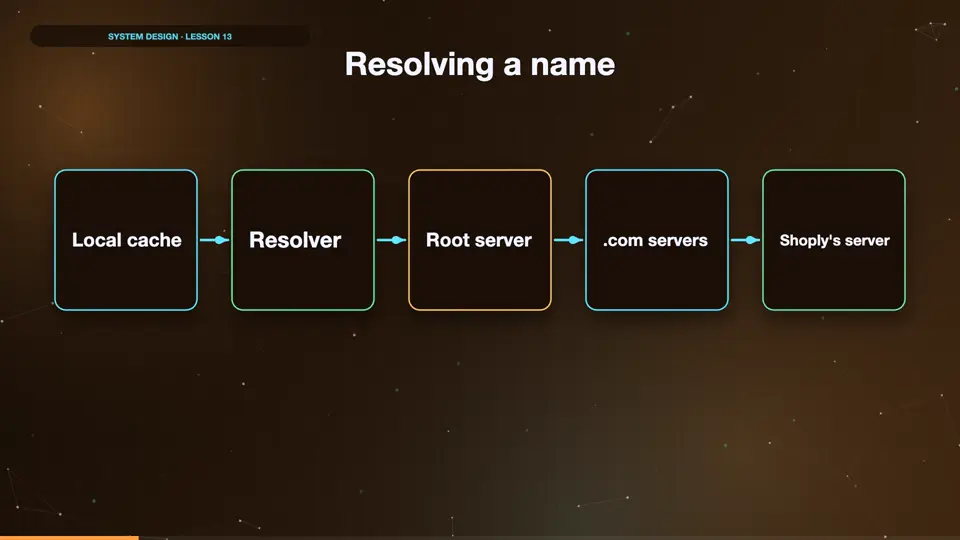
When you type shoply dot com, your computer first checks its own cache. If the answer isn't there, it asks a resolver, usually run by your internet provider. The resolver asks a root server, which points to the dot com servers. Those point to Shoply's own name server, which finally gives the IP address.
- Local cache
- Resolver
- Root server
- .com servers
- Shoply's server
Asking DNS from Python
Python can ask DNS too. Get address info returns the addresses for a name. Here we look up localhost, which every computer knows, so this works anywhere. Run it. Localhost maps to one two seven dot zero dot zero dot one, the address that always means this machine.
import socket

name = "localhost"
infos = socket.getaddrinfo(name, 80, socket.AF_INET, socket.SOCK_STREAM)
for family, kind, proto, canon, (ip, port) in infos:
print(f"{name} -> {ip}")localhost -> 127.0.0.1
DNS in system design
DNS matters in design, for three reasons. Answers are cached for a time called the TTL, so changes take a while to spread. DNS can return different addresses to different users, sending them to the nearest data centre. And if DNS is down, nobody can find you, so it must be very reliable.
| key | value |
|---|---|
| TTL | how long answers are cached |
| Geo DNS | nearest data centre |
| Round-robin | several addresses |
| Critical | if it fails, nobody finds you |
Summary
DNS turns names into IP addresses, through a chain of servers, with caching at every step. Next, the language browsers and servers speak. HTTP.
Key takeaways- Names to numbers
- Cached with a TTL
- Can route to the nearest site