
Failover
Switching to the backup.
Having a backup is only half the job. When the main server fails, something must notice, and switch traffic to the backup. That switch is called failover.
- A backup exists
- Something must notice
- And switch
Active-passive vs active-active
There are two common setups. In active passive, one server does all the work, and a standby waits. When the active one fails, the standby takes over. In active active, both servers handle traffic all the time. If one fails, the other simply takes all of it. It uses resources better, but needs both to handle the full load.
Active-passive
- One works, one waitsSimpleStandby is idle
Active-active
- Both serve trafficNothing idleEach must handle all
A database failover
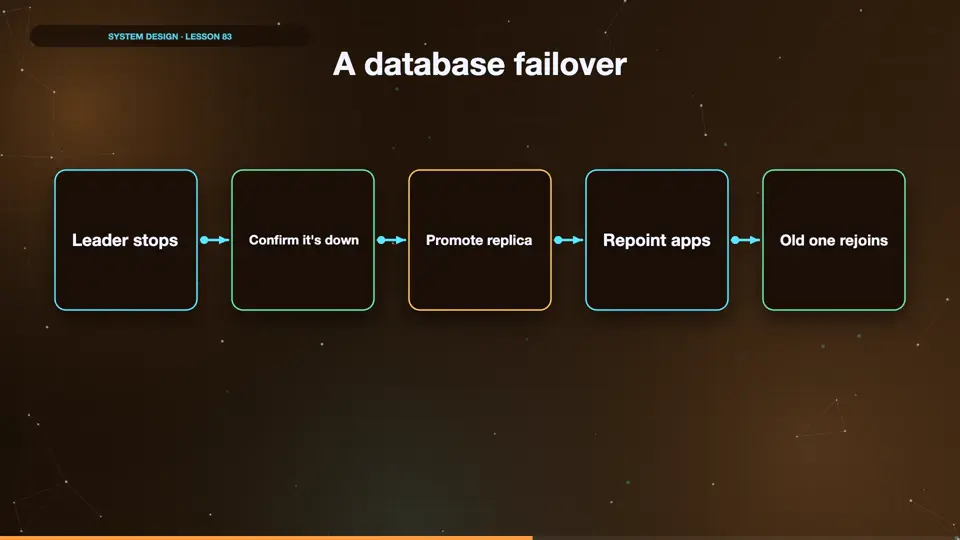
Here's a database failover. The leader stops answering health checks. The system waits a few seconds, to make sure it's really down. A replica is promoted to be the new leader. Apps are pointed to the new address. And when the old leader returns, it rejoins as a follower, not a second leader.
- Leader stops
- Confirm it's down
- Promote replica
- Repoint apps
- Old one rejoins
Summary
Failover switches traffic to a backup when the main part fails. Active passive keeps a standby, active active shares the load. Next, planning for the really big disasters.
Key takeaways- Detect
- Promote
- Repoint