
Object Storage
Files and photos.
Shoply's product photos don't belong in the database. Databases are built for small, structured rows, not megabytes of image data. Big files go into object storage.
- Photos aren't rows
- Databases want small data
- Use object storage
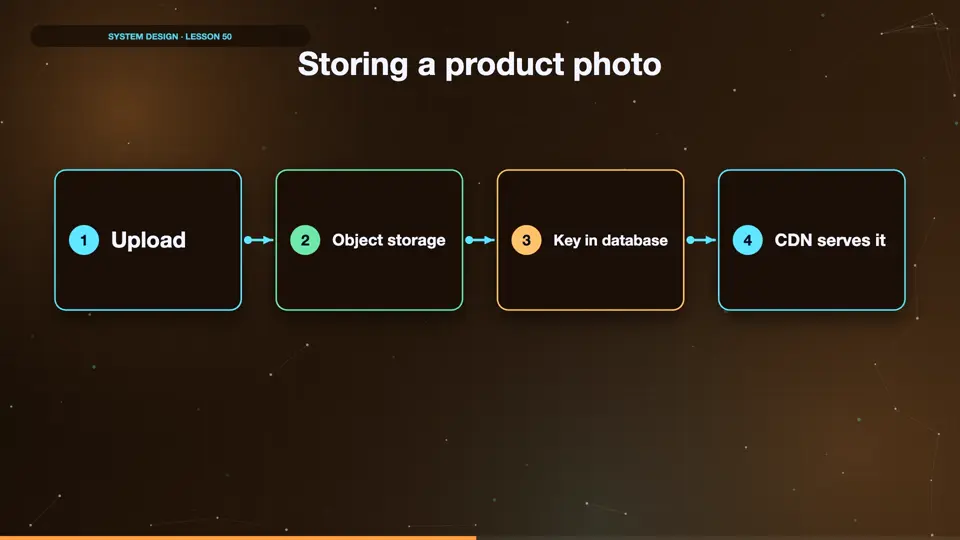
Storing a product photo
Here's the usual pattern. The seller uploads a photo. The app stores the file in object storage, like Amazon S three, under a unique key. The database stores only that key, plus details like the size. And a CDN serves the photo to customers around the world.
- Upload
- Object storage
- Key in database
- CDN serves it
Why object storage
Object storage is built for this job. It's cheap per gigabyte. It's practically unlimited. It keeps several copies of every file, so it's extremely durable. And it works over plain HTTP. What it doesn't do is edit files in place. You replace the whole object.
| key | value |
|---|---|
| Cheap | pennies per GB |
| Unlimited | no disks to manage |
| Durable | many copies |
| Whole objects | replace, don't edit |
Summary
Big files go into object storage, the database keeps just their keys, and a CDN delivers them. Next, how search boxes find words so fast.
Key takeaways- Files in object storage
- Keys in the database
- CDN in front