
Practice: Design a Pastebin
Your turn.
Your turn. Design a pastebin, a site where people paste text, and get a link to share it. Like a URL shortener, but storing the text itself. Pause the video, and work through the four steps on your own.
- Paste text, get a link
- Like a shortener
- Pause and try
Requirements and estimates
Here's one answer. Users paste up to one megabyte of text, get a short link, and pastes can expire. Reads are fast and highly available. Estimates, one million new pastes a day, ten reads each, and an average paste of ten kilobytes. That's about ten gigabytes a day, and under four terabytes a year.
| key | value |
|---|---|
| Paste | up to 1 MB, optional expiry |
| Traffic | 1M writes, 10M reads a day |
| Average paste | 10 KB |
| Storage | ~10 GB a day |
One possible design
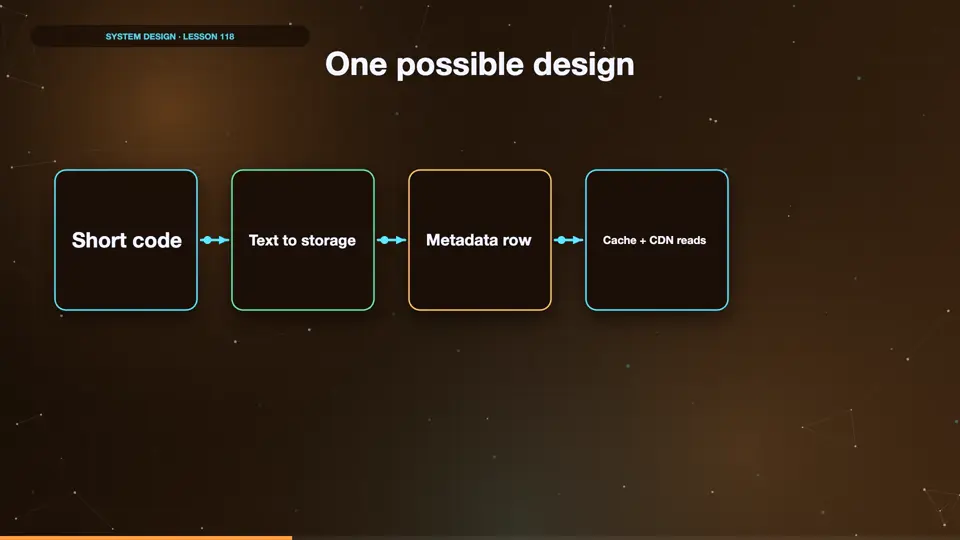
The design reuses what we know. The API server makes a short code from a unique ID. The text goes into object storage, because it can be large. A small database row stores the code, the storage key, and the expiry date. Reads check a cache first, and popular pastes are served from a CDN. A daily job deletes expired pastes.
- Short code
- Text to storage
- Metadata row
- Cache + CDN reads
- Expiry job
Summary
A pastebin combines short codes, object storage, metadata in a database, caching, and a cleanup job. If you got close, you're thinking like a system designer. Next, the whole course on one page.
Key takeaways- Short codes
- Text in object storage
- Cache, CDN, cleanup