
Chat App: Delivery
Online and offline.
Every online user keeps a WebSocket open to a chat server. With millions online, there are hundreds of chat servers. So when Sam messages Priya, how does the message find Priya's connection?
- WebSockets to chat servers
- Hundreds of servers
- Find Priya's connection
Sending a message
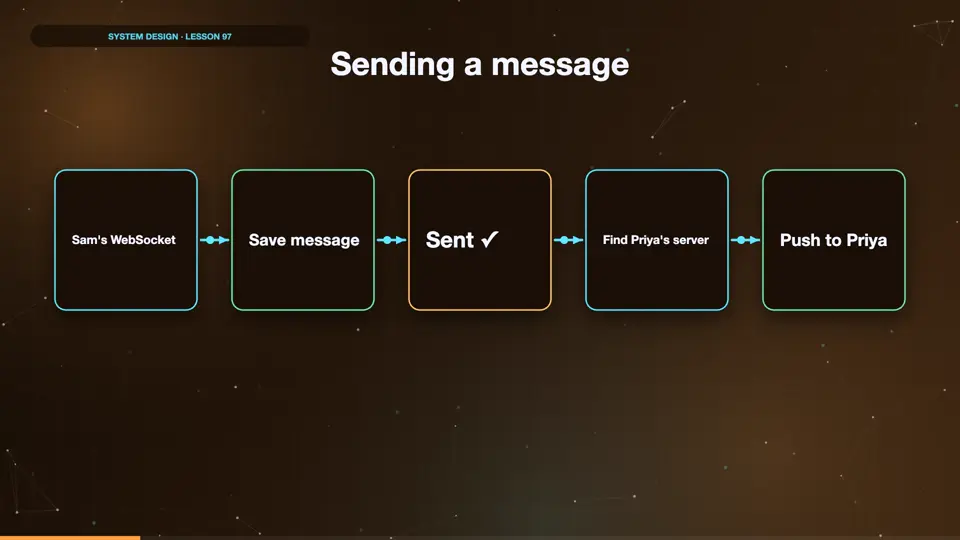
Sam's app sends the message over its WebSocket to chat server one. The server saves it to the message store first, so it's never lost, and tells Sam it's sent. Then it looks up Priya in a presence service, which knows that Priya is connected to chat server seven. Server seven pushes the message down Priya's WebSocket.
- Sam's WebSocket
- Save message
- Sent ✓
- Find Priya's server
- Push to Priya
Online vs offline
If Priya is online, the message arrives in milliseconds, and her app sends back a delivered receipt. If she's offline, the message waits in the store. A push notification is sent to her phone. And when her app reconnects, it asks for every message after the last one it has, and catches up.
Priya online
- Pushed instantlyDelivered receiptThen read receipt
Priya offline
- Waits in the storePush notificationSyncs on reconnect
Summary
Chat messages are saved first, then routed through a presence service to the receiver's server. Offline users get a notification, and sync when they reconnect. Next, storing messages and handling groups.
Key takeaways- Save first
- Presence finds the server
- Sync on reconnect