
Notification System
Email, SMS, push.
Shoply needs to send notifications. Order confirmed emails, delivery text messages, and phone push alerts. Millions a day, through several outside providers, without spamming anyone.
- Email, SMS, push
- Millions a day
- No spam
The notification pipeline
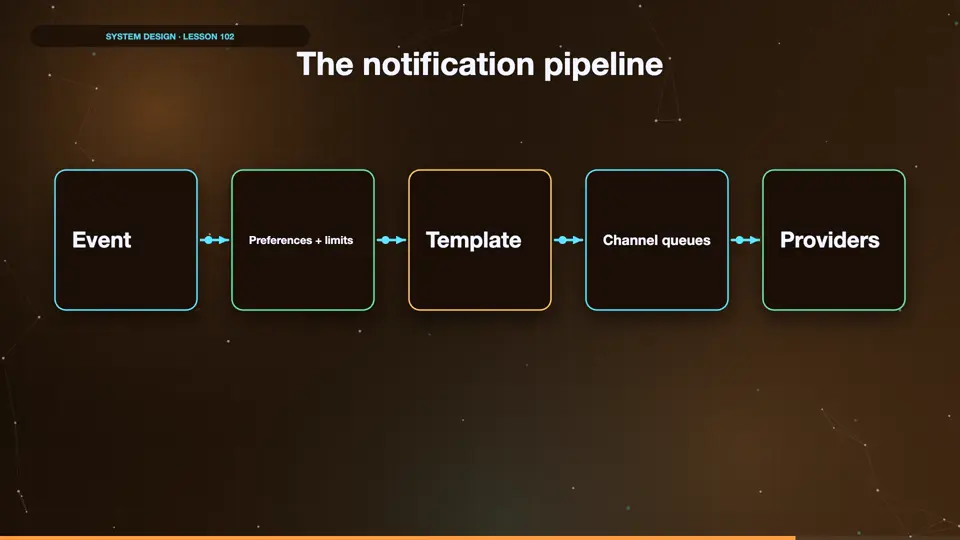
Services publish a notification request, like order shipped for Sam. The notification service checks Sam's preferences, and rate limits, so nobody gets flooded. It fills in a template. Then it puts a job on a queue for each channel. Workers send through providers, like an email service, an SMS gateway, and Apple and Google push.
- Event
- Preferences + limits
- Template
- Channel queues
- Providers
Making it reliable
Providers fail sometimes, so workers retry with backoff, and failed jobs go to a dead letter queue. Each notification has an ID, so retries never send twice. Every send is logged, for support. And users can turn off any channel, which the system must always respect.
| key | value |
|---|---|
| Retries | with backoff |
| Idempotent | no double sends |
| Dead letters | for failures |
| Preferences | always respected |
Summary
A notification system checks preferences, fills templates, and sends through per channel queues, with retries and no duplicates. Next, video streaming.
Key takeaways- Preferences and limits
- Queue per channel
- Retry without duplicates