
Working with Text
Strings, f-strings and handy methods.
Every order needs a thank you note. Ava used to type each one by hand, with the customer's name, the plant, and the date. Text is just data, and Python is wonderful with text. By the end of this lesson, one program will write all of her notes.
- Text in Python is called a string
- Strings can be joined, sliced and changed
- Goal: automatic thank you notes
Creating strings
A string is text inside quotes. Single quotes and double quotes both work, so choose one, and stay consistent. Use triple quotes for text on many lines. You can join strings with plus, and repeat them with star. The len function counts the characters.
name = "Ava"
shop = 'Leafy Corner'
note = """Thank you!
See you soon."""
print(name + " from " + shop)
print("=" * 20)
print(len(shop))
print(note)Ava from Leafy Corner ==================== 12 Thank you! See you soon.
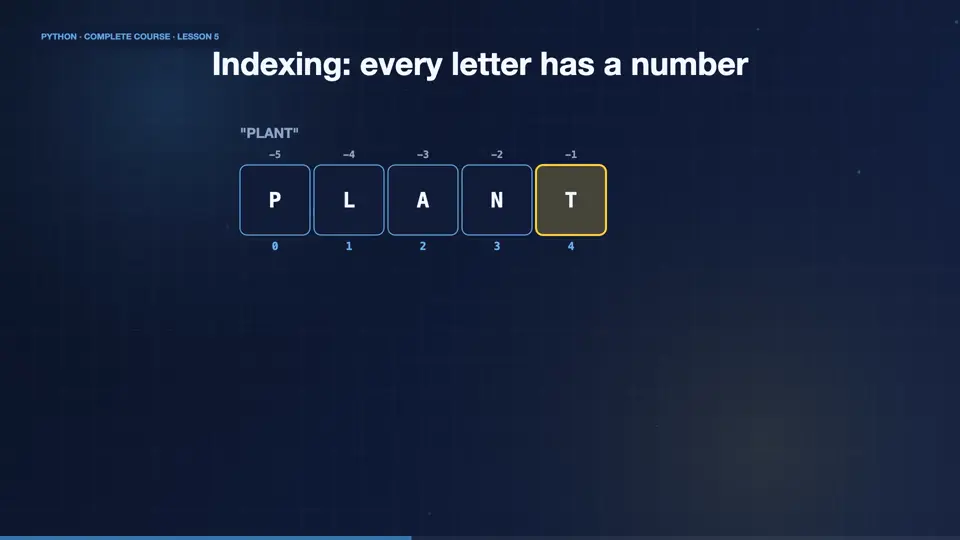
Indexing: every letter has a number
Every character in a string has a position, called an index. Counting starts at zero, not one. So in the word plant, p is index zero, and t is index four. Negative numbers count from the end, so minus one is the last character. This zero based counting takes a day to get used to, and then it feels natural.
Slicing strings
Slicing takes a part of a string. Write the start index, a colon, and the end index. The end is not included. Leave one side empty to go to the edge. A third number is a step, and a step of minus one reverses the string. Slices never crash, even if they go past the end.
Useful string methods
Strings come with methods, small tools you call with a dot. Upper and lower change the case. Strip removes spaces from the ends. Replace swaps text. Split cuts a string into a list, and join glues a list back together. Strings never change in place, each method returns a new string.
f-strings: the modern way
Joining with plus gets messy. A much better way is the f string. Put an f before the opening quote, and write variables inside curly brackets. Python fills them in. You can even do maths inside, and format numbers, like two decimal places, with a colon and the letter f. This is how Ava writes her notes.
name = "Maya"
plant = "monstera"
price = 24.5
qty = 2
print(f"Hi {name}!")
print(f"{qty} x {plant} = ${qty * price:.2f}")
print(f"{plant.upper():>12}|")Hi Maya!
2 x monstera = $49.00
MONSTERA|Strings never change
One more important fact. Strings are immutable. That means you cannot change a character inside them. Trying to do it gives an error. Instead, you build a new string, and store it. It sounds like a limit, but it makes strings safe and predictable.
Not allowed
- word[0] = "m"
- TypeError: no item assignment
- strings are immutable
Do this instead
- word = "m" + word[1:]
- a brand new string
- the old one is replaced
Write the thank you note
Your turn. Store a customer name and a plant. Then print a thank you note using an f string, like, Thank you, Sam, for buying a fern. Ready? Here is one solution. Two variables, and one f string. Change the variables, and the note changes.
Make name and plant variables, then print a thank-you note with an f-string.
Show hint
print(f"... {name} ... {plant}")
Show solution
name = "Sam"
plant = "fern"
print(f"Thank you, {name}, for buying a {plant}!")Thank you, Sam, for buying a fern!
Summary
Wonderful. You can now create, slice and transform text. You know indexes start at zero, methods like upper, strip and split, and that f strings make notes easy. Next, Ava makes the program talk with her customers, using input, and decisions.
Key takeaways- Indexes start at 0, negatives count from the end
- Slices: text[start:end:step]
- f-strings: f"Hi {name}"