
Packaging and Publishing
Share your code with the world.
Ava's price calculator has become useful, and her friends want it. Sending files by email does not scale. Python has a standard way to package code, so that anyone can install it, with one pip command. And the same process publishes it to PyPI, where millions of developers can find it.
- Emailing files does not scale
- A standard way to package
- Publish to PyPI, install with pip
Project layout
A tidy project has a clear layout. A source folder holds your package. A tests folder holds the tests. A readme describes the project, and a license says how others may use it. A single file, called pyproject dot toml, describes the name, the version, and the dependencies. Keep everything in version control, with git.
pyproject.toml
Here is a minimal configuration file. The build system section names the tool. The project section gives the name, the version, the description, the Python version, and the dependencies. The scripts section turns a function into a command, that users can run. TOML is easy to read, and Python can parse it with the toml lib module.
import tomllib

text = """
[project]
name = "leafy-tools"
version = "0.1.0"
requires-python = ">=3.10"
dependencies = ["requests>=2.31"]

[project.scripts]
leafy = "leafy.cli:main"
"""

cfg = tomllib.loads(text)
print(cfg["project"]["name"], cfg["project"]["version"])
print(cfg["project"]["scripts"])leafy-tools 0.1.0
{'leafy': 'leafy.cli:main'}Build and publish
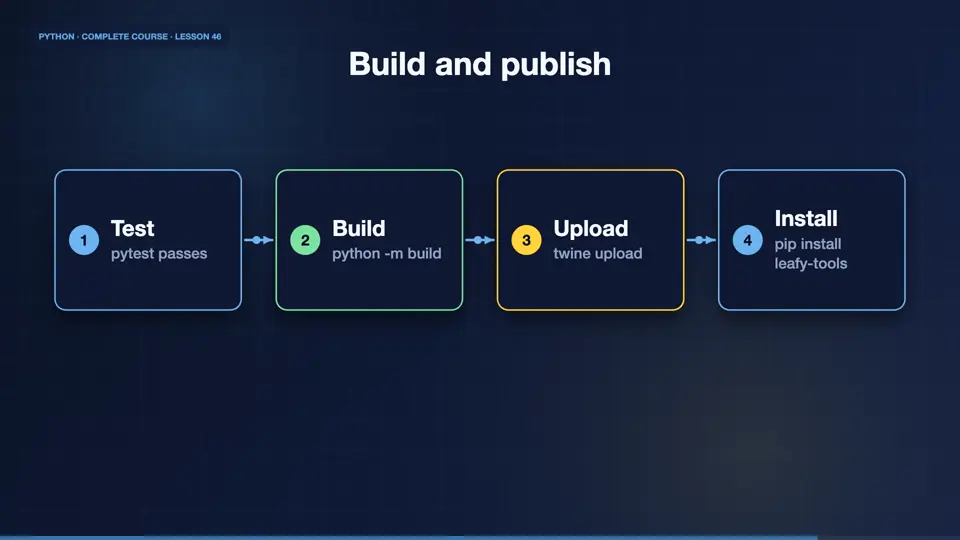
The steps are always the same. Write the code and tests. Update the version. Build the package, with the build tool, which creates a wheel and a source archive. Upload them with twine, to PyPI. Then anyone can run pip install, and your package name. Try the test index first, so mistakes stay private.
- Testpytest passes
- Buildpython -m build
- Uploadtwine upload
- Installpip install leafy-tools
Versioning and good citizenship
Use semantic versioning. Major, minor, and patch numbers. A patch fixes bugs. A minor adds features, without breaking anything. A major may break things. Write a changelog, pin your dependencies sensibly, and respond kindly to issues. Open source is a community, and your package is a small piece of it.
Parse a config
Your turn. Parse this small TOML text with tomllib, and print the value of the shop name, and the list of plants. Ready? Here is one solution. Loads turns the text into a dictionary, and we index into it.
Use tomllib.loads on the text and print shop["name"] and the plants list.
Show hint
tomllib.loads(text)
Show solution
import tomllib

text = """
[shop]
name = "Leafy Corner"
plants = ["fern", "ivy"]
"""
cfg = tomllib.loads(text)
print(cfg["shop"]["name"])
print(cfg["shop"]["plants"])Leafy Corner ['fern', 'ivy']
Summary
Great job. You know how to lay out a project, describe it in pyproject dot toml, build it, and publish it. You have now covered the language, the tools, and the professional habits. In the final clip, we bring everything together, in one capstone project, and a roadmap for your future.
Key takeaways- src layout + pyproject.toml
- build, then twine upload
- Semantic versioning