
Databases with SQLite
Store and query data.
Ava's orders live in a JSON file, and it is slowing down. Searching for one customer means reading everything. Two programs writing at once could corrupt the file. A database solves both. And Python already includes a small, fast, reliable one, called SQLite, that needs no installation and no server.
- A growing JSON file gets slow
- Two writers can corrupt it
- SQLite: a database inside Python
Tables, rows and SQL
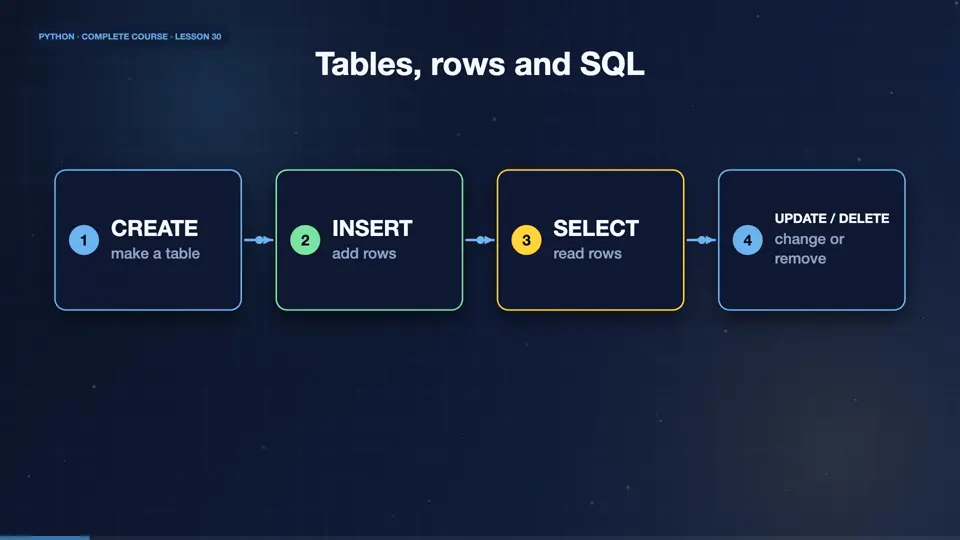
A relational database stores data in tables. A table has columns, like name and price, and each record is a row. You talk to it with SQL, a language of short commands. Create table makes a table. Insert adds a row. Select reads rows. Update changes them, and delete removes them. Four verbs cover most of what you will ever need.
- CREATEmake a table
- INSERTadd rows
- SELECTread rows
- UPDATE / DELETEchange or remove
Create, insert and select
Connect to a database with sqlite3 connect. We use a memory database here, which vanishes at the end. Execute runs a command. Use question marks as placeholders, and pass the values separately. Never build SQL by joining strings, because that opens the door to SQL injection attacks. Fetchall returns the rows.
import sqlite3

db = sqlite3.connect(":memory:")
db.execute("CREATE TABLE plants (name TEXT, price REAL, stock INTEGER)")
db.executemany("INSERT INTO plants VALUES (?, ?, ?)",
    [("fern", 9.5, 12), ("ivy", 7.0, 4), ("rose", 11.0, 0)])
rows = db.execute("SELECT name, price FROM plants").fetchall()
print(rows)
for name, price in rows:
print(name, price)[('fern', 9.5), ('ivy', 7.0), ('rose', 11.0)]
fern 9.5
ivy 7.0
rose 11.0Filtering, sorting and updating
A where clause filters rows, order by sorts them, and limit keeps the top few. Update changes existing rows, and delete removes them. Aggregate functions like count, sum, and avg summarise a whole table. Here Ava finds the cheap plants that are in stock, restocks one, and totals her stock value.
import sqlite3

db = sqlite3.connect(":memory:")
db.execute("CREATE TABLE plants (name TEXT, price REAL, stock INTEGER)")
db.executemany("INSERT INTO plants VALUES (?, ?, ?)",
    [("fern", 9.5, 12), ("ivy", 7.0, 4), ("rose", 11.0, 0)])
print(db.execute("SELECT name FROM plants WHERE stock > 0 AND price < 10 ORDER BY price").fetchall())
db.execute("UPDATE plants SET stock = stock + 20 WHERE name = ?", ("rose",))
db.execute("DELETE FROM plants WHERE name = ?", ("ivy",))
print(db.execute("SELECT name, stock FROM plants").fetchall())
print(db.execute("SELECT SUM(price * stock), COUNT(*) FROM plants").fetchone())[('ivy',), ('fern',)]
[('fern', 12), ('rose', 20)]
(334.0, 2)Two tables and a join
Real data is split across tables, linked by an id. A join combines them in a query. Here, orders refer to customers by id. The join shows each order with the customer name. This avoids copying the same name in many places, and keeps the data consistent. And commit saves your changes to a real file.
import sqlite3

db = sqlite3.connect(":memory:")
db.execute("CREATE TABLE customers (id INTEGER PRIMARY KEY, name TEXT)")
db.execute("CREATE TABLE orders (id INTEGER PRIMARY KEY, customer_id INTEGER, total REAL)")
db.executemany("INSERT INTO customers VALUES (?, ?)", [(1, "Maya"), (2, "Sam")])
db.executemany("INSERT INTO orders VALUES (?, ?, ?)", [(1, 1, 34.5), (2, 2, 12.0), (3, 1, 8.0)])
q = "SELECT c.name, SUM(o.total) FROM orders o JOIN customers c ON c.id = o.customer_id GROUP BY c.name"
print(db.execute(q).fetchall())
db.commit()[('Maya', 42.5), ('Sam', 12.0)]Good database habits
A few habits keep databases safe. Always use placeholders for values. Call commit to save, or use the connection as a context manager, which commits for you. Give every table a primary key. Close connections when finished. And when your data outgrows SQLite, the same ideas carry over to PostgreSQL and MySQL, and to libraries that map tables to Python classes, called ORMs.
A tiny contacts table
Your turn. Create a table called pots, with a name and a size. Insert two rows, then select and print the names of the pots, larger than ten. Ready? Here is one solution. Create, insert many, and a where clause.
Create table pots(name, size), insert two rows, and print the names with size > 10.
Show hint
WHERE size > 10
Show solution
import sqlite3

db = sqlite3.connect(":memory:")
db.execute("CREATE TABLE pots (name TEXT, size INTEGER)")
db.executemany("INSERT INTO pots VALUES (?, ?)", [("small", 8), ("large", 20)])
print(db.execute("SELECT name FROM pots WHERE size > 10").fetchall())[('large',)]Summary
Well done. You can create tables, insert, query, filter, update, join, and aggregate, with SQLite, using safe placeholders. Next, we step onto the internet, and learn how programs talk to other programs, using web APIs and JSON.
Key takeaways- sqlite3.connect, execute, fetchall
- SELECT, WHERE, JOIN, GROUP BY
- Use ? placeholders, then commit