
Variables and Types
Boxes with labels, and the four basic kinds of values.
Ava sells a monstera plant for twenty four dollars. But tomorrow the price changes. She does not want to hunt for every twenty four in her program, and fix each one by hand. She wants to store the price once, with a name, and use that name everywhere. That is exactly what a variable does.
- The problem: the same number repeated everywhere
- The idea: store it once, with a name
- The tool: a variable
Variables are labeled boxes
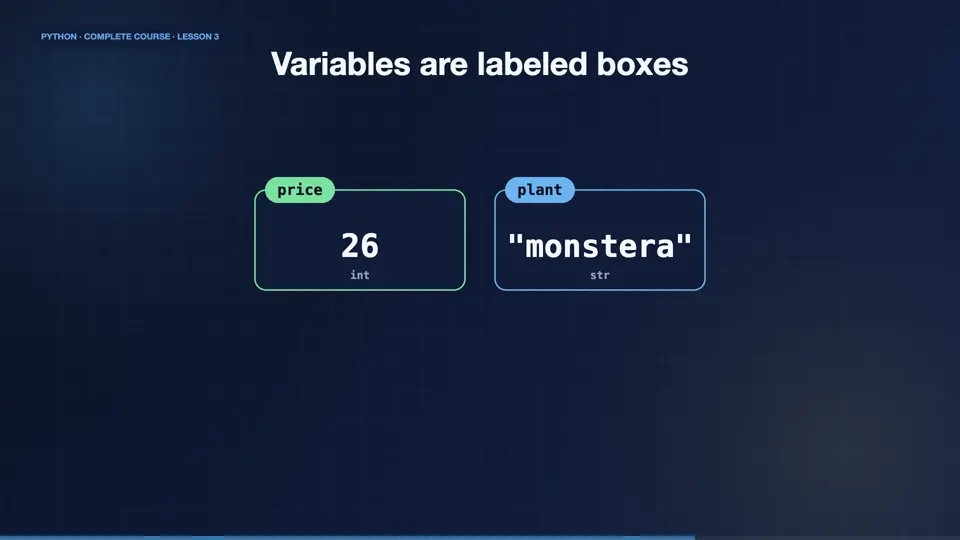
A variable is a name that points to a value. Think of a box with a label. The label is the variable name, and the thing inside is the value. In Python, you create one with the equals sign. The name goes on the left, and the value on the right. Here, price holds twenty four. Later, we put a new value in the box, and it simply holds the new one.
| variable | type | value |
|---|---|---|
| price | int | 26 |
| plant | str | "monstera" |
Using variables
In code, the equals sign does not mean equal, like in mathematics. It means, store this value under this name. Once stored, we can use the name anywhere. Here, we print the plant and the price. Then we change the price, and print again. The old value is gone, replaced by the new one.
plant = "monstera"
price = 24
print(plant, price)
price = 26
print(plant, price)monstera 24 monstera 26
The four basic types
Every value has a type. Whole numbers are integers, called int. Numbers with a decimal point are floats. Text is called a string, or str, and is written inside quotes. And true or false values are booleans, called bool. Python works out the type by itself, so you never have to say it.
| Type | What it holds | Example | In Ava's shop |
|---|---|---|---|
| int | whole numbers | 24 | plants in stock |
| float | decimal numbers | 24.99 | the price |
| str | text, in quotes | "monstera" | the plant name |
| bool | True or False | True | is it on sale? |
Asking Python for the type
You can ask for the type of any value with the type function. Python answers with the class. Twenty four is an int. Twenty four point nine nine is a float. Quoted text is a str. And True is a bool. A variable has the type of the value inside it, so plants, holding twelve, is an int.
Naming rules
Names have rules. Use letters, digits, and underscores. Never start with a digit. No spaces, and no special symbols. Names are case sensitive, so price and Price are different. By convention, Python programmers write names in lowercase, with underscores between words. That style is called snake case. Choose clear names, like plant price, never just x.
A tiny shop report
Let's put it together for Ava. We store the plant name, the price, how many are in stock, and whether it is on sale. Then we print a small report, and the type of the price. Notice how the names make the code readable. Anyone can understand it, even without comments.
plant_name = "Monstera"
price = 24.99
stock = 12
on_sale = True
print(plant_name)
print(price)
print(stock)
print(on_sale)
print(type(price))Monstera 24.99 12 True <class 'float'>
Make your own variables
Your turn. Create variables for a plant name, its price, and how many you have. Then print each one. For a bonus, print the type of the price. Ready? Here is one solution. Three variables, then four prints. Your plant can be anything you like.
Create variables for a plant name, price and stock, print them, and print type(price).
Show hint
Three assignments, then print.
Show solution
plant = "Fern"
price = 9.5
stock = 40
print(plant)
print(price)
print(stock)
print(type(price))Fern 9.5 40 <class 'float'>
Summary
Great work. You learned that a variable is a name that points to a value. You met the four basic types, int, float, string, and bool. And you know the rules, and the style, for naming things. Next, Ava does some arithmetic, because she needs to add up her orders.
Key takeaways- A variable is a labeled box for a value
- int, float, str and bool are the basic types
- Use clear snake_case names